The Future of Web Application Development
Contents
- Designing Distributed User Interfaces
- Why do Test and Measurement Engineers need Web Technology?
- A Web-based User Interface Development Platform: Guiding Principles
- Next Steps
Designing Distributed User Interfaces
Megatrends such as the Industrial Internet of Things (IIoT) have quickly moved from concepts and pilot projects to fleet-wide deployments with impressive results. As applications grow in complexity, the test and measurement industry is evolving to become smarter and more connected. The increased availability and affordability of smart sensing devices allows engineers to add sensing and decision-making capabilities at the device level to maximize uptime, boost performance, and drive future product innovation. These capabilities become paramount when tasks such as data acquisition, analysis, and control need to be geographically distributed and performed by various collaborative processing elements to support remote operations. This kind of distributed implementations is triggered by the need for higher precision I/O, complex and time critical distributed control, high-throughput volume data acquisition and analytics, as well as the need to surface data to multiple stakeholders in the organization.
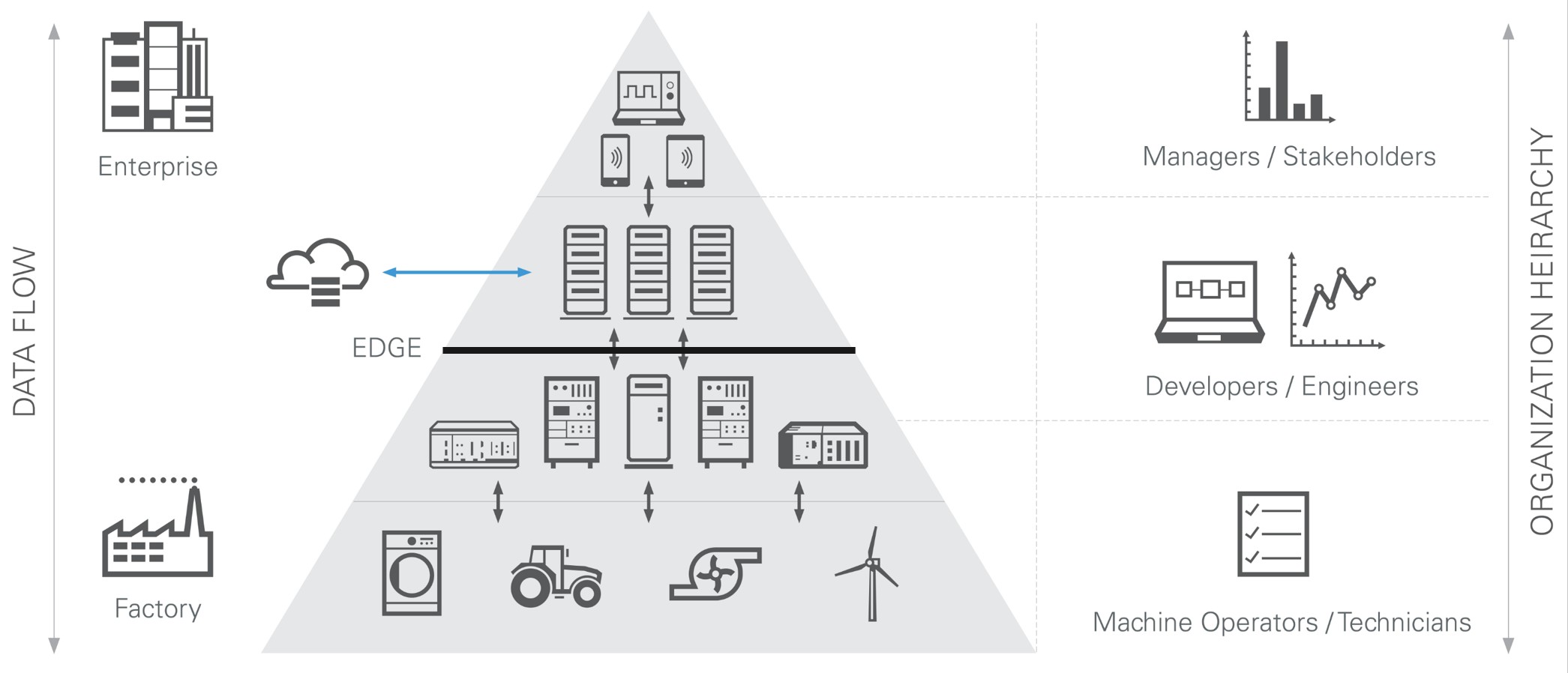
Fig 1. As systems increase in complexity, developers are faced with data management and visualization challenges at various levels of the organization
Putting the right information in front of the right stakeholders is a critical aspect of distributed applications that directly impacts the ability of making informed business decisions. This is an especially complex problem because it does not only involve the creation of distributed user interfaces, but also data management capabilities, security assurance, and networking concepts. Some main requirements include developing interfaces for operators to remotely configure deployed systems to switch between operating modes, change settings, or modify profiles. Another scenario requires a user interface for remotely operating or supervising control panels for a small set of assets. A different need typical of distributed production test scenarios or environmental monitoring is the real-time monitoring of systems, including information such as health, failures, and performance. Finally, management and enterprise levels demand real-time monitoring with insights into historical data, trends, and key performance indicators over time. In this way, serving the data visualization needs of different stakeholders with varying degrees of complexity across all distributed scenarios becomes a challenge.
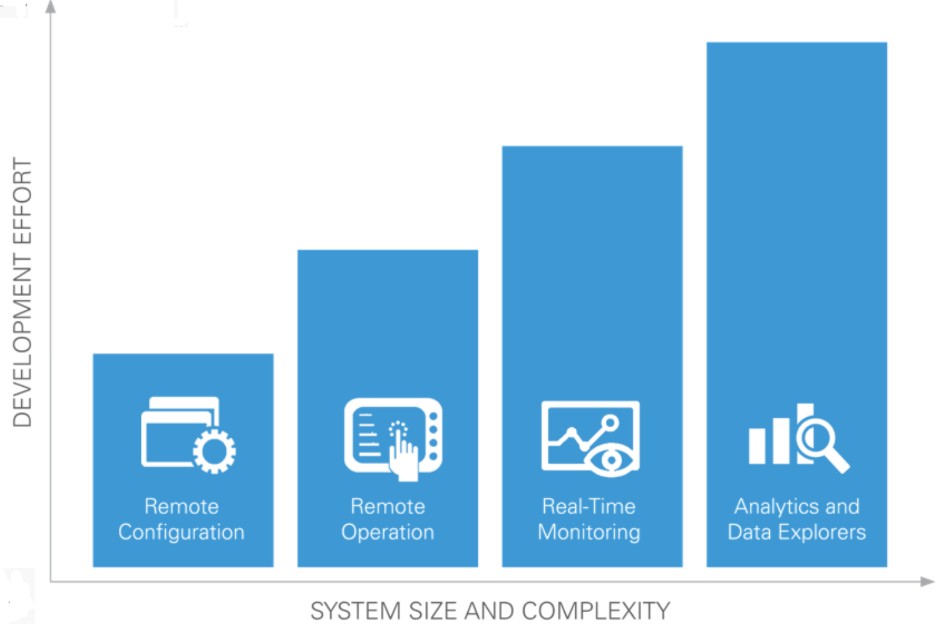
Fig 2. Creating remote user interfaces represents different levels of effort depending on the complexity and size of the system at hand.
With this level of complexity, most test and measurement engineers find it non-trivial to simply pick up an IIoT infrastructure off the shelf. To be more effective, there is a need for a platform that provides the scalability and performance of mainstream Web and Big Data technologies that can be developed, deployed, and maintained by engineers with collaboration of IT specialists, web developers, UX and Visual designers, data scientists, and stakeholders of various types. Over the last 3 decades, National Instruments has developed and cultivated a platform with LabVIEW, PXI, and RIO for high performance test and measurement applications on the edge. During the last few years, NI has been expanding the platform by adding modular, reusable software components at the network, IT/server, and web layers to enable distributed applications. These platform elements are being rolled into multiple software products to solve the key challenges of building powerful modern engineering solutions. These challenges include effectively managing distributed systems as well as harnessing the insights from edge-generated data and visualizing such information to make data-driven decisions.
Let’s take as an example the imperial need of distributed applications to remotely manage and configure assets in order to increase uptime and operational performance. The NI platform includes a solution for this kind of scenario through SystemLink, a system management software that provides secure, centralized management capabilities for distributed test, measurement, and control applications. SystemLink increases system uptime and awareness of system state through system management tools that track connection state, system settings, and calibration data. SystemLink improves the efficiency of mass software deployment with component level updates, dependency awareness, and version history.
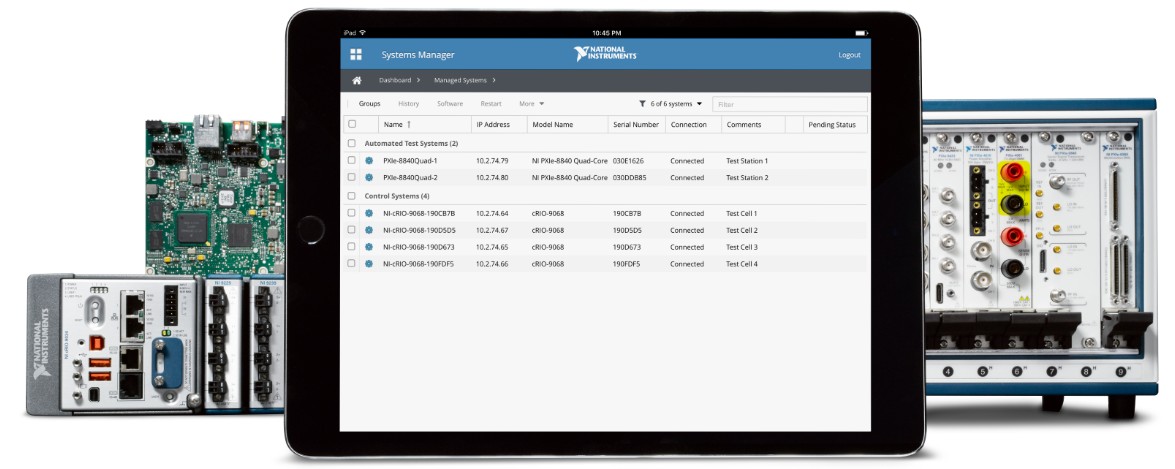
Fig 3. SystemLink is a systems management software for the centralized management of distributed test, control, and monitoring systems.
The need to easily visualize data is very imporant for this kind of distributed applications as well, and to enable engineers to develop end-to-end solutions, productive application development tools that seamlessly work together are required. For distributed applications, the G Web Development Software complements this platform by enabling engineers to leverage familiar LabVIEW programming paradigms and create full stack applications that can run on any modern web server and browser without any plugins or downloads. The G Web Development Software integrates with the rest of NI's software platform to make Web technologies accessible for the creation of custom, remote user interfaces for new and existing applications.
Why do Test and Measurement Engineers need Web Technology?
For distributed systems, web technology is quickly becoming the de-facto application layer for the orchestration, control, and visualization of data. However, modern web technology is a complex collection of standards, frameworks, technologies, and conventions which requires significant training and experience to establish proficiency. Most test and measurement engineers do not consider themselves web developers and do not have the time nor resources to gain the necessary expertise. Additionally, most test engineering teams cannot outsource critical parts of their applications that require web technology such as presentation of information, control schemes, security, and access management since these areas demand control within the organization. While adding web development talent to test engineering teams is possible, there is risk of significant loss in translation of context between test engineers and web developers. At the end of the day, common challenges of developing, deploying, maintaining, and upgrading distributed systems such as effectively managing lifecycles, deriving insights and decisions in real-time, and creating secure access to applications reside still in the test engineering team realm.
With the G Web Development Software, NI provides an intuitive starting point for engineers creating remote control and monitoring interfaces for test and measurement systems. Engineers can use familiar LabVIEW Front Panel and Block Diagram editing patterns to develop engineering applications without requiring knowledge of web technologies. The Web Module also includes mechanisms to securely deploy web applications and establish communication with edge nodes. Additionally, this web technology platform is designed to be highly open and extensible so it can be used to create full-fledged distributed test, measurement, control and monitoring applications in collaboration with professional web developers and IT specialists. In the follow section of this white-papers we explain the foundational elements and guiding principles for future investments on NI’s web-based design tools.
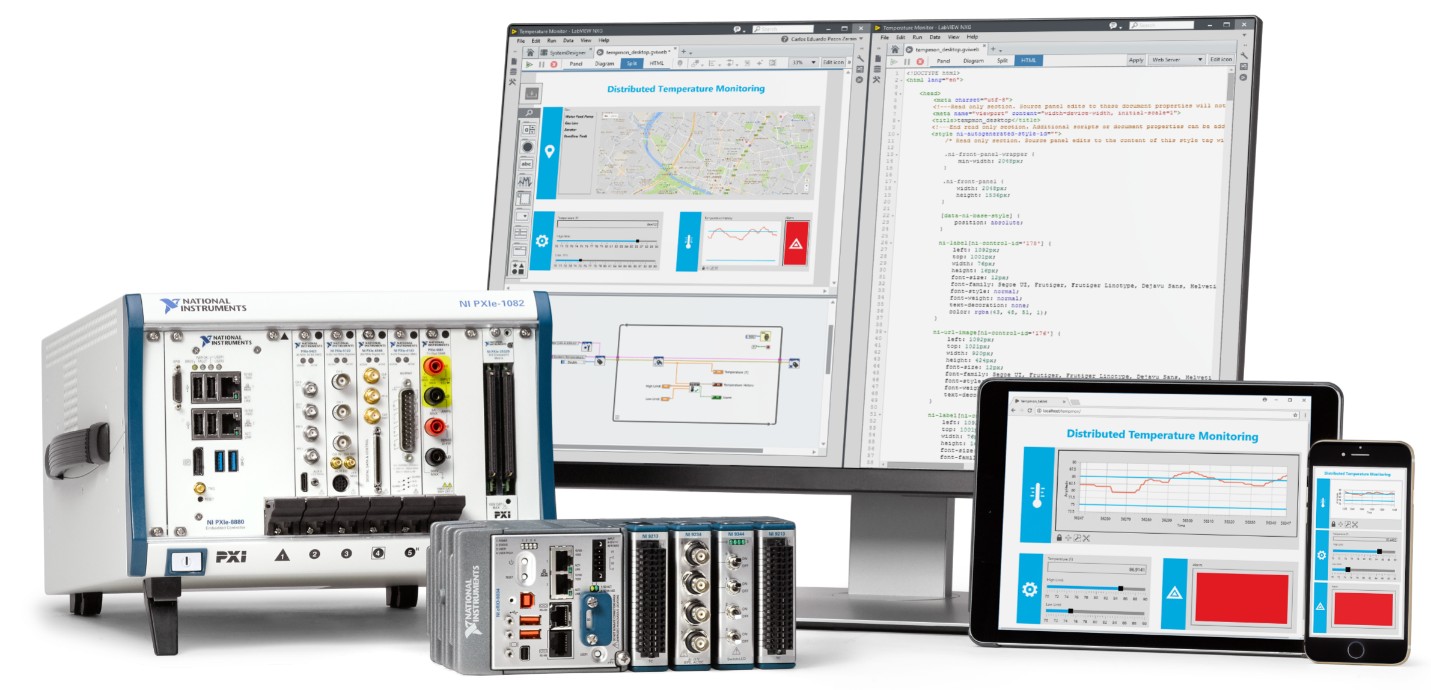
Fig 4. The G Web Development Software helps you create high-performance, web-based user interfaces.
A Web-based User Interface Development Platform: Guiding Principles
Intuitive Starting Point for Web Development
Preserving the skill set of LabVIEW developers for the creation of web-based interfaces is one of the main principles for the design of the G Web Development Software. With this in mind, a new type of VI introduced with the Web Module is the WebVIs. This new file format represents a technology advancement for the generation of G code that works the same way as any other VI, but that is automatically translated into Web standards such as HTML, CSS, and JavaScript. This technology lowers the barrier of developing Web applications by abstracting away the complexity of mastering multiple standards to meet the requirements of the application at hand.
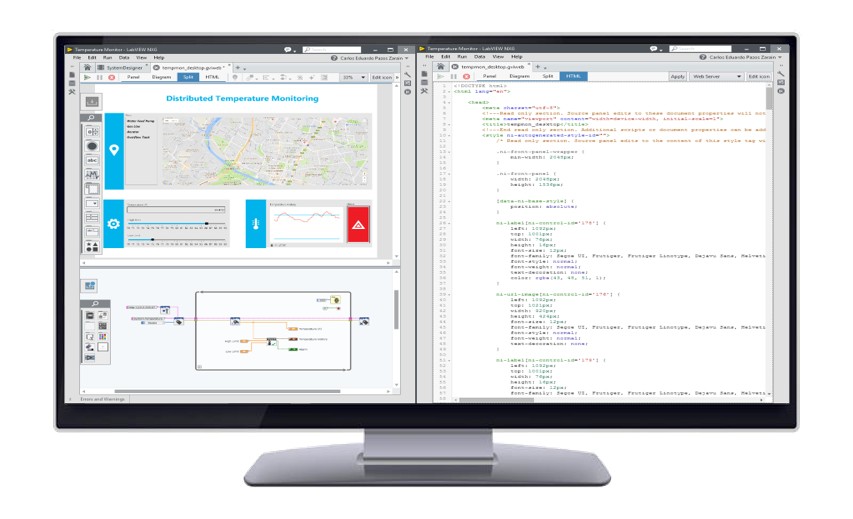
Fig 5. WebVIs enable users to author VIs that can run in any modern web browser without plugins, or installers.
Similarly, the concept of providing intuitive starting points is expanded to transferring secure, reliable data over a network. The G Web Development Software includes straightforward ways to move data back and forth between data sources and a centralized location that serves as a broker for data services. This is achieved through APIs built on web standards (HTTP, AMQP, Websocket) that serve common engineering use cases such as communicating Tag scalar values to and from measurement and test devices, providing asynchronous messages for alarm and event management, and transferring files for reporting and postprocessing. Additionally, these APIs include an HTTP Client implementation to communicate data to and from any third-party Web Service. National Instruments is exploring additional data services for future releases of the G Web Development Software, such as transferring waveform data.
Finally, the deployment of web applications is also simplified with productive workflows to facilitate set up processes and sharing of web applications. This includes access to the NI Web Server for the easy creation of hosted applications where security and access control are defined by the user. The NI Web Server can be used to host applications on a dedicated computer; however, the G Web Development Software is flexible enough to produce standard output files that can be hosted by any third-party server. Future looking, technology will be integrated to facilitate the hosting process by automating the deployment flow directly from the development environment to a cloud service hosted by National Instruments. This service also intends to include the creation of configuration-based dashboards for the easy creation of in-browser user interfaces that directly connect to data available in the data broker without having to program or add logic to the application.
Mapping to Engineering Requirements
Another guiding principle of NI tools for the creation of web-based user interfaces is the alignment of engineering requirements of test and monitoring applications with the design tools to provide best in class performance. From the user interface point of view, the G Web Development Software includes high-performance engineering widgets that serve the most common scenarios for the graphical representation of tanks, LEDs, gauges, charts, graphs, etc. User interfaces and widgets are automatically translated into HTML and CSS code to represent them in any modern web browser. These widgets have been designed with performance in mind to serve the most demanding applications. Specifically, for the case of charts and graphs they have been tested to run 500, 000 data points at 60fps or better. National Instruments is committed to adding to and increasing the performance of this collection of widgets as new versions of the G Web Development Software are released
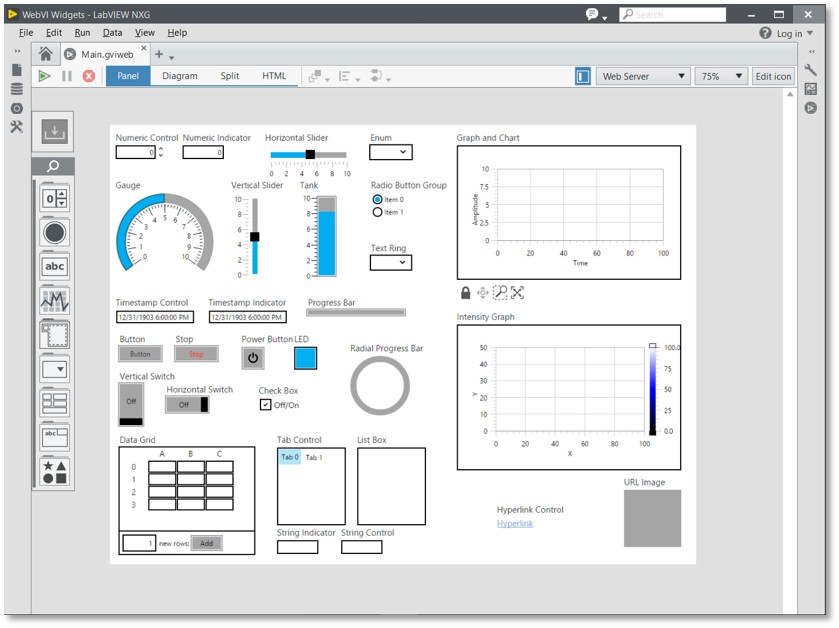
Fig 6. WebVIs include a collection of high-performance engineering widgets for the development of test and measurement user interfaces.
Similarly, the user interface designed in WebVIs comes accompanied with application logic implemented in the diagram similar to what is present in LabVIEW VIs. Custom logic can be embedded in the user interfaces using commonly available functions to define program flow, logic, and analysis. Application logic is translated into JavaScript code for its execution in any modern web browser to control the behavior and respond to events from the user interface.
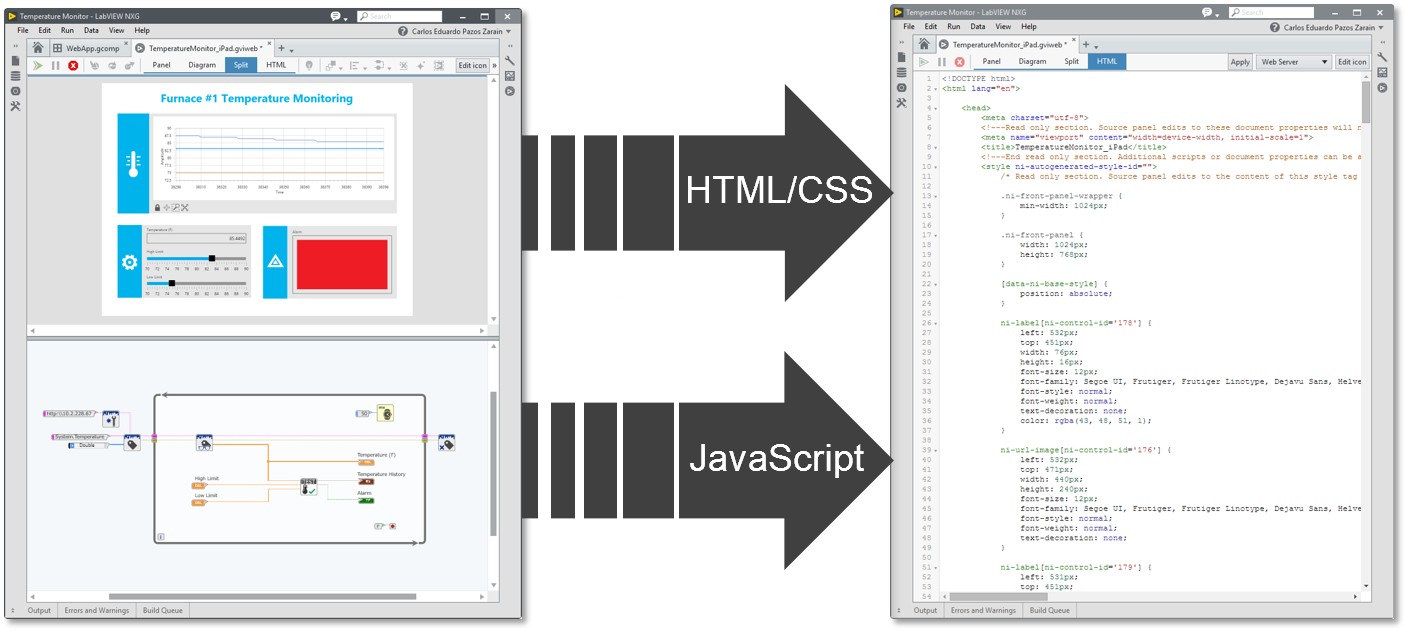
Fig 7. WebVIs automatically generate HTML, CSS, and JavaScript code to run applications on any modern web browser.
Standards-based Extensibility
The use of standards and open source technologies is definitive to provide extensibility and be able to run applications on any modern web browser. An important design decision was the ability to open and expose the generated HTML, CSS, and JavaScript code from WebVIs to fully customize the application on the provided editor or any third-party editor. These capabilities can be extended to bring existing content from the web as well as reuse scripts to control the behavior of user interfaces. Flexibility and standardization are common denominators in the design of WebVIs and other components of the G Web Development Software to seamlessly integrate with existing implementations and commercial technologies. For future releases of the G Web Development Software, users can expect to see new features that extend this openness to include even more ways to integrate WebVIs with existing web technology.