ActiveX and LabVIEW
Overview
Contents
- Overview of ActiveX
- ActiveX Automation with LabVIEW
- LabVIEW as an ActiveX Container
- ActiveX Events and LabVIEW
- Information about OLE Variants and LabVIEW
Overview of ActiveX
ActiveX is the general name for a set of Microsoft Technologies that allows you to reuse code and link individual programs together to suit your computing needs. Based on COM (Component Object Model) technologies, ActiveX is an extension of a previous technology called OLE (Object Linking and Embedding). Each program does not need to regenerate components, but rather, reuse components to give you the power to combine applications together. LabVIEW offers support for ActiveX automation as a server as well as support for ActiveX Containers, and ActiveX Events.
ActiveX Automation
ActiveX/COM refers to the process of controlling one program from another via ActiveX. Like networking, one program acts as the client and the other as the server. LabVIEW supports automation both as the client and the server. Both programs, client and server, exist independent of each other but are able to share information. The client communicates with the ActiveX objects that the server opens to allow the sharing of information. The automation client can access the object's properties and methods. Properties are attributes of an object. Another program can set or retrieve an object's attributes. Similarly, methods are functions that perform an operation on objects. Other applications can invoke methods. An example of an ActiveX property is the program name, height or width. An example of an ActiveX method is the save or print method.
ActiveX Controls and Containers
The most common usage of ActiveX is via ActiveX controls, which are embeddable components that exist inside ActiveX containers. Any program that can function as an ActiveX container allows you to drop ActiveX controls into the program as a container. From these containers, the ActiveX controls have their own functionality and properties. LabVIEW is an ActiveX container and can house ActiveX controls. Again, properties and methods manipulate the embedded control.
ActiveX Events
ActiveX is an event-driven technology. Programs report when certain events occur so that other programs, or you, can react accordingly. LabVIEW supports the processing of ActiveX events via both automation and embedding of ActiveX controls.
ActiveX Automation with LabVIEW
LabVIEW as an ActiveX server or ActiveX client can interface with other programs from the LabVIEW programming interface. In this case, LabVIEW acts as the automation client and requests information of the automation server, or other program. Likewise, other ActiveX automation clients can interface with the LabVIEW ActiveX automation server. Common programs used are Microsoft Visual Basic and Microsoft Visual C++.
LabVIEW as an Automation Client
LabVIEW provides functions in its API that allow LabVIEW to act as an automation client with any automation server. The diagram below shows LabVIEW's programming flow, and gives the associated functions with each block.
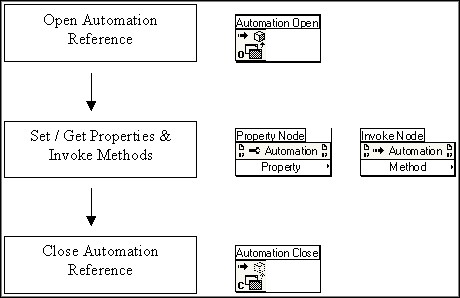
Figure 1.
In general, information about a program’s ActiveX automation server can be obtained from the program’s documentation or by browsing the program’s type library. Often, LabVIEW is used as an automation client for Microsoft Office programs and their object models are available online from Microsoft.
LabVIEW as an Automation Server
Other programs can interface with the LabVIEW automation server using ActiveX automation. Using an automation client, it is possible to programmatically launch LabVIEW, open and run VIs, and pass their data back to the calling program. The automation client interfaces with the LabVIEW type library which is located in the \labview\resource directory. By browsing this type library, information about the classes that LabVIEW exports is available. In general, LabVIEW exports a creatable class, Application, and a dispatch class, VirtualInstrument. Additionally, LabVIEW executables can be ActiveX automation servers. Automation clients such as LabVIEW or another LabVIEW executable can access ActiveX automation servers.
LabVIEW as an ActiveX Container
In general, LabVIEW can embed any ActiveX control. Using the control’s properties and methods, LabVIEW can programmatically interact with the control. The flow chart for using an ActiveX container is shown below:
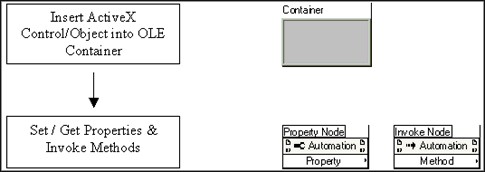
Figure 2.
You can explore the properties and methods available using the property nodes and invoke nodes by wiring a reference to the nodes.
ActiveX Events and LabVIEW
LabVIEW supports ActiveX events via automation and ActiveX controls embedded in containers. ActiveX events allow programmers to receive notification of a specific occurrence and then act accordingly. Commonly, programs wait until an event has fired and then after the event fires, continue with program execution dependent on what event fired. The flow chart for setting an ActiveX event sequence in LabVIEW is shown below with the corresponding LabVIEW functions.
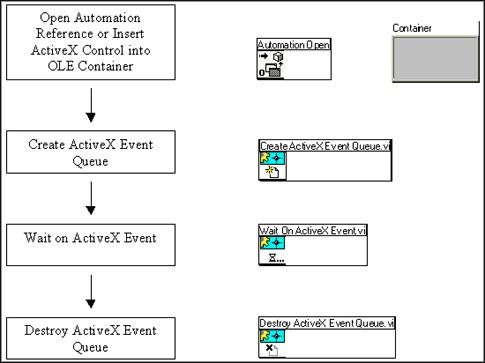
Figure 3.
Information about OLE Variants and LabVIEW
The Variant data type in ActiveX/OLE is used to pass data between programs. A variant can be anything; it can represent any data type. It is necessary to use this data type when passing data between programs because common data types in each program can be represented differently. For example, an array in LabVIEW is represented differently than an array in Visual Basic. Thus, by passing data as variant we can pass that information from one ActiveX component to another. Convert the variant data sent from one program to a useable data type when the other program receives it. The To G Data function allows you to convert a variant to a LabVIEW data type.