Overview
Welcome to the Designing Next Generation Test Systems Developers Guide. This guide is collection of white papers designed to help you develop test systems that lower your cost, increase your test throughput, and can scale with future requirements. This white paper provides guidance on choosing the right software application development environment (ADE). To download the complete developers guide (120 pages) , visit ni.com/automatedtest.
Table of Contents
Industry Trends and Challenges
The rapid advancement in global design and new product development are creating new opportunities for test managers and engineers to develop test systems that greatly contribute to accelerating the product development cycle. The approach to test system development is shifting from using application-specific, turnkey test systems to focusing on building a modular test framework. The next-generation test framework should accommodate the test requirements of multiple products and facilitate the addition of new test technologies for additional test coverage in the future. Developing a robust, open test software framework is a key component of designing the architecture of a modular test framework.
The need to develop a modular, flexible test software framework has become more evident as the ratio of development costs versus capital costs increases. Development costs, such as system integration and software development, are often 2 to 10X more than capital costs in most test systems today. This rapid rise in development costs is causing a profound impact on the ability for many test engineering groups to keep up with the accelerated product development cycle and globalization of design and test. The current approaches to test system development are generating far too many projects for today’s engineers to keep up with.
The complexity of products that engineers need to test is increasing rapidly as well. Markets are demanding higher quality and more features. Currently, a product might include significantly more functionality condensed in the same amount of space. Testing this increasing functionality requires the addition of new technologies to your test system, which can be a challenge for turnkey test systems due to their lack of flexibility. In contrast, a modular test architecture can inherently add new features as they are required. Using a modular test software architecture helps you reduce development costs, decrease product development cycles, and keep up with the increasing complexity of new products.
Defining a Modular Test Software Framework
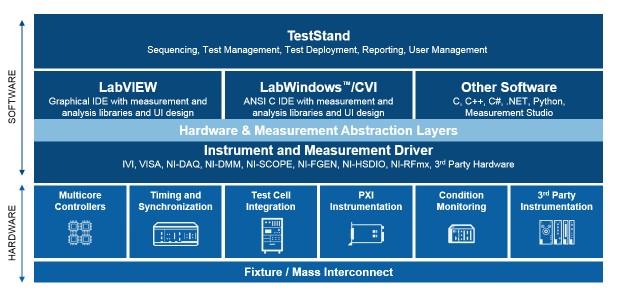
Designing efficient test systems requires a modular software architecture , figure 1, and development tools optimized for test. To develop test systems faster and more cost-effectively, it is critical that you evaluate your test software architecture to maximize code reuse. Examining your test software architecture consists of evaluating the software development tools you are using and studying your approach to test code development. Understanding the importance of modular test software architectures and how to develop your tests as modules rather than building stand-alone applications will significantly improve your test software reuse.

[+] Enlarge Image
Figure 1. The Test System Architecture
Incorporating modular test software architectures begins with choosing a software development environment that is designed for easily connecting to your instruments and quickly performing any type of measurement and analysis required for your tests. Such test software development tools include NI LabVIEW, LabWindows/CVI, and Measurement Studio for Visual Studio .NET. Using the proper test development environment, you can more easily share your test programs with others in your group and across test departments in your organization.
Selecting test and measurement hardware with robust software interfaces is another important layer in defining modular software architectures. Measurement and control services software such as NI Measurement & Automation Explorer (MAX), NI-DAQ, Virtual Instrument Software Architecture (VISA), LabVIEW Plug&Play drivers, and Interchangeable Virtual Instrument (IVI) drivers provide modular hardware interfaces for configuring and programming your test system through the use of virtual channel names, virtual devices, and simulation interfaces. Such modular measurement and control services driver software helps you avoid developing test programs that are permanently tied to specific hardware and channels in your test system, thus increasing the ease of code reuse.
Test modules created by design engineers for prototype and validation tests are an integral asset to production test departments. Production test engineers can easily integrate tests developed during the prototype and validation phases into final automated test systems using industry-standard test management software such as NI TestStand.
NI TestStand provides built-in test management capabilities such as test module adapters for calling tests written in common test languages such as LabVIEW, LabWindows/CVI, C/C++, and Visual Studio .NET regardless of the function prototypes defined for each test. Maximizing code reuse between the product design and manufacturing teams reduces test development effort ensuring production schedules are met and demands for improved quality are upheld. The flexible NI TestStand module adapters ensure maximum code reuse across the product development cycle with minimal training and code.
The National Instruments Modular Test Software Framework
The management level of the modular test software framework is responsible for directing the execution of the whole test system. The open software architecture of NI TestStand is a popular choice for test management software and greatly reduces the effort required to implement a scalable test software framework. NI TestStand provides a completely modular and open architecture that can be used “as is” off the shelf or used as individual components for designing your completely customized NI TestStand-based test systems. Figure 2 describes the NI TestStand architecture graphically.
The center of the NI TestStand architecture is the NI TestStand Engine, a powerful multithreaded test engine with complete and extensively documented API. By communicating with the NI TestStand Engine, the module adapters provide an open language interface to automate tests written in any language. The process models provide superior modularity between the test code and the system level functions that must be performed. The Sequence Editor provides an easy-to-use, powerful development environment for test sequences. Lastly, the operator interfaces are provided in source code in multiple programming languages for rapid customization to match your exact needs.
NI TestStand Engine
All parts of the NI TestStand architecture are directed by the NI TestStand Engine, which is a set of libraries that export an ActiveX/COM API. The API gives developers the ability to perform any operation on the NI TestStand Engine programmatically by using the more than 1,400 exported functions. The NI TestStand Engine implements multithreading, which enables you to increase throughput by testing multiple units simultaneously. The engine also relieves developers from including limit testing in their test code by implementing this functionality natively. By not including limit testing, test code becomes more flexible and reusable. Another feature of the NI TestStand Engine is that it implements flow control functionality much like any programming language. Finally, it also increases the security of your test system by implementing multilevel user access and management.
Module Adapters
For the NI TestStand Engine to call code written in different languages, it takes advantage of the different module adapters available with NI TestStand. The module adapters provide an open language interface between the NI TestStand Engine and your test code written in LabVIEW, LabWindows/CVI, .Net, C/C++ DLLs, ActiveX/COM and HT Basic. By calling code in different languages, you are able to reuse any existing legacy code as well as take advantage of newer technologies. With code modules, you can send and receive information from your code modules using an arbitrary number of parameters or by using the NI TestStand API. Other features provided by the module adapters include stepping into code modules for debugging and using code templates to improve programmer productivity.
Process Model
Testing a UUT requires more than just executing a set of tests. Usually, the test system must perform a series of operations such as identifying the UUT, logging results, and generating a test report. The set of such operations and their flow of execution are called a process model. The process models provide superior modularity between the test code and the system level functions that must be performed by implementing these system level functions and using them with multiple test sequences. NI TestStand is shipped ships three process models, which can be used as is or fully customized. The Sequential process model can be used for testing one unit at a time, while the Batch and Parallel process models use the NI TestStand multithreading functionality to test more than one unit at the same time.
Sequence Editor
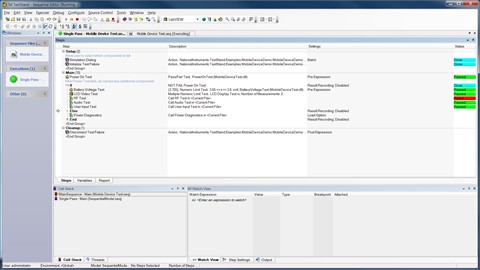
The Sequence Editor provides test engineers all the functionality and tools needed to develop the most sophisticated automated test systems. In the Sequence Editor, Test Sequence Files can be created, debugged and modified. Test Sequence Files contain test steps that can contain code modules developed in any test programming language. Furthermore, the Sequence Editor includes a utility to build deployment packages to ease the distribution of Test Sequences and operator interfaces. The Sequence Editor also provides user-management services that can prevent some users from using restricted functionality based on the privileges defined by your TestStand administrator. Figure 2 shows the Sequence Editor displaying a test sequence written in LabWindows/CVI.

[+] Enlarge Image
Figure 3. NI TestStand Sequence Editor
Operator Interfaces
Lastly, an operator interface is a customizable user interface for NI TestStand that can be used to execute and debug test sequence files created in the Sequence Editor. The operator interface is typically used on a manufacturing floor or if you need to deliver a custom look and feel to your test or validation system. TestStand operator interfaces use the NI TestStand User Interface Controls to facilitate development by fully implementing common features such as Sequence File Display and Execution tracing. NI TestStand includes ready-to-run operator interfaces written in LabVIEW, LabWindows/CVI, C#, VB, and VB .NET.
Application Development Environments (ADE)
ADEs play a critical, visible role in a test software framework. With these tools, the system developer designs and integrates the system that takes measurements, displays information to the end user, connects with other applications, and much more. The ADEs used to develop measurement and automation applications provide an easy-to-use design model, compiled performance, and application-level programming flexibility for a complete range of applications. Equally as important, these ADEs tightly integrate with Measurement and Control Services Software that connects to a wide variety of I/O devices, and scales from small applications to large systems.
Although it is an important element, ease of use goes beyond how quickly someone can get up and running. With easy-to-use ADEs, developers can easily integrate processing routines with multiple measurement devices, create sophisticated user interfaces, deploy and maintain an application, and modify the application as product designs evolve and system needs expand.
Despite the perceived flexibility benefit of using in-house software architectures, organizations that use proprietary software often incur unintended expenses as they fight to keep up with rapidly advancing technologies, such as OSs and networking technologies, that are not core to their business. This effort can siphon valuable resources away from business operations and often lead to a loss of valuable time. For example, by using an off-the-shelf ADE designed for measurement and automation, developers can quickly and easily upgrade to the latest OS, or integrate emerging Internet and XML standards with minimal development investment. Or, when using an ADE such as Visual Basic or Visual C++, specialized measurement and automation add-ins can significantly reduce development time.
In addition to the tight integration with Measurement and Control Services Software, ADEs used to develop a measurement and automation system can manage and process measurements. To do this most effectively, the ADE incorporates measurement data types directly in the environment so that these measurements are easy to use in additional processing routines. For maximum development productivity, the ADE include comprehensive statistical and numerical analysis functions, as well as high-performance signal processing and control algorithms common in measurement applications. ADEs integrate typical routines found in measurement and automation applications, including functions such as PID and fuzzy logic control, noise reduction, spectral measurements, digital filtering, response measurements, signal detection, numerical integration and differentiation, curve fitting, fractional-octave analysis, and order analysis.
For more information, view the Choosing the Right Software Application Development Environment white paper.
Measurement and Control Services
Selecting test and measurement hardware with robust software interfaces is another important layer in defining modular test architectures. Measurement and control services software such as NI Measurement & Automation Explorer (MAX), NI-DAQ, Virtual Instrument Software Architecture (VISA), LabVIEW Plug&Play drivers, and Interchangeable Virtual Instrument (IVI) drivers provide modular hardware interfaces for configuring and programming your tests. Such modular measurement and control services driver software helps you avoid developing test programs that are permanently tied to specific hardware and channels in your test system, thus increasing the ease of code reuse.
Configuration Manager
A configuration manager, such as MAX, presents a unified system view of measurement hardware supported in the Measurement and Control Services Software. With MAX, users can define channel names to organize signals or specify scaling functions to convert digitized signals to measurement quantities. The key benefit of the configuration manager is the integration with the ADEs. This integration gives developers the ability to integrate multiple measurements easily into a single application without tedious programming. Without these configuration tools, developers must spend needless time configuring these measurement functions programmatically.
Instrument Connectivity
Integrating existing traditional instruments into the test software framework should exploit technologies, such as Plug and Play Instrument Drivers and IVI, to facilitate the communication with these instruments and their interchangeability. A Plug and Play instrument driver is a set of functions, or VIs in the case of LabVIEW, that control a programmable instrument. Instrument drivers help users get started using their instrument from their computer and save them development time and cost because users do not need to learn the programming protocol for each instrument. With open-source, well documented instrument drivers, end users can customize their operation for better performance.
IVI implements a driver framework that facilitates instrument interchangeability. An IVI driver uses a general API for each kind of instrument and separately implements the driver to communicate with particular instruments. By separating the API from the particular driver implementation of each instrument, an engineer can design a system using a particular IVI-compliant oscilloscope; once the system is deployed, he/she can change the brand and model of the instrument without having to rewrite the test application.
Programming Tools
Drivers can go one step beyond providing an easy-to-use API by adding tools to facilitate development by saving you time. I/O assistants are interactive tools for very rapidly creating a measurement or stimulus applications. An example of an I/O assistant is DAQ Assistant, which is part of the NI-DAQmx driver. DAQ Assistant presents a panel to the user for configuring common data acquisition parameters without programming. The combination of easy-to-use assistants and powerful programming environments is necessary to provide both rapid development and the capabilities to meet a breadth of application requirements.
Summary: Developing a Modular Software Architecture
A modular software framework consists of three tightly integrated layers, which provide system management, application development and measurement and control services. System management software consists of tools to develop the framework for your whole test system, define the execution flow, collect results and communicate them by using reports or logging to a database. Use the application development tools to create the particular tests you will want to perform on the unit under test. Measurement and control services provide an interface for software to control the instruments and hardware that are part of the test system.
Relevant NI Products and Whitepapers
National Instruments, a leader in automated test, is committed to providing the hardware and software products engineers need to create these next generation test systems.
Software:
- NI TestStand Test Management Framework
- LabVIEW Graphical Programming Environment
- Signal Express Interactive Measurement Software
Hardware:
- Modular Instruments (Oscilloscopes, Multimeters, RF, Switching, and more)
- Multi-function Data Acquisition
- PXI System Components (Chassis and Controllers)
- Instrument Control (GPIB, USB, and LAN)
White papers:
NI offers a Designing Next Generation Test Systems Developers Guide. This guide is collection of whitepapers designed to help you develop test systems that lower your cost, increase your test throughput, and can scale with future requirements. To download the complete developers guide (120 pages), visit ni.com/automatedtest.
Reader Comments | Submit a comment »
Legal
This tutorial (this "tutorial") was developed by National Instruments ("NI"). Although technical support of this tutorial may be made available by National Instruments, the content in this tutorial may not be completely tested and verified, and NI does not guarantee its quality in any way or that NI will continue to support this content with each new revision of related products and drivers. THIS TUTORIAL IS PROVIDED "AS IS" WITHOUT WARRANTY OF ANY KIND AND SUBJECT TO CERTAIN RESTRICTIONS AS MORE SPECIFICALLY SET FORTH IN NI.COM'S TERMS OF USE (http://ni.com/legal/termsofuse/unitedstates/us/).