Introduction to PCI Express
Overview
The Peripheral Component Interconnect Express (PCIe) bus is a serial expansion bus standard that enables high-speed data transfer and low latency between a computer and its components. The technology connects the motherboard to peripherals such as measurement and memory storage devices and is common in desktop and laptop computers, servers, gaming systems, and other electronics. This guide will familiarize you with PCI Express for test and measurement applications.
Contents
- A Need for Higher Data Transfer Rates and Lower Latency
- The PCI Express Standard
- Hardware and Software Compatibility
- Choosing the Right PC to Host PCI Express Boards
- Conclusion
A Need for Higher Data Transfer Rates and Lower Latency
The rate of innovation in desktop computers is mind-boggling. Following Moore’s law, processing speeds have doubled every 18 months since the invention of the integrated circuit. Software makers create new products to support the latest advances in processing speeds, memory size, and hard disk capacity, while hardware vendors release new devices and technologies to keep up with the demands of the latest software. This rapid innovation is also evident with PC-based measurement hardware and software, with plug-in devices now providing sampling rates and resolutions higher than ever before.
The PCI Express Standard
PCI Express was introduced to overcome the limitations of the original PCI bus, which operated at 33 MHz and 32 bits with a peak theoretical bandwidth of 132 MB/s. It uses a shared bus topology, where bus bandwidth is divided among multiple devices, to enable communication among the different devices on the bus. Over time, devices have evolved and become more bandwidth-hungry. As a result, bandwidth across the PCI bus has become limited due to these bandwidth-hungry devices starving other devices on the same shared bus.
The most notable PCI Express advancement over PCI is its point-to-point bus topology. The shared bus used for PCI is replaced with a shared switch, which gives each device its own direct access to the bus. Unlike PCI, which divides bandwidth between all devices on the bus, PCI Express provides each device with its own dedicated data pipeline. Data is sent serially in packets through pairs of transmit and receive signals called lanes, which enable 250 MB/s bandwidth per direction, per lane. Multiple lanes can be grouped together into x1 (“by one”), x2, x4, x8, x12, and x16 lane widths to increase bandwidth to the slot and achieve up to 4 GB/s total throughput.
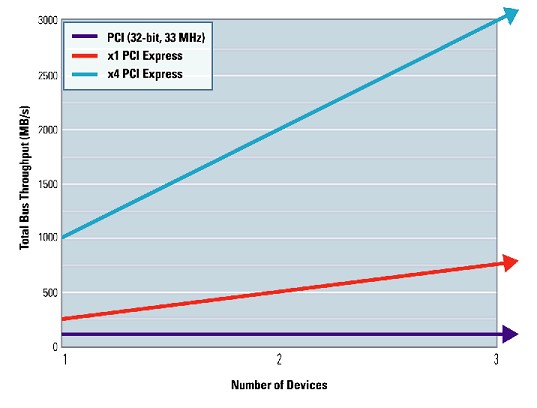
Figure 1: PCI Express provides dedicated, scalable bandwidth with up to 30 times the bandwidth of traditional PCI.
Applications such as data acquisition and waveform generation require sufficient bandwidth to ensure that data can be transferred to memory fast enough without being lost or overwritten. With PCI Express, because data bandwidth is dramatically improved compared to legacy buses, data is streamed faster and the amount of required onboard memory is minimized. Using data storage technologies, such as RAID (Redundant Array of Independent Disks), large amounts of data produced by high-speed devices can be continuously streamed and stored for further analysis. The PCI Express bus has additionally served as the foundation for new bus technologies such as PXI Express, which have brought the same express technology advantages to the PXI form factor.
Hardware and Software Compatibility
PCI Express maintains software compatibility with traditional PCI but replaces the physical bus with a high-speed (2.5 Gb/s) serial bus. Because of this architecture change, the connectors themselves are not compatible. Devices with smaller connectors can be “up-plugged” into larger host connectors on the motherboard, improving hardware compatibility and flexibility. However, “down-plugging” into smaller-sized connectors is not supported.
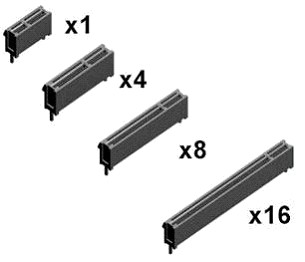
Figure 2: The standard PCI Express slot sizes on computers today are x1, x4, x8, and x16.
Software compatibility is also ensured by the PCI Express specification. The configuration space and programmability of PCI Express devices are unchanged from the traditional PCI methodology. All operating systems are able to boot without modification on a PCI Express architecture. Additionally, because the PCI Express physical layer is transparent to application software, programs originally written for PCI boards can run unchanged on PCI Express boards. This backward compatibility of PCI Express software with traditional PCI is critical in preserving the software investments of both vendors and users.
Choosing the Right PC to Host PCI Express Boards
Today, most PCs are shipped with a combination of PCI and PCI Express slots. The most common PCI Express slot sizes are x1 and x16. The x1 slots are typically general-purpose and the x16 slots are used for graphics cards or other high-performance devices. Generally, x4 and x8 slots are used only in server-class machines.
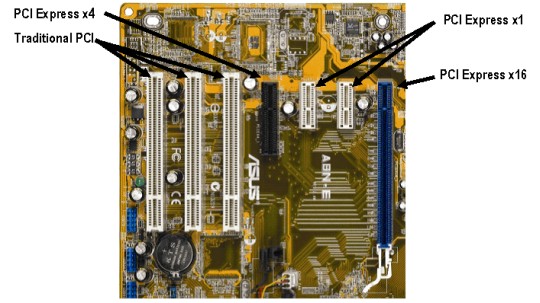
Figure 3: Most motherboards have a combination of PCI and PCI Express slots.
Conclusion
The next-generation PC bus is here. PCI Express has opened the door for measurement devices to reach their full potential. As instruments become faster and more precise and they produce larger amounts of data, the scalable architecture of PCI Express ensures that the computer bus will no longer be the bottleneck for measurement performance.
Next Steps
- Select the Right PC for Your PCI Express Hardware
- See PCI and PCI Express options for multifunction I/O, analog output, digital I/O, sound and vibration, oscilloscopes, GPIB, serial, and DMM hardware
- For an example of how to get started using a PCI Express NI data acquisition device, visit Getting Started with PCI Express Multifunction I/O and LabVIEW