LabVIEW Object-Oriented Programming: The Decisions Behind the Design
Overview
This paper assumes some familiarity with LVOOP. You might consider reviewing the relevant sections of the LabVIEW Help and the example programs before continuing.
This document has been updated for LabVIEW 2009.
Contents
- The High-Level Design of LVOOP
- The Design of a LabVIEW Class
- The Design of Class Methods
- Advanced OO Feature Support
- Conclusion
- Related Links
The High-Level Design of LVOOP
Why does LabVIEW need object-oriented programming?
The goal of LabVIEW is to put the power to program the computer into the hands of engineers and scientists not formally trained in programming. We want to structure LabVIEW so that the interface feels intuitive to those users who have no formal training in programming.
Object-oriented programming has demonstrated its superiority over procedural programming as an architecture choice in several programming languages. It encourages clear divisions between sections of the code, it is easier to debug, and it scales better for large programming teams. LabVIEW R&D wanted this power to be accessible by our customers. We wanted the language to be able to enforce some of these software best-practices.
OO programming requires more planning ahead than procedural programming. If you write a set of VIs to be used a couple times, maybe to calculate some value or to get a particular value from a DAQ card, then building a class to wrap those VIs is probably overkill. But if those VIs form an application that you plan to maintain for a few years, OO may be the right choice. We wanted LabVIEW to have the tools of modern software design without those tools getting in the way of the engineering prototyping for which LabVIEW is so well known.
Sections of this document updated for LabVIEW 2009 are noted with [LV2009] in the text.
we want wire and node
to morph naturally
into class and method.
What did we decide "object-oriented programming" meant?
C++ is an object-oriented language. So is Java. And Smalltalk. The list goes on. Each of these languages includes a unique feature set. When we decided to add OO to LabVIEW, we had to decide what that meant. Were the C++ templates a feature of C++ or a feature of OO? How about operator overloading? Or Java's "synchronized" keyword?
We decided that OO means two things: encapsulation and inheritance. These are the twin pillars that we kept in our minds when deciding what we had to support to call ourselves an OO language. LabVIEW users had to be able to "encapsulate" a class data type – define a block of data, like a cluster, and tell LabVIEW to allow access to that data only in functions specified by the user. Users also had to be able to "inherit" a new class – choose an existing class and create a new class using the existing one as a starting point, and override methods from the parent class. Focusing on these two principles helped prevent feature creep.
How does OO fit with dataflow? (The Great By-Value vs. By-Reference Debate)
LabVIEW uses dataflow syntax. A node in a diagram operates on its inputs and, for the most part, operates only on those inputs, without affecting the values on other wires elsewhere in the diagram. When a wire forks, its value is duplicated. These wires use "by-value" syntax consistent with dataflow. The exceptions are refnum data types. A refnum is a reference to a shared location in memory that may be operated on by multiple nodes through some protection mechanism. Refnum types in LabVIEW include the queues, file I/O, VI Server types, etc. When a wire forks, the shared memory is not duplicated. The only thing that forks is the number that lets LabVIEW look up that shared memory. These wires use "by-reference" syntax. When developing LabVIEW classes, we faced an early decision about whether the class wires should be by-value or by-reference.
Consider C++. That language has two ways of declaring an object: on the stack or as a pointer in the heap. When you pass the object to a function or assign it to another variable, you must be constantly aware of whether you are passing the object by value or by reference. Did you just make a copy of your data, or are you now sharing your data with someone else? Java and C# on the other hand have only a by-reference syntax. Variable assignments of function parameters always reference the original object. To make a duplicate you explicitly create a new object using the original as a source.
Which would be appropriate for LabVIEW? In a dataflow language, using by-value syntax means the value on each individual wire is independent from every other wire. This allows multiple threads to execute in the code without concern that one section of code will affect the values in another section. By-reference syntax shatters that independence. Suddenly the user is responsible for tracking how many times a reference has been shared and making sure that no section of the code is accessing the reference at the same time as any other section. The user must understand protected sections, mutexes, and race conditions. On the plus side, building certain data structures, notably cyclic graphs or relational databases, is simpler with references, and these often complex data structures are a big reason someone might use OO.
LabVIEW has mechanisms already for sharing data on a wire. Although those mechanisms are insufficient by some standards, they do exist, and they improve in every LabVIEW release. LabVIEW didn’t need another way to share data. It needed a way to isolate data. It is hard to guarantee data consistency when you cannot limit changes to the data. To support encapsulation, we decided that a class in LabVIEW should be basically a cluster that cannot be unbundled by all VIs. Thus, unlike Java or C# and unlike C++, LabVIEW has a pure by-value syntax for its objects. When a wire forks, the object may be duplicated, as decided by the LabVIEW compiler.
Choosing by-value instead of by-reference impacts all other design decisions. Many of the standard OO design patterns are predicated on one object being able to point and say, "I care about that object over there." LabVIEW has mechanisms for creating references to data – uninitialized shift registers, global variables, single element queues – but the user must do more work to utilize these mechanisms than he or she would have to if we had a native by-reference syntax. And yet these other mechanisms have proved sufficient to build many complex data structures. But there is a problem with any by-reference solution: these structures are not consistent with dataflow, so they do not benefit from one of LabVIEW’s greatest strengths: the natural parallelism. Following the design patterns of other languages causes inefficiencies and strange bugs. Over time, our own design patterns have emerged, demonstrating just how powerful the by-value syntax can be.
This decision is the single greatest point of contention when people first encounter LVOOP, but the LabVIEW R&D team has spent years reviewing it, and we are quite confident this is the right choice for LabVIEW. Improvement of our reference capabilities will be considered for the future, but a solid by-value implementation is critical to any real development consistent with dataflow.
[LV2009] In LabVIEW 2009, we introduced Data Value References. These are a new refnum data type capable of serving as a reference to any LabVIEW data, be it a plain integer, an array, a cluster or a LabVIEW object. This new addition to the language is discussed later in this document.
What considerations were given to vocabulary choice?
The name chosen for a concept affects how people think of that concept and how easy it is for them to learn the concept. When we brought object-oriented programming to LabVIEW, there was a lot of discussion about how much "computer science" to introduce. LabVIEW aims to make programming accessible to users with no computer science training. Our customers are scientists and engineers doing test and measurement, industrial control, and hardware design. The language of LabVIEW is accessible to many of these customers in the first place because of its resemblance to a wiring schematic. We tried to find metaphors that were equally accessible for the various OO concepts.
We decided to use family terms for the inheritance hierarchy: parent and child, sibling and cousin. These are concepts that customers are already going to have in their vocabulary. When a speaker refers to the parent of a given class, listeners understand the relationship and can follow the conversation easily. We could have used terms like "super class" or "base class", but these don’t establish the same immediate relationship in a person’s mind the way the family terms do. The localization team liked these terms for the ease of translation. We also declared that user interfaces and documentation would always draw inheritance trees with the ancestors on top and descendents on bottom. Too much time in other languages has been wasted in design meetings by developers who do not realize that they are looking at trees upside down. We wanted to encourage consistency among LabVIEW developers.
With scope terminology, we decided that it was best to go with industry standards of "private," "protected," and "public." Some developers initially objected to the word "protected." Private data and public data are intuitive concepts. The word "protected" is not so meaningful – protected from what? – and there was a temptation to choose a word that actually identified the scope, such as "family," keeping with the concepts we had chosen for inheritance. However, the term "protected" is consistently used across the industry, regardless of language, and users would likely see that term in any 3rd party help or textbook. Since the term did not conflict with any existing concept in LabVIEW, we decided to stick with the standard terms. [LV2009] When we added the "community" scope, there was no analogous concept in most other programming languages. In this case we coined our own term. If your inheritance tree was "family", then your friends formed your "community". We felt that this most clearly explained how "community" fit with the other scopes, although, to be honest, some of us were disappointed that we couldn't find a term that started with the letter P, just to fit with the original three scopes.
The word "class" prompted the longest debate. "Class" is obviously the industry standard for "a block of data and the functions that operate on that data grouped together." It is the fundamental idea in OO programming. But we debated whether another word would be more accessible to our users. LabVIEW already had the idea of a typedef – a control VI that defines a new data type based on existing types. One proposal avoided the keyword "class" and instead talked about a new kind of typedef: the object typedef. Although this might be more accessible conceptually to the LabVIEW user who is seeing OO for the first time, our earliest adopters were likely to be those who had seen OO in other languages. Not using the term "class" would have confused such people – how can a language be OO without classes? So, like "protected", we went with the industry standard. We were careful in documentation to differentiate "LabVIEW classes" from "VI Server classes."
The concepts of "virtual" and "virtual dispatching" posed a problem for LabVIEW. These terms are also industry standard. In C#, C++ or Java, virtual functions are functions that invoke different versions based on the run-time data type of one of the inputs (the "this" object). LabVIEW functions are called "virtual instruments." Talking about "virtual virtual instruments" would be awkward. Also, "virtual" has never seemed like a particularly accurate term – it is hard to understand what aspect exactly is "virtual" about these functions. So we chose "dynamic" and "dynamic dispatching." These contrast well with the concept of a static dispatch, which is the kind of subVI call that LabVIEW has used for decades. Using "dynamic" and "static" clearly identifies what separates these two groups of VIs. The word "static" has all sorts of meanings in other OO languages which raised issues for LabVIEW; this term is discussed later in this document.
There were other smaller discussions on other terms. The chosen vocabulary of OO is a feature as much as any actual aspect of the user interface. In order to make OO accessible, every new concept had to be challenged. We could not assume that the C++ or Java name for a feature was the right name for LabVIEW.
The Design of a LabVIEW Class
What is the purpose of the "LabVIEW Object" class?
"LabVIEW Object" is the name of a particular LabVIEW class. This special class is the ultimate ancestor for all LabVIEW classes. JAVA has a similar class (java.lang.object). C++ does not. C# has a hybrid "object" type that is the root of all class types and built-in types, such as numerics.
Having a common ancestor class provides a way to write functions that can take any class and operate on those classes in a common manner. C++ does not need such a class because it has templates, but adding templates to a language dramatically increases the language complexity. Although LabVIEW might someday have class templates, we felt that a less complex solution was necessary. A common ancestor class provides a type that can be used by nodes such as Build Array to store objects from multiple classes in a single array. Arguably LabVIEW does not need this "generic class" because it has the variant data type which can contain any LabVIEW data. But LabVIEW Object can connect to the To More Specific Class function, which variant type cannot do (and it would be strange if we made changes such that LabVIEW allowed the variant to do so).
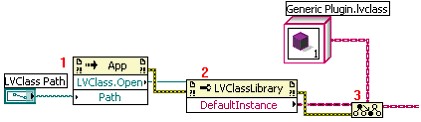
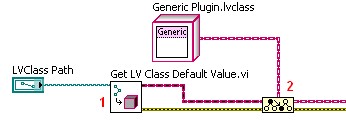
One specific use case for the LabVIEW Object class is for dynamic loading classes into a framework. There are two notable functions that return LabVIEW Object: the "Default Instance" property of an LVClassLibrary reference and the "Get LV Class Default Value.vi." Both of these functions looks up a class (one using a refnum the other using a path) and returns an instance of the class with the default values for all fields, as set in the Private Data Control. These functions allows you to dynamically load and instantiate any class. Users rely on this common technique in "plug-in" applications. Because LabVIEW Object does not have any methods defined on it, you will want to use the To More Specific Class function to convert the wire to a class type which does have methods defined. For a plug-in architecture, you would define a class named "Generic Plugin.lvclass," or similar name, with all the methods defined. Use this class as the parent for all your specific plugged-in items. Then you can dynamically load children classes. The class refnums are not supported in the run time engine of LabVIEW, so anything that will be built as a DLL or EXE or downloaded to a target will want to use the VI.
| Original LV 8.2 method (does not work in run time engine)
|
| LV 8.5 and later method (works in run time engine)
|
Why do classes only have private data? Why not protected or public data?
Just as we challenged the names used in other languages, we also challenged entire features. LabVIEW has private data only. You cannot create public or protected data. Only VIs can be public or protected.
The most compelling reason to make all data private is code correctness for users. We tried to establish the language and environment of LabVIEW such that users choose the best architecture even when they are not trained in choosing architectures, and that means limiting the number of computer science concepts that they have to understand. Accessing the data of a class only through a method provides a guaranteed bottleneck for debugging value changes. It creates a place where range checking and other sanity check code can be added. And it makes sure that code outside the class does not have any binary dependency on the class, so new revisions of the class can be disseminated even to built applications. These are major advantages of class data encapsulation, and we want to encourage people to design software that naturally has this advantage. By not supporting public or protected data, we eliminate a potentially confusing computer science concept from the language (at the very least, we cut out one more thing that needs explanation) and drive people toward a better architecture.
[LV2009] Data also cannot be placed in the community scope, for the same reasons discussed above.
This choice causes the proliferation of accessor methods. Creating "read" and "write" methods for every data value in a class is a process acknowledged to be cumbersome. LabVIEW 8.5 introduced the ability to create accessor VIs from a wizard dialog, and LV2009 added further options to that dialog.
We were concerned about the performance overhead of making a subVI call instead of just unbundling the data. We found that our current compiler overhead for the subVI call is negligible (measured between 6 and 10 microseconds on average PC). A bundle/unbundle operation directly on the caller VI versus in a subVI is nearly the same amount of time. We do have an issue with data copies for unbundled elements because much of LabVIEW's inplaceness algorithm does not operate across subVI boundaries. As a workaround, you may also choose to avoid accessor methods in favor of methods that actually do the work in the subVI to avoid returning elements from the subVI, thus avoiding data copies. This choice is frequently better OO design anyway as it avoids exposing a class' private implementation as part of its public API. In future versions, we expect that inlining of subVIs will become possible, which will remove the overhead entirely.
We feel in the long term it is better to improve the editor experience and the compiler efficiency for these VIs rather than introducing public/protected/community data.
Where are the constructors?
This question is generally asked in a frustrated voice by someone who knows OO from another programming language and has been using LVOOP for a couple of hours. Something so fundamental to the language cannot be so completely hidden, and the person feels either ashamed for not being able to find it or angry at us for making it so hard to find! But the answer is simple: There are no constructors.
Let's consider the use cases for constructors:
- Setting the initial values of an object.
- Calculating the initial values of the object from a set of parameters.
- Calculating the initial values of the object from environment data (such as recording the timestamp when the object was constructed).
- Reserving system resources (memory, communication channels, hardware, etc) for use by this object (to be freed later by the destructor).
LabVIEW has the ability to set the default value for your class. The values that you set in your private data control are the default values for your class. Now, are these calculated values? No. They are static. You do not have any place to put running code as part of your default value. This is the same as a simple default constructor in other OO languages. The initial value for all instances of the class is just this default value, so Constructor Use Case #1 is fulfilled.
How do you declare an integer in C++?
How do you declare an integer in LabVIEW?
Consider this C++ class...
double mz;
std::string ms;
Thing(int x) : mx(x), ms("def") {
~Thing() { }
How do you invoke a non-default constructor in C++?
How do you invoke a non-default constructor in LabVIEW?
The idea of a constructor is a problem in the dataflow world. Everything either starts with a value (completely calculated without any external inputs) or values flow to it and it is calculated when those values arrive. A LabVIEW class has an initial value at creation defined by the data type in the private data control. That is Constructor Use Case #1. All instances initialize to this same value. If you want further behavior, you define it on the block diagram by creating a subVI that takes in non-class inputs and outputs a class. That is Constructor Use Case #2.
Constructor Use Case #3 is a more advanced concept for software programmers. LabVIEW has support for this concept, but not in an obvious way. Counting how many instances of the class exist (using a class static field), or recording the timestamp of a given instantiation is functionality most classes do not need. We left such functionality for a more advanced tool. You construct an XControl of your class' type. The XControl has code that runs at edit time and at run time to initialize values of the class. In the Façade VI you can include any code you need to set the values for the instance of your data. Creators of the class may find this a bit cumbersome today. It is certainly something that we hope to make easier over time. But it is the correct place to put this functionality – in the code that underlies the control.
Constructor Use Case #4 can only be discussed in combination with the next question.
Where are the destructors?
What is the lifetime of the C++ integer?
What is the lifetime of the LabVIEW integer?
LabVIEW does not have "spatial lifetime". LabVIEW has "temporal lifetime". A piece of data exists as long as it is needed and is gone when it is not needed any more. If it is copied into front panel control, it stays there, even after execution finishes. Copies on the wires exist until the next execution of that wire. Another copy will be made for any probe on the wire. In a pure theoretical dataflow language, there would be a separate copy on every individual wire, because every wire is an independent computation unit. Of course, that would be inefficient to actually implement, so LabVIEW's compiler optimizes the number of copies. But the principle is the same: data lives for a long time, sometimes outliving the program that generated that data.
In such an environment, consider Constructor Use Case #4. When would the constructor reserve resources? What would happen each time a copy was made? Would you need different copy constructors for the copy made at a fork of the wire and for the copy into an indicator and for the copy made into a probe? If you try to answer these questions, you will find yourself listing many special cases and exceptions. Deciding exactly when to run these implicit constructors to reserve resources is very hard and, if you did find satisfactory answers, you still have to decide when the destructor should run to release those resources.
Resource reservation in LabVIEW is handled by refnum data types. The refnum types copy the reference number by value on the wire, and you must explicitly invoke a function to "deep copy" or to release them. The queue data type for example has an Obtain Queue that reserves the reference and an explicit Release Queue that frees it. Unless you call Release Queue, the queue will stay in memory until the VI finishes execution, at which point LabVIEW implicitly releases it.
Without a better concept of "lifetime," Use Case #4 isn't viable.
In summary, LabVIEW, as a dataflow language, does not normally have variables. Wires are not variables. Front panel controls are not variables. Even local or global variables are not allocated with a specific lifetime, the way variables are in other languages. Variables are part of a model that conflicts with dataflow. Without variables and a way of defining the lifetime of those variables, construction and destruction are meaningless concepts, and therefore we left them out of the initial language design.
[LV2009] The Data Value References provide a solution to this issue. Because they are refnum data types, they have a well defined lifetime. DVRs can be created for any LabVIEW data type, but we did something special for LabVIEW classes. In the Class Properties dialog, there is an option on a class, enabled by default, to limit creation and destruction of DVRs of objects of that class only to member VIs of the class. Or, to put it another way, only the member VIs of the class can create references to the class. Any other VI that attempts to connect a wire of the class type to the New Data Value Reference primitive will be broken. This restriction means that a class can put initialization code into their member VIs to guarantee that no reference to the class is ever created without getting assigned a proper value (as defined by the class author). Likewise, no reference can ever be destroyed except by a member VI, which provides a way for the class author to have deallocation code. This deallocation code is not invoked if the reference is implicitly released by a VI halting, but as long as you always explicitly destroy any reference you create, the DVRs provide a lifetime scope for LabVIEW objects, and thus support for Use Case #4.
Be aware: Reference types should be used extremely rarely in your VIs. Based on lots of looking at customer VIs, we in R&D estimate that of all the LabVIEW classes you ever create, less than 5% should require reference mechanisms. If you find yourself doing more than that, think about ways to use more by-value classes, because you are almost certainly needlessly costing your self performance.
What is the in-memory layout of a class?
Storing classes efficiently in LabVIEW was an interesting challenge.
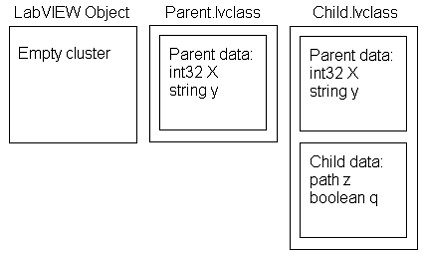
A class’ data is defined in two parts:
- The chunk of data inherited from its parent
- Its own private data cluster
You can think of any given class as a cluster of clusters – each of the inner clusters comes from one of its ancestors, except the last which is the private data cluster of the class itself. The ultimate ancestor, LabVIEW Object, contributes no data fields.
LabVIEW does not have a function stack. Dataflow, where nodes on different diagrams running in parallel may interleave with each other, makes a stack architecture problematic. Instead, when a VI compiles, LabVIEW allocates a "dataspace" for that VI. The dataspace is an allocation of all the data needed to execute that VI. Any thread knows that it is free to write into its region of the dataspace without having to worry that another thread is writing there, so there is no need for mutex locking.
To implement classes, we needed to be able to allocate a class in the dataspace. A wire that is of the parent type must be able to carry data of its own type or any descendent type, so the allocation that we make in the dataspace has to be able to hold any one of the classes. That means that we cannot just allocate these clusters of clusters directly.
To further complicate the design, an object needs to carry around its class information. An object is a self-aware piece of data. It knows its own type (that is why objects can perform operations such as To More Specific Class and dynamic dispatching). The class information has to be a part of the object at some point.
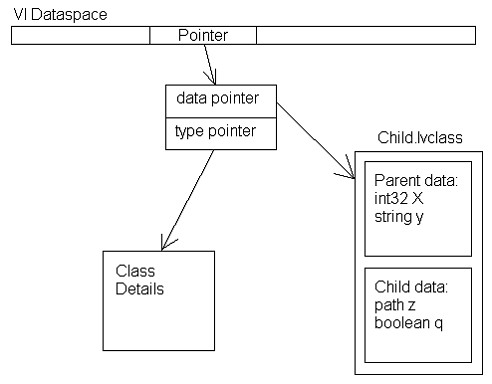
So the final structure in memory looks like this:
LabVIEW allocates a single instance of the default value of the class. Any object that is the default value shares that pointer. This sharing means that if you have a very large array as the default value of your class there will initially only be one copy of that array in memory. When you write to an object’s data, if that object is currently sharing the default data pointer, LabVIEW duplicates the default value and then perform the write on the duplicate. Sharing the default instance makes the entire system use much less memory and makes opening a VI much faster.
Can I define classes recursively?
The data in the private data control may be of any well-defined LabVIEW type, including other LabVIEW classes. The cluster can even be left empty for classes that only define methods and do not have any data of their own.
A recursive class is a class that uses its own definition as part of itself. This kind of class appears in other object languages. For example, in C++, you might see:
XYZ *anotherInstanceOfThisType;
Thus it appears that the class uses its own type to define itself. This is not exactly correct. Technically, the type of the field is actually "pointer to XYZ", not "XYZ" itself. This technical distinction is important to understanding how these other languages are able to allocate memory for a recursively defined object. They do not actually reserve space for the object. They reserve space for a reference to such an object.
If you include a LabVIEW class control in the private data cluster, the entire class is included in the private data. It is not a reference to the class. Therefore a class cannot contain itself in its own private data.
[LV2009] LabVIEW does have refnum controls. The queue refnum or the new Data Value refnum controls can be used to give the private data of one class a reference to another class. Many users might expect that this technique would allow Class X to include a refnum to Class X. Technically, it would be possible, but LabVIEW forbids it. This was a source of much debate in R&D. Trying to explain which other classes could be legally used in any given class and under which conditions could become confusing to people less familiar with programming in general or OO specifically. We finally settled on one hard and fast rule: Class X can contain any class that doesn't itself use class X. Very straightforward. A parent class cannot include its own child class because the child uses the parent. But a child can use the parent because the parent does not use the child. Having this rule makes for very clean load and unload behaviors, without worrying about circular dependencies.
If you need to have class X include a reference to class X, use a reference to the parent of X instead. Because a child object is always valid to have as a parent value (in a parent control or on a parent-type wire), you can build your references this way.
There is a rather curious aspect of LabVIEW OOP that may be counterintuitive to users of other programming languages. A child class can include the parent class as a data member of the child class. The parent class is fully defined without the child class and thus you can use it as part of the private data cluster of the child class without creating a recursive type definition. At run time, you can store any value into that position, including another instance of the child class itself -- without needing to have a reference data type at all. You can, therefore, create a chain of objects of the same type, terminated by an instance of the parent class. In fact, any linked list or tree data structure can be built this way, and those data structures are completely dataflow safe. Examples of this have been posted in various places on ni.com and lavag.org.
How do I make class data (also known as static data)?
Class data is data that is not part of the object instances. Only one copy of class data exists in memory, and access to that single instance may be scoped public, protected, or private. There are several ways of creating class data.
The easiest is the global VI. Adding the global VI into your class and then setting the scope to be private or protected will limit which other VIs can access that data. But global VIs, even when scoped within classes, are generally unacceptable – they are not thread safe because they operate outside the dataflow and they have significant performance overhead (a copy is required even for a read-only operation).
A better solution is a VI with an uninitialized shift register, known as a "LV2-style global" in online help. This method of creating global data has existed in LV since LabVIEW 2.0 (thus the name). You can make such a VI a member of a class and then set the scope to be private or protected. Such globals allow you to define the set of thread-safe operations available on your data. For more details, see LabVIEW Help or the example VIs. We ship a specific example showing one possible way to implement the industry standard "singleton" design pattern.
The Design of Class Methods
Which wire is the "this" object? How do I make class static methods?
C++ and Java both have the concept of a "this" object. When you define an object’s method in these languages, you specify the explicit parameters to the function. The language assumes one additional implied parameter, the object on which the method operates. The implied parameter is called the "this" object, and you use special syntax used to access parts of that object.
In these languages, a "class static method" is a function that is part of the class but does not have an implied parameter. You cannot use the special "this" syntax in a class static method because there is no implied object.
LabVIEW does not include either of these concepts. You explicitly declare all of inputs to your member VIs in the connector pane. LabVIEW never adds an implied input. Because no implicit input exists, no difference exists between a VI that has such an input and one that does not.
LabVIEW does include methods that we describe as "static", but we use the term for a different meaning than the other languages. LabVIEW distinguishes between two types of methods: dynamic methods and static methods. A static method is a simple subVI call, which LabVIEW has had since its inception. A method is called "static" because the subVI node always calls the same subVI. In contrast, a dynamic method is a set of VIs. A dynamic subVI node uses dynamic dispatching to call one of the VIs in the set, but exactly which one is not known until run time.
How does dynamic dispatching work? What is the overhead of this versus a regular subVI call?
Dynamic dispatching is the feature whereby a node that looks like a subVI call actually calls one of several subVIs at run time depending upon the value on the wire at the dynamic dispatch input terminal. Conceptually, it is like a polymorphic VI that chooses which VI to execute at run time instead of at compile time.
Because of VI Server, which supports dynamic calls to any VI, testers often assume that dynamic dispatching is slow in comparison to subVI calls. However, the compiler has much more information about the specific set of VIs that may be invoked for a dynamic dispatch call than it does for a generic VI Server call and therefore can provide better performance.
Each object traveling on the wire carries a pointer to its class information (refer to the "What is the memory layout of a class?" section earlier in this document). That class information includes the "dynamic dispatch table," which is a table of VI references. Each class copies its parent’s table exactly. It then replaces the VI reference for any parent function with its own overriding VIs. The class appends to its table any of its dynamic dispatch VIs that are not overrides of its parent.
-
- Parent.lvclass defines two dynamic dispatch VIs: A.vi and B.vi.
- Child.lvclass inherits from Parent. It defines two dynamic dispatch VIs: B.vi and C.vi. B.vi overrides the second entry in the table.
- Junior.lvclass inherits from Child. It defines two dynamic dispatch VIs: A.vi and D.vi. A.vi overrides the first entry in the table.
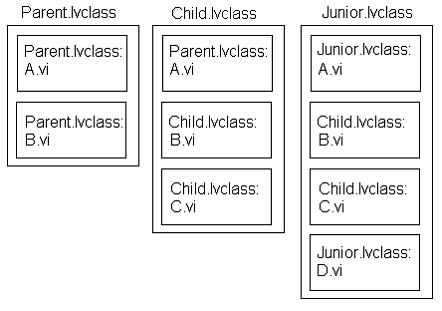
A dynamic dispatch subVI node on the diagram records a particular index number when it compiles. A node that represents an invocation of A.vi, for example, records index 0. A node for an invocation of B.vi would record index 1. At run time, whenever an object comes down the wire, the node will access the dynamic dispatch table of that object. It will retrieve the VI at the recorded index and invoke that VI. The node does not incur any overhead of name lookup or searching lists to figure out which subVI to call. The time complexity is O(1) no matter how deep the inheritance tree gets or how many dynamic dispatch VIs the classes define.
From there it is mostly just a subVI call. There can be a performance hit since LV cannot optimize inplaceness (memory duplication) as well across a dynamic dispatch call versus a static dispatch call. LabVIEW minimizes this by optimizing for the inplaceness of the eldest ancestor – so an invocation of B.vi would use the Parent.lvclass version of B.vi to decide whether copies of the inputs are needed or not. In most cases we find that because the child override VIs use the same connector pane and serve the same function as the parent VI, they tend to need the same inplaceness patterns. When the inplaceness patterns do match, the overhead is the same as a subVI call. This does mean that you may get a performance benefit from wiring up inputs to outputs on ancestor implementations even when you do not expect the ancestor implementations to ever be invoked directly (such as when you are using the ancestor as an abstract class).
Can I overload VI names in classes?
No. Overloading is a feature in other OO languages where two functions have exactly the same name but a different parameter list. The compiler figures out which function the programmer intended to call based on the parameters given in the function invocation. This feature means that you can have, for example, multiple functions called "Init," one which does initialization of the object from a file (and so takes a path as its only parameter) and another that does initialization from another object (and so takes that object as its parameter).
This feature is the source of some terrible bugs in these other languages, particularly when dynamic dispatching is involved. If someone changes the parameter list in the parent class but forgets to change the parameter list in the child class, the compiler treats these as two different function declarations, not a compiler error. All the bugs occur at run time and exactly what is going wrong can be very hard to deduce. In LabVIEW we do not allow two VIs with the same name to be in memory under any circumstances. Adding overloading, a feature that creates a new class of hard-to-debug bugs, was not a good reason for us to change that rule.
Advanced OO Feature Support
Is there any way to declare one class a friend of another class?
[LV2009] Yes, in LabVIEW 2009 and later. Any library (.lvlib, .lvclass, .xctl, .lvsc) can declare a list of friend VIs or friend libraries. By declaring a VI to be a friend, the library is giving that other VI special permission (we will discuss what that permission is in a moment). By declaring another library to be a friend, this library is giving all the member VIs of that other library the special permission.
The special permission is the right to call community-scoped member VIs. Suppose Library X has several member VIs, A.vi, B.vi, and C.vi. Now, A.vi is marked as private scope. That means that only other VIs that are members of X can call A.vi. B.vi is in public scope, so any other VI can call it. But C.vi is in the community scope. That means it can only be called by members of library X and those VIs outside the library X that are friends can call it.
For those unfamiliar with this idea, declaring another class to be a "friend" of this class gives that other class permission to access the private parts of this class. The "friend of" syntax is important for some APIs. The classic example is a Matrix class and a Vector class – the function that multiplies a matrix times a vector needs access to the private internal parts of both classes.
Why did we create a new "community" scope?
[LV2009] Other programming languages that include the "friend" concept generally give the friends wide open access to access all the private parts. Giving a friend class access to all of your private methods and data opens up too many backdoors for data to change without going through the defined VIs. Even giving them access just to the private methods is almost always overkill. Most of the time the friends only need access to a specific method. By having a community scope, the private parts of the library are still free to change without breaking external dependencies. Furthermore, the list of community-scoped VIs provides a better record of why a given VI or library was named as a friend. Too often in programming languages, one element is a friend of another and no one remembers why that friendship was necessary.
Why can't descendant classes access community scoped VIs?
[LV2009] The VIs that are in community scope can be called by the owning library and the friends of that library. If the library is a class (as opposed to a project library, XControl or StateChart), then the class may have descendant classes. The member VIs of descendant classes cannot call community scoped VIs. Sometimes you want the same functionality to be usable by your friends and by your family, and this division leads to having to write two VIs, one in the community scope and one in the protected scope.
R&D does not consider this a bug. It is our intended behavior. We chose not to complicate the interface by having another new scope that combined "protected and community" together as one. And we could not allow the child classes to have blanket access to the community scoped VIs without providing a hole in the scope protection. Only friends should be able to call the community scoped VIs, and if a programmer could easily create a new child VI and then wrap the community-scoped VI in its own public VI, the community scope might as well not exist. The friends list is a finite, explicit list of who can use this VI, so that if that VI's connector pane changes, a user knows exactly which caller VIs may need to be edited, without worrying that lots of other VIs throughout the descendant hierarchy might also be using the VI.
Can I create an inner class?
Not in this version. A class library cannot contain any other library type (plain library, XControl, or LabVIEW class). This is something we would like to open up in the future, but the priority will depend upon the demand.
Do you have support for private inheritance?
Any control of a parent type can contain data of any descendent type. The data that flows down a parent wire may be of any descendent type. This is the key to how dynamic dispatching works and why OO can help you write generic algorithms that do custom steps for each class type. During development, one beta customer gave feedback that this was detrimental to LabVIEW’s position as a strongly typed language. He wanted a way to inherit a child class from a parent class but prevent the child class from upcasting to a parent type. That way if he accidentally connected a child wire to a parent terminal, he would get a broken wire.
Effectively, the customer was asking for a feature other languages call "private inheritance." With private inheritance, a class would still inherit all attributes of its parent, but no VI outside of the class would know about that inheritance and so would not allow the types to wire together. LabVIEW only has public inheritance. Private inheritance is a rarely used aspect of OO programming that would add unnecessary complexity. Any attempt to support it would require answers to some hard questions about how private inheritance would work in our language. You would have to sometimes be able to wire child data to parent terminals in order to invoke methods inherited from the parent class. But that would put child data inside a parent control on the FP of the parent VI. What would happen if the value of that parent control were accessed, through a property node, by a VI not in the class? Would we return an error? Or would we let the child data be returned, even though no one outside the class is supposed to know that child and parent have any relationship? Questions like these make the idea of private inheritance hard to handle. LabVIEW is unlikely to ever include this feature.
Do you have support for multiple inheritance?
Multiple inheritance -- having multiple parent classes that bring all the data and behavior of two classes together -- is a great theory that in practice creates as many problems as it solves. "I want to have all the attributes of A and of B combined in C" sounds really good, until you start considering how to handle name collisions, how to composite the data, how to resolve diamond inheritance (where D inherits from B and C, which both inherit from A) and other ugly cases. LabVIEW does not have multiple inheritance and probably never will. In LabVIEW 2020, we added LabVIEW interfaces, which are a new data type similar to classes but without any private data. Interfaces solve most of the use cases for multiple inheritance. Please see the shipping LabVIEW 2020 documentation to learn about interfaces. The details behind their implementation can be found by reading LabVIEW Interfaces: The Decisions Behind the Design
Why does LabVIEW forbid LabVIEW classes in the interface of LV-built DLLs (shared libraries)? Why can't I pass LabVIEW objects to a Call Library Node?
When you use Application Builder to build a DLL (or shared library on other platforms), LabVIEW will not allow any VI to be exported from that DLL if the connector pane of the VI uses any LabVIEW classes. The interface between LabVIEW and external code must be in plain data types.
If you look back at the in-memory layout of a class instance, you’ll see that there’s a lot of very LabVIEW-specific pointers and allocations. No other EXE or DLL will have any ability to use that data structure or get access to the pieces of the class needed to support dynamic dispatching or to enforce class scoping. Similarly, the C++ implementation of classes varies from compiler to compiler. Most C++ users will advise against putting C++ classes in the interface of DLLs because of this variance. The nature of OO is such that the implementation structure that is best for one compiler is not good for another, and so they rarely can interact with each other.
Can I import/export my class to/from .NET?
[LV2009] LabVIEW 2009 does allow you to create .NET assemblies from your VIs. To do so, create a new Build Specification in your project for ".NET Assembly." As part of your source VIs, you can include LabVIEW classes. Those classes can be exported in the assembly interface and exposed as .NET classes. If you then try to use that .NET assembly in LabVIEW, the class will appear as a .NET refnum, and will be handled by reference just as any refnum would be.
Conclusion
Will LVOOP revolutionize all user VIs and someday be called "LabVIEW's finest feature"?
Some of us like to dream about an OO revolution. But the honest truth is that OO is not for everyone. It is a tool, one more in an ever expanding set of tools that LabVIEW gives to users. For the quick, single VI to take a measurement, LabVIEW classes are overkill. But for full applications, even small utilities, object-oriented programming can help organize code, improve maintainability and generally make the LabVIEW experience more manageable. In the first release there were some rough edges, and we knew that only our advanced customers would plunge in to see how wet they got. Over time, though, we have seen OO features become a staple of LabVIEW development. We have even seen some LabVIEW users who start off using OO for their very first project, just as occurs in other programming languages.
The LVOOP team still holds out hope for that "finest feature" part. Let us know what you think!