Table of Contents
Overview
One of the most common data acquisition applications is logging acquired data to disk for future analysis. All National Instruments data acquisition (DAQ) devices are shipped with free data logging software. Depending on your data logging application requirements, you may need additional functionality. This article introduces the three levels of data logging software for use with National Instruments DAQ devices – NI LabVIEW SignalExpress, NI LabVIEW SignalExpress LE and NI LabVIEW.

Figure 1. Choose from three levels of data-logging software.
NI LabVIEW SignalExpress
LabVIEW SignalExpress is interactive measurement software for quickly acquiring, analyzing, and presenting data without programming. LabVIEW SignalExpress provides an interactive data logging environment to reuse the same express technology available in NI LabVIEW graphical system design software. Built with data logging in mind, LabVIEW SignalExpress provides a broad set of features for completing common data logging tasks, including basic data analysis, alarming, customizable graphs and displays to present your data.
Automatic Device Detection
When you plug in a USB DAQ device, it is automatically detected by the NI-DAQmx hardware driver which immediately launches a data logging application based on the measurements being made. By combining NI DAQ devices with LabVIEW SignalExpress you can configure an entire data logging application in a few minutes.

Figure 2. Automatic device detection makes setting up a data logging application quick and easy.
Channel View
For quick setup and configuration, LabVIEW SignalExpress has a Channel View you can use to simultaneously configure multiple channels for logging. The Channel View allows you to configure a multi-channel data logger making various types of measurements all with a few clicks of the mouse.

Figure 3. The Channel View allows you to quickly configure properties of your measurements.
Data View
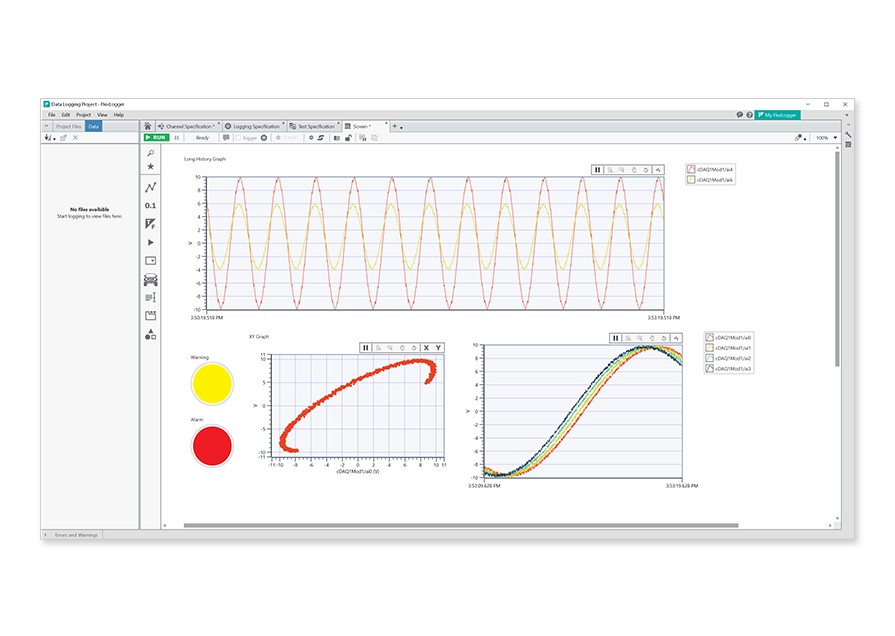
The Data View of LabVIEW SignalExpress is the main window for presenting the acquired data and analysis. You have the option of customizing the Data View by adding graphs, charts, thermometers, meters, gauges, and LEDs. You can create your display in the Data View while the application is running by dragging and dropping the data from the applicable step into the Data View.
Signal Processing and Data Analysis
Many simple data loggers can do nothing more than acquire a basic signal. With LabVIEW SignalExpress you can perform basic data analysis to determine maximum and minimum values, averages, and RMS values. You can also run and set masks and limits to dictate thresholds within your acquired data. LabVIEW SignalExpress allows you to perform a wide variety of time and frequency domain analysis functions including Fast Fourier Transforms (FFT), octave analysis, and tone extraction. You also have the ability to apply lowpass, highpass, and other filtering techniques to your signals to get rid of unwanted aliasing and noise. You can perform analysis on your data as it is being acquired or analyze data previously logged to disk. No other data logging software gives you this flexibility.
Data Import, Export, and Streaming
LabVIEW SignalExpress simplifies many common data logging tasks, including exporting your data. Exporting your data to common Windows applications such as Microsoft Excel is as easy as right-clicking on your data or dragging and dropping your data from LabVIEW SignalExpress into Excel.
You can also log data to disk by clicking the record button. By storing multiple logs you can load data later to perform off-line analysis. LabVIEW SignalExpress automatically formats the data and applies column headers using the TDMS (Technical Data Management Streaming) file format. The TDMS format adds descriptive information to your bulk data to allow for complete documentation of your saved data such as operator name, data and time, and various other test parameters. TDMS files are also optimized for data mining to help you quickly search, find, analyze, and present your test data in an off-line data management tool such as NI DIAdem. Lastly, TDMS files can be opened in Excel for further analysis using the free TDM Add-in for Microsoft Excel.

[+] Enlarge Image
Figure 4. LabVIEW SignalExpress allows you to customize your user interface with multiple indicators and makes exporting data quick and easy.
Recording Options
LabVIEW SignalExpress allows you to configure when and how your data will be logged. In the Recording Options tab you can specify alarms, dynamic events, and start and stop conditions for your data logs. By setting alarm conditions in your LabVIEW SignalExpress project you can be notified when thresholds have been passed, tests have failed, or other specific events have occurred during acquisition runs. In addition, you can react to specific events by setting digital lines and analog levels. Lastly, you can specify start and stop conditions to begin or end your recording based on a signal value, software trigger or time of day.

Figure 5. With LabVIEW SignalExpress, you can configure advanced recording options with no programming required.
Project Documentation
You can create custom reports within the Project Documentation tab, similar to what you can create in a basic word processing application. Adding documentation within the LabVIEW SignalExpress environment allows you to easily maintain your data logging application because your documentation stays with your engineering data and is instantly updated each time a new set of data is recorded. The graphs and indicators placed within your documentation update while your project is logging or replaying data in playback mode. You can also save your project document as an html file to share with others who do not have LabVIEW SignalExpress.
Connection Diagram
Often the most difficult step in setting up a data acquisition system is determining how your sensors should be connected to your DAQ device. LabVIEW SignalExpress includes a connection diagram for many analog input steps to show you exactly how to connect your signals to your DAQ hardware.
NI LabVIEW SignalExpress LE
LabVIEW SignalExpress LE provides a subset of functionality offered within the LabVIEW SignalExpress interactive measurement environment for free and is included with NI data acquisition devices that are compatible with NI-DAQmx driver software. Customers who already own a device compatible with NI-DAQmx can download LabVIEW SignalExpress LE for free.
Using LabVIEW SignalExpress LE with NI-DAQmx driver software, you can acquire, log, export, and view historical data. However, it does not provide the analysis functions, alarming, or events that may be required in your data logging applications. Upgrading to LabVIEW SignalExpress gives you the full functionality provided in the interactive data logging software. Table 1 shows a complete comparison between LabVIEW SignalExpress LE and LabVIEW SignalExpress.
NI LabVIEW
For creating a user-defined data logging application, there is no better tool than LabVIEW. LabVIEW gives you the ability to write to many different types of files including ASCII, binary and TDMS. The lower-level data logging functions in LabVIEW allow for streaming to disk at rates as high as 1.2 GB/s. With LabVIEW graphical programming you can take advantage of LabVIEW SignalExpress and extend your data logging application by:
- Creating custom user interfaces
- Handling if-else and what if scenarios
- Defining custom timing, triggering, event and alarm conditions
- Applying hundreds of math, signal processing and analysis functions
- Saving your data to custom file formats and databases
- Sharing your results over the web
- Distributing your applications as executables

Figure 6. Low-level TDMS functions in LabVIEW optimize data logging performance.
Inherently, tools that do not require programming are limited in their functionality. By combining LabVIEW SignalExpress and LabVIEW, you have limitless options for your data logging application. To help you transition from LabVIEW SignalExpress to LabVIEW, you can automatically generate LabVIEW code from your existing LabVIEW SignalExpress projects. This means you can start your data logging applications using LabVIEW SignalExpress and port your projects to LabVIEW for complete customization, flexibility, and functionality with little programming required.

Figure 7. Generating LabVIEW code within SignalExpress makes customizing your data logging application easy.
Other Data Logging Software from National Instruments
For application-specific data logging tools, consider some of the add-on data logging software that plugs into LabVIEW and LabVIEW SignalExpress.
LabVIEW Data Logging and Supervisory Control Module
National Instruments also provides the LabVIEW Datalogging and Supervisory Control (DSC) Module for developing your HMI/SCADA for process control and industrial automation applications, and high-channel-count data logging applications. With the LabVIEW DSC Module, you can extend your LabVIEW application to log data to a networked historical database, track real-time and historical data trends, configure alarms and events, set up security on your applications, and easily network OPC devices and LabVIEW Real-Time targets together into one complete system.
NI Sound and Vibration Assistant
The NI Sound and Vibration Assistant extends NI LabVIEW SignalExpress technology to provide specific sound and vibration measurements and analysis. The Sound and Vibration Assistant is designed for audio testing, acoustic measurements, environmental noise testing, machine condition monitoring, vibration analysis, noise and vibration control, and noise, vibration, and harshness (NVH) measurements. The Sound and Vibration Assistant provides application-specific analysis, UI components, and examples that plug into LabVIEW SignalExpress.
NI Veristand
NI VeriStand is a software environment for configuring real-time testing applications, including hardware-in-the-loop (HIL) tests. Veristand gives you the ability to configure triggerable multi-file data logging systems for real-time, multicore test systems.
Comparison Table
National Instruments provides three levels of data logging software, each customized to meet your specific application needs. With easy configuration and customizable data presentation, LabVIEW SignalExpress is a premier choice for interactive data logging. For basic data acquisition and presentation, LabVIEW SignalExpress LE provides a free option. To expand upon the options provided in the non-programming environment which LabVIEW SignalExpress provides, you can continue to the LabVIEW graphical development environment to obtain complete control over functionality and customization of all aspects of your application.
For additional information on any of the three levels of National Instruments data logging software, contact an NI technical representative. You can also evaluate all three levels of data logging software for free.
Table 1. Compare the three levels of NI data-logging software.
Purchase Options
A 30-day evaluation of LabVIEW SignalExpress is included with the purchase of any NI data acquisition device. After the evaluation, you can continue to use LabVIEW SignalExpress LE, or purchase the Full version of the product. Purchasing options include purchasing LabVIEW SignalExpress standalone, or purchasing LabVIEW Full or Professional Development Systems, both of which include LabVIEW SignalExpress. View the following links for pricing information.
NI LabVIEW SignalExpress Purchase Options
NI Developer Suite (Includes NI LabVIEW, NI LabVIEW SignalExpress and more)
Evaluate National Instruments software for free
NI LabVIEW Online Evaluation Software
Download NI LabVIEW SignalExpress LE Software with a 30-Day Full Version Evaluation
Reader Comments | Submit a comment »
Legal
This tutorial (this "tutorial") was developed by National Instruments ("NI"). Although technical support of this tutorial may be made available by National Instruments, the content in this tutorial may not be completely tested and verified, and NI does not guarantee its quality in any way or that NI will continue to support this content with each new revision of related products and drivers. THIS TUTORIAL IS PROVIDED "AS IS" WITHOUT WARRANTY OF ANY KIND AND SUBJECT TO CERTAIN RESTRICTIONS AS MORE SPECIFICALLY SET FORTH IN NI.COM'S TERMS OF USE (http://ni.com/legal/termsofuse/unitedstates/us/).