NI TDMS File Format - What is a TDMS File?
Overview
Several roadblocks can impede the optimal exchange of technical information. The most notorious is the improper capture of information at the time of test or simulation. All too often data is stored without descriptive information, in inconsistent formats, and scattered about on arrays of computers, creating a graveyard of information that makes it extremely difficult to locate a particular data set and derive decisions from it. When data sets cannot be located, tests or simulations must be recreated. As a result, many companies see decreased efficiency and drastically increased development costs. To meet these challenges, NI has defined a technical data management (TDM) solution that includes three integral components:
- The NI TDMS file format for saving well-documented measurement data
- The NI DataFinder for quickly locating previously stored data sets
- NI DIAdem or the LabVIEW DataFinder Connectivity VIs for processing data and creating reports
The first step to achieving a cohesive data management solution is ensuring that data is stored in the most efficient, organized, and scalable fashion. This white paper details the first facet of the NI TDM solution – the NI TDMS file format – a file format optimized for saving measurement data to disk.
Contents
- Traditional Approaches to Measurement Data Storage
- Overview of the TDMS File Structure
- Writing and Reading TDMS Files with NI Software
- Writing and Reading TDMS Files with Third-Party Programming Software
- Distributing and Exchanging TDMS Files with Colleagues Using Microsoft Excel
- Mapping Existing Data Files to the TDMS Data File Format
- The Fastest Way to Stream Measurement Data to Disk
- Focus on the Data, Not the Format
- Take the Next Steps Today
Traditional Approaches to Measurement Data Storage
You can choose from a variety of format options for measurement data storage. Unfortunately, careful consideration of data storage options is not typically at the forefront of application planning. The file format choice is often overlooked in favor of higher-visibility decisions such as hardware system design or software architecture. Data storage decisions are sometimes made arbitrarily or on an as-needed, per-application basis without second thought for reusability and scalability, which leads to complex and costly software rearchitecture. Because applications and requirements change over time, even the most popular traditional storage formats quickly fall short of meeting the demands of engineers and scientists storing time-based measurement data. Table 1 shows the pros and cons of some of the most commonly chosen storage options for measurement data.
| ASCII | Binary | XML | Database | TDMS | |
|---|---|---|---|---|---|
| Exchangeable | ✓ | ✓ | ✓ | ||
| Small Foot Print | ✓ | ✓ | |||
| Searchable | ✓ | ✓ | |||
| Inherent Attributes | ✓ | ✓ | |||
| High-Speed Streaming | ✓ | ✓ | |||
| NI Platform Supported | ✓ | ✓ | ✓ | ✓ * | ✓ |
| * May require a toolkit or add-on module. | |||||
Table 1. The TDMS file format combines the benefits of several data storage options in one file format. | |||||
NI introduced the Technical Data Management Streaming (TDMS) file format as a result of the deficiencies of other data storage options commonly used in test and measurement applications. The binary TDMS file format is an easily exchangeable, inherently structured, high-speed-streaming-capable file format that, when combined with the other technologies in the NI TDM solution, becomes quickly searchable without the need for complicated and expensive database design, architecture, or maintenance.
For a more in-depth overview of the different data storage choices in Table 1, see Comparing Common File I/O and Data Storage Approaches.
Overview of the TDMS File Structure
The single, most important feature to understand about the internal format of the TDMS file structure is its inherent hierarchical organization. The TDMS file format is structured using three levels of hierarchy, as shown in Figure 1 – file, group, and channel. The file level can contain an unlimited number of groups, and each group can contain an unlimited number of channels. Because of this channel grouping, you can choose how to organize your data to make it easier to understand. For example, you may have one group for your raw data and another group for your analyzed data within one single file.1 Or, you may have multiple groups that correspond to sensor types or locations.
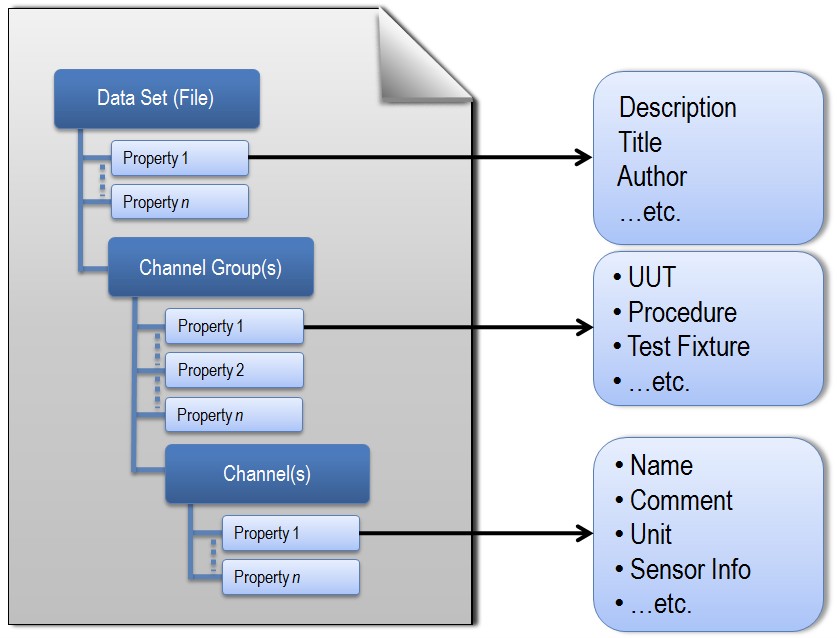
Figure 1. Each TDMS file contains descriptive information on the file, group, and channel levels.
At each level of the hierarchy, you can store an unlimited number of custom scalar properties. Each level accepts an unlimited number of custom-defined attributes to achieve well-documented and search-ready data files. The descriptive information located in the file, a key benefit of this model, provides an easy way to document the data without having to design your own header structure. As your documentation requirements increase, you do not have to redesign your application; you simply extend the model to meet your specific needs. The more custom properties you use to document your measurement data, the more easily it can be located at a later date by using an NI DataFinder client that abstracts complex database communication from the user.
For a detailed technical description of the internal structure of the open TDMS file format, see TDMS File Format Internal Structure.
1TDMS files also automatically generate a complimentary *.tdms_index file. This file provides consolidated information on all the attributes and pointers in the bulk data file that drastically speeds up read access to the data on larger data sets. This index file is not required for storage or distribution and automatically regenerates.
Writing and Reading TDMS Files with NI Software
The NI TDMS file format is an NI platform-supported file format. All NI software development environments interface with TDMS files as part of their native function palettes or libraries. These interfaces abstract the complexity of storing structured data while making it easy to add descriptive information along with captured measurement or simulation data.
LabVIEW
There are multiple interfaces to NI TDMS files from NI LabVIEW software. The easiest way to get started writing TDMS files in LabVIEW is with the Write to Measurement File Express VI. This Express VI offers the ease of dialog-based configuration but sacrifices performance and is not suitable for high-speed streaming or real-time applications.
For more flexibility and to achieve the best performance, use the TDMS primitive VIs from the File I/O palette. With these VIs, you can read and write TDMS files and their properties in the most efficient manner possible. This method of accessing TDMS files is real-time-capable using the LabVIEW Real-Time Module. The TDM Streaming palette was introduced in LabVIEW 8.2.
Installation of LabVIEW or drivers released in August 2010 or later includes access to a brand new TDMS Advanced palette for extremely low-level control of TDMS files, so you can perform advanced techniques such as asynchronous writes and reads.
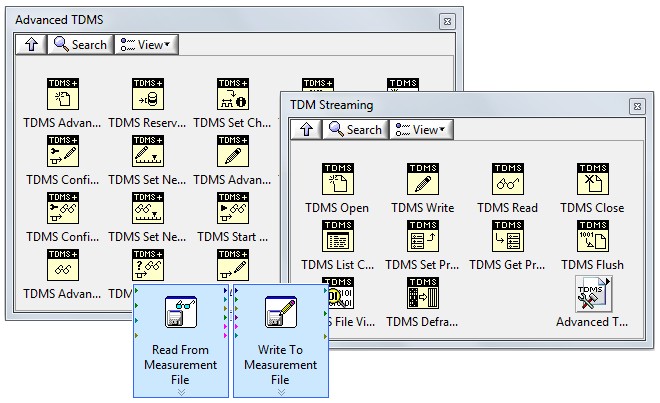
Figure 2. You can choose from several interfaces in LabVIEW to read and write TDMS files.
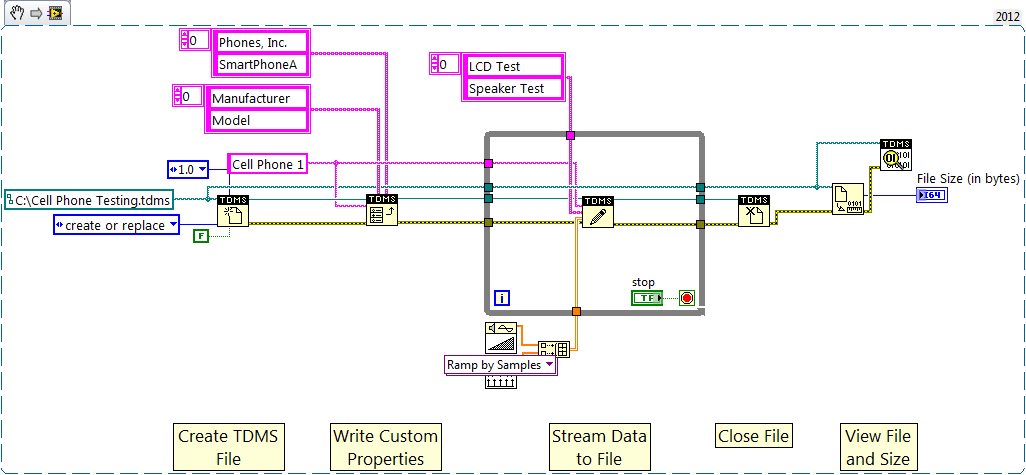
Figure 3. The TDM Streaming palette offers the most flexible and efficient approach to reading and writing TDMS files using LabVIEW.
For a detailed overview of reading and writing TDMS files with LabVIEW, see Introduction to LabVIEW TDM Streaming VIs.
LabWindows™/CVI
You can access TDMS files in NI LabWindows™/CVI software using one of two libraries. The first – the LabWindows/CVI TDM Streaming Library – is by far the faster and more universal approach. With this API, you can interface with TDMS files in real-time applications using the LabWindows/CVI Real-Time Module. The TDM Streaming Library was introduced in LabWindows/CVI 8.1.
The alternative interface to TDMS files from LabWindows/CVI is the DIAdem Connectivity Library, which uses NI DIAdem software as an intermediate mechanism for writing or reading TDMS files.
Note: Support for the DIAdem Connectivity Library was removed in LabWindows/CVI 2017. NI recommends that you use the TDM Streaming Library for existing projects and the TDM C DLL (attached) for new projects.
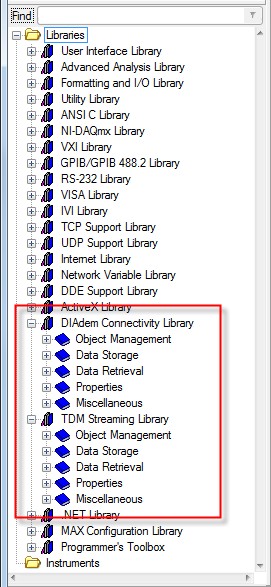
Figure 5. LabWindows/CVI offers two interfaces to TDMS files, but the TDM Streaming Library is by far the more efficient and flexible of the two.
.NET Languages Using Measurement Studio
The NI Measurement Studio TDM Streaming .NET Class Library – introduced in Measurement Studio 8.6 – provides a fast and flexible way to interface directly with TDMS files using .NET languages. Note: Access to the TDM Streaming .NET Class Library is restricted to the Professional and Enterprise editions of Measurement Studio.
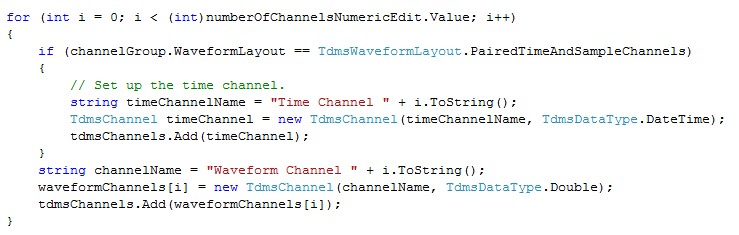
Figure 6. Measurement Studio includes a built-in TDM Streaming .NET Class Library.
NI DIAdem
NI DIAdem software is a flexible data post-processing, visualization, and reporting environment that is easily expandable to work with any custom file format through the use of DataPlugins. DIAdem is specifically designed to read and write TDMS files out of the box; however, any data loaded into the Data Portal – a visual representation of internal DIAdem memory – is inherently mapped onto the TDMS model. Using DIAdem – a client to the NI DataFinder and the third facet of the NI TDM solution – you can search the NI DataFinder index to locate the data you are looking for as easily as you locate information on the Internet using search engines like Google.
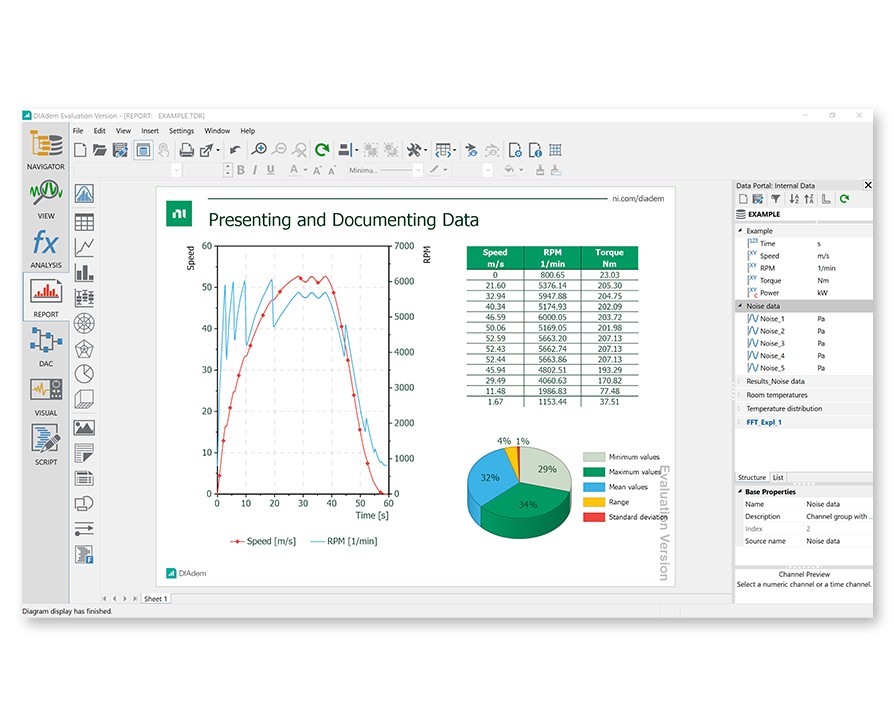
Figure 7. You can configure DIAdem to map any custom file format onto the TDMS model to capitalize on the strengths that it offers.
To learn more about DIAdem for interactive visualization, analysis, and reporting, see ni.com/diadem.
NI VeriStand
NI VeriStand is a configuration based software environment for real-time testing that enables you to log measurements to TDMS files in multiple ways. You can use the built–in stimulus profile editor tool to create automated test scripts for generating real-time stimulus to a device under test while logging system parameters to file. You can also configure measurements and log data directly from the user interface using the workspace data-logging object introduced in NI VeriStand 2013. NI VeriStand 2013 also adds direct DIAdem integration so that you can automate both post processing and report generation. This ensures that your data files are processing and presented the same every time you run a test, which allows you to make decisions faster and improve product quality.
Watch this video overview to learn how to create and manage real-time test data with VeriStand and DIAdem.
Writing and Reading TDMS Files with Third-Party Programming Software
Users can read and write TDMS files using third-party applications.
OpenOffice.org Calc
With the free add-in for OpenOffice.org Calc, you can load and process TDMS files including descriptive information in OpenOffice.org Calc. Just download the add-in, install it, and use the OpenOffice.org Calc functions with an additional menu to load TDMS files and to configure the add-in.
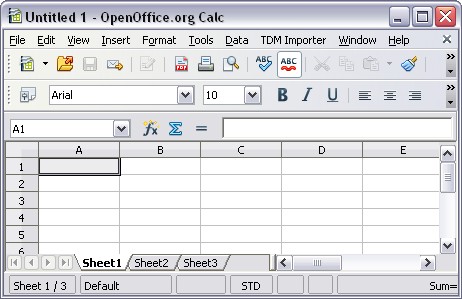
Figure 8. The free add-in for OpenOffice.org installs a new menu item into OpenOffice.org Calc for importing TDMS files.
To learn more or download the free add-in, see TDM Add-In Tool for OpenOffice.org Calc User Guide.
The MathWorks, Inc. MATLAB® Software
NI has developed an example demonstrating how to read TDM and TDMS files from within the MATLAB® from The MathWorks software environment.
Distributing and Exchanging TDMS Files with Colleagues Using Microsoft Excel
Though all NI development environments can write and read TDMS files, it is occasionally beneficial to share data files with colleagues or managers who do not have NI software installed. As a result, NI provides the TDM Excel Add-In as a free add-in for a common software environment – Microsoft Excel – so that many engineers can access these TDMS files. This add-in is installed with NI software and also available as a stand-alone download for users looking to view data who do not have NI software on their machine. Though Microsoft Excel is not an ideal tool for postprocessing measurement data, it is a feasible environment for quickly viewing small data files. This free add-in is accessible from within the Excel environment.
All NI software installs a brand new technology for interfacing with TDMS files directly from within Windows Explorer. This new Excel Importer utility appears in the “Open With” section of the Windows Explorer right-click context menu and enables colleagues without access to NI software to associate Microsoft Excel as the default program for viewing TDMS files. Once the file extension has been associated with the Excel Importer (an automatic process if DIAdem is not present on the machine), colleagues can simply double-click on a TDMS file to open it with Excel.
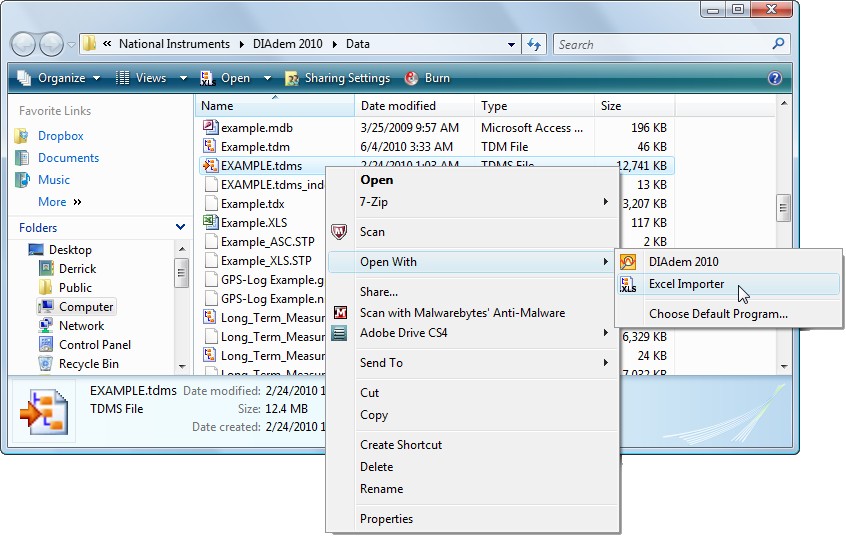
Figure 9. Using a free add-in, you can double-click TDMS files in Windows Explorer and open them in Microsoft Excel – even with no NI software installed.
Mapping Existing Data Files to the TDMS Data File Format
Sometimes it is impossible to use the TDMS file format. For example, occasionally customer or supplier requirements dictate that you must use a particular file format for data storage. Certain traditional instruments automatically provide data output files using a custom format. Furthermore, legacy measurement data that has already been collected in a particular fashion cannot be recollected simply to store it in the TDMS file format.
For this purpose, NI has created a technology that you can use to provide a description of how to map any arbitrary custom file format onto the TDMS model. You can create this technology – called DataPlugins – using a DIAdem wizard or program it using VBScript, C++, or LabVIEW. Once you have described how to interpret your custom file format using the TDMS model, the NI DataFinder can identify and index descriptive information, enabling searchability from an NI DataFinder client like the LabVIEW DataFinder Connectivity VIs or DIAdem.
NI offers hundreds of free DataPlugins for you to download. To download a DataPlugin for the most common file formats to use the TDMS model, or to request a DataPlugin be written for free for your custom file format, see ni.com/dataplugins.
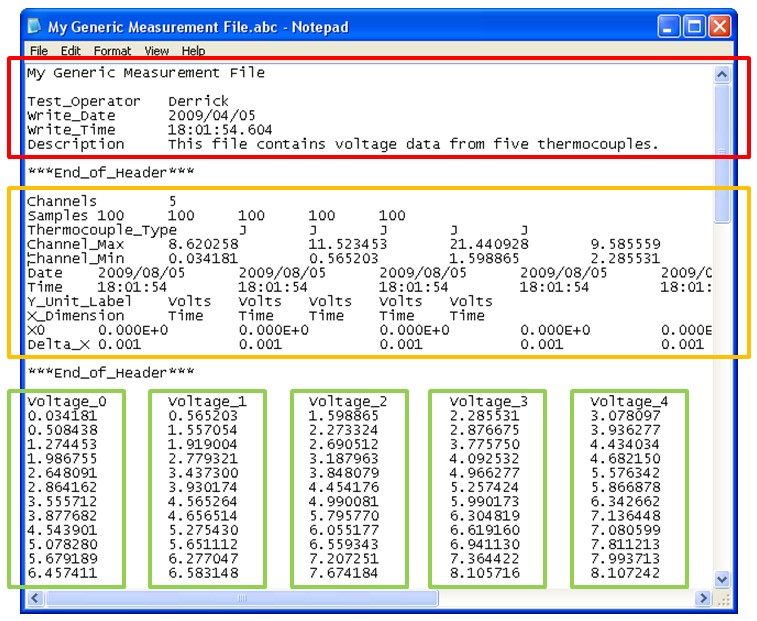
Figure 10. With DataPlugins, you can describe the location of File, Channel Group, and Channel information within any custom file format – like the one in this image – for use with the TDMS model.
The Fastest Way to Stream Measurement Data to Disk
With NI-DAQmx 9.0 and later, you can log data to TDMS files from directly within the DAQmx API. By configuring logging via the DAQmx Configure Logging VI, you can easily integrate TDMS logging into existing applications. Furthermore, this method of streaming data to disk helps you truly push the boundaries of high-speed measurement data streaming by optimizing several memory operations and bypassing Windows, LabVIEW, and TDMS buffers for maximum efficiency. Tests with the DAQmx Configure Logging VI have realized data streaming rates of more than 1.2 GB/s. To learn more about how to integrate TDMS logging within your NI-DAQmx application, see NI-DAQmx High-Speed Streaming to Disk.
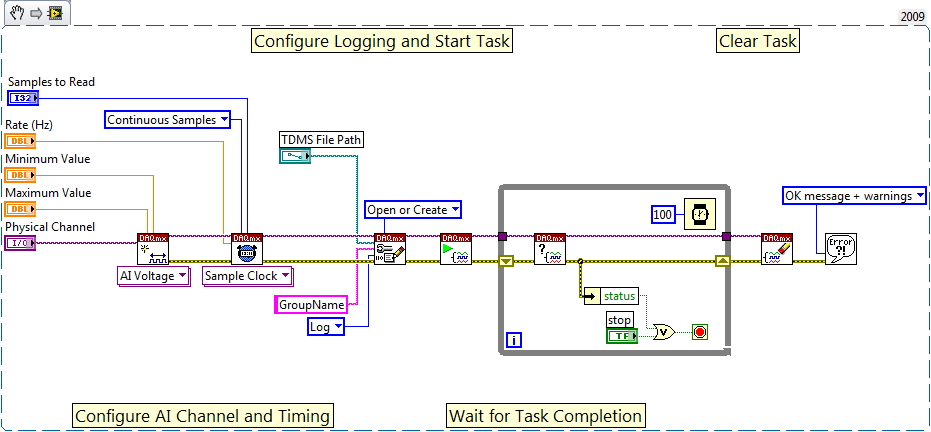
Figure 11. Using the NI-DAQmx Configure Logging VI, you can stream data to disk via the TDMS file format with one small extra step.
Focus on the Data, Not the Format
NI developed the TDMS file format to help engineers and scientists properly store the large amounts of data they generate during simulation and test. With an easy-to-use interface for storing well-organized and documented files, you can focus your efforts on more pressing areas of your applications and let the data storage aspect of your application interface scale naturally with your application.
Take the Next Steps Today
- Learn How to Write Data Management Ready TDMS Files
- Understand the Internal Structure of the TDMS File Format
- Learn More about the Key Technologies of the NI Technical Data Management Solution
- Download and Evaluate NI DIAdem for Free
MATLAB® is a registered trademark of The MathWorks, Inc.
The mark LabWindows is used under a license from Microsoft Corporation. Windows is a registered trademark of Microsoft Corporation in the United States and other countries.
Requirements
Software
Language(s): VB Script