TestStand Process Model Development and Customization
Overview
Process model development and customization is a powerful feature in NI TestStand, allowing you to generalize concepts in multiple test sequences and promote code reuse to reduce development and maintenance time.
This document outlines best practices for customizing the process model. This document is most useful to those who have a working knowledge of basic process model development. To become familiar with these concepts, refer to the Process Model Theory document for an overview of how TestStand uses process models.
Contents
- Role of Process Models in a Test System
- Process Model Components
- Customizing the Process Model
- Modifying Existing Model Behavior
- Modifying Process Model Data Structures
- Defining Custom Behavior for a Specific Test Station
- Upgrading Customized Process Models to Later Versions of TestStand
- View Additional Sections of the TestStand Advanced Architecture Series
Role of Process Models in a Test System
Creating a full featured test for a product requires more than just executing a set of test cases. Usually, the test system must perform a series of operations before, during, and after it executes the sequence that performs the tests. Common operations that define the testing process include identifying the UUT, notifying the operator of pass/fail status, logging results, and generating a test report. The set of such operations and their flow of execution is called a process model. In TestStand, the process model layer is implemented in sequence files, and is distinct from the TestStand engine. This modularity allows you to customize the process models without affecting the test executive itself.
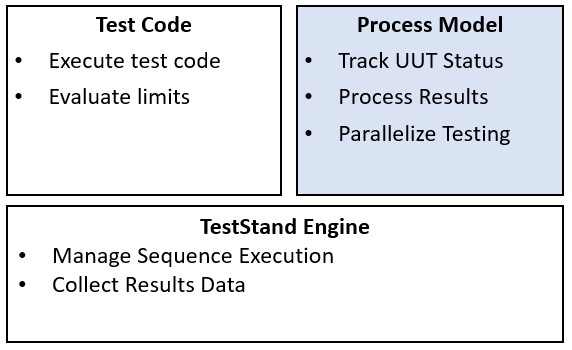
Process models provide an additional layer, separate from both the test executive and test code, to implement common testing functionality
Process models set TestStand apart from most home-grown test executives. Typically, these applications do not have the concept of a process model, and either the test sequence or the test executive itself provides the mechanism for common testing tasks. Neither of these approaches are ideal:
- If the test code is responsible for these common operations, each new test set created will need to repeat this code.
- If common operations are implemented directly in the test executive, making changes to the common test operations requires updates to the entire test executive.
Using a process model to perform common tasks allows for increased modularity and reusability because you can make modifications to common operations in only one location, while still keeping them separate from the underlying test executive.
The TestStand process models are further modularized through the plug-in architecture. The process models call plug-in sequence files to implement result processing, such as report generation and database logging. You can modify these plug-ins or create your own to extend the functionality of the process model without modifying the process models themselves.
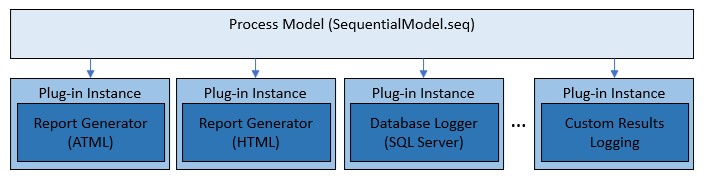
The process model calls into plug-ins to perform result processing, including report generation and database logging. You can also create custom plug-ins to implement custom logging mechanisms
You can use the TestStand process models to create an extremely powerful and flexible test application. The modular implementation of the process model minimizes the amount of code changes you need to make when updating framework functionality. Using the TestStand process model architecture to develop a complete test system can save time as well as development and maintenance costs.
Process Model Components
In TestStand, process models are implemented as sequence files with the process model option enabled, which allows them to contain additional types of model specific sequences. The sequence file type is configured in the Advanced tab of the Sequence File Properties. These sequence types each have specific behavior:
- Execution Entry Points allow users to execute tests using a desired process model sequence.
- Configuration Entry Points provide a user interface for users to configure process model settings, and store those setting.
- Model Callbacks allow the Test Sequence file to override process model behavior.
Use the Model tab of the Sequence Properties dialog box to configure the types of sequences a process model file can contain.
Execution Entry Point Sequences
Execution entry points provide a way for users to execute their test code via the process model. The default TestStand process model provides two Execution entry points, Test UUTs and Single Pass. Each of these entry points are implemented in a sequence in the process model sequence file. In the sequence editor, the Execute menu lists execution entry points when the active window contains a sequence file that uses the process model.
The Sequential process model uses the Single Pass and Test UUTs Execution entry points. Both Execution entry points call the MainSequence sequence of the client sequence file to execute tests for one UUT at a time. The entry points also share other actions, such as generating test reports and storing data results in a database.
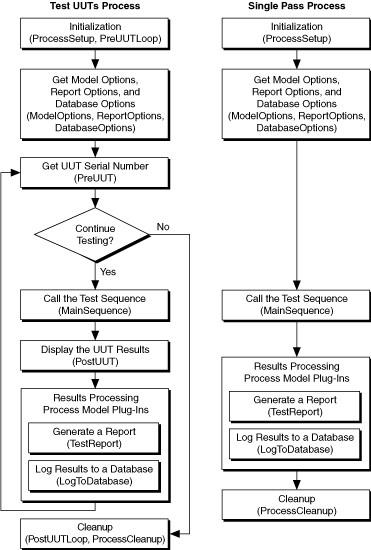
Single Pass and Test UUT Execution Entry Point Flow in Sequential Process Model
The entry point name expression is the name that appears in the Sequence Editor or in a user interface while using the entry point. Use the Entry Point Name Expression text box on the Model tab of the Sequence Properties dialog box to edit this value. The Entry Point Name Expression text box is visible only when the sequence you select is an Execution entry point. A default value, such as ResStr("MODEL", "TEST_UUTS"), uses the ResStr function, which features TestStand localization. Replace the value with another localized value or use a constant string expression that describes the entry point from the point of view of a user.
Using localization strings instead of a constant has the benefit of allowing you to make changes to the string value without the need for modifying the process model itself. For more information on using TestStand resource strings for localization, refer to the Localizing TestStand to Different Languages Tutorial.
Configuration Entry Points
Configuration entry points provide a way for users to configure the settings for the process model. The default models contain the Model Options and Result Processing entry points. Similar to execution entry points, configuration entry points are implemented in a sequence in the process model file and are listed in the Configure menu in the sequence editor. To save settings, the model entry points write data to configuration files in the TestStand configuration directory.
Model Callbacks
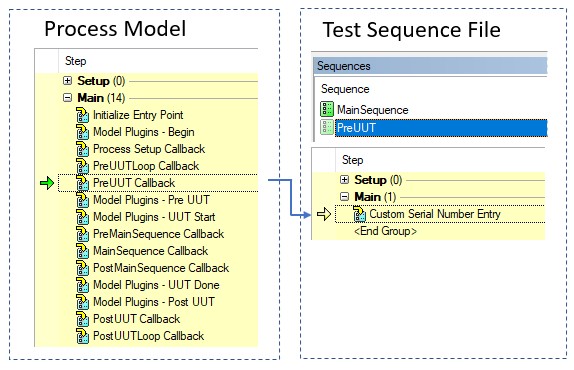
Model callbacks allow test developers to customize certain aspects of the process model for their particular test, without making changes to the process model itself. The process model defines callback sequences that the entry points call at various points in execution. For example, the Test UUTs entry point calls the PreUUT callback sequence before beginning the test to prompt the user for a serial number. If a test developer requires a specific change to this functionality, they can override the callback in their test sequence file. In this case, when the model calls the PreUUT sequence, the sequence in the test sequence file is called instead of the PreUUT sequence in the process model file.
For a detailed description of process model callbacks, refer to the Using Callbacks in NI TestStand document.
The test sequence file can override callback sequences in the process model to define custom behavior
Process Model Plug-Ins
The default process models use a plug-in architecture to implement result processing, including report generation and database logging. Each plug-in is implemented in a separate sequence file which contains plug-in entry point sequences which are called at various points in the main process model entry points. The process models also provide a plug-in configuration dialog that allows test developers to configure which plug-ins are active and configure plug-in settings.
For more information on the TestStand process model plug-in architecture, refer to the Process Model Plug-in Architecture help topic.
Additional Engine Callbacks
Process Model sequence files provide additional engine callbacks that are not available in standard sequence files. These callbacks, which have the prefix “ProcessModel”, execute only for steps in the current client sequence file of the process model where you define them. For example, the ProcessModelPostStep callback executes after each step that executes in the Test Sequence but does not execute after steps in the process model itself.
A common application for these callbacks is custom error handling. Typically, test developers want to extract as much information as possible from errors and want control over system behavior when errors occur. In other use cases, subcontracted, fully automatic environments typically require start/stop inputs and red/green light outputs with appropriate debug logging to trace previous system and test error activity.
You can use the ProcessModelPostStepFailure and the ProcessModelPostStepRuntimeError Engine callbacks defined at the process model level to generically handle errors from all client sequence files without requiring extra effort from the test sequence programmer. These callbacks execute if an error occurs in the client sequence file.
Customizing the Process Model
In many cases, you may need to extend or modify the functionality of the process models that ship with TestStand. Common changes to the process models include modifications to reports, test retry strategies, error handling and logging, station calibration routines, and UUT selection mechanisms.
Adding New Functionality using Process Model Plug-Ins
The default process models use plug-ins to implement result processing functionality, including report generation and database logging. However, plug-ins are not limited to only result processing. If you need to add functionality to the process model, you can create a plug-in to implement this functionality without modifying the process models themselves. This approach has many advantages:
- You can easily integrate your plug-ins with the sequential, batch, and parallel models, instead of implementing changes to each.
- You will not need to maintain and deploy a customized process model.
- You can integrate customizations with future changes to the process models.
- Plug-ins can be shared without the need for integrating process model code changes.
By default, users must create instances of plug-ins for the model to execute them. This opt-in approach is desirable if the new functionality you are adding is only required in certain cases. If the functionality should always execute, similar to code in the process model itself, you can use a process model plug-in addon. Model Plug-in addons are implemented in the same way as standard plug-ins, but are saved in the addons subfolder in the plugins directory. They do not appear in the plug-in configuration dialog, and they are always executed.
Creating New Plug-Ins
You can develop custom plug-ins to extend the model in many ways in addition to custom result processing. Test station calibration is one example of functionality you could add to the process models through a custom plug-in. You might need to confirm station calibration validity before executing test sequence files on a test station. These routines typically check that test equipment is calibrated based on an expiration date. Expiration of calibration triggers an error condition, warns the operator, and prevents the test from executing.
By implementing the functionality in a custom model plug-in, you can allow users to disable the calibration if necessary, and provide a configuration interface for test developers through the result processing dialog. Refer to the creating process model plug-ins topic for implementation information.
Modifying Existing Model Behavior
To change behavior that is implemented directly in the process model, such as UUT serial number tracking, making changes directly to the model is necessary. Use a copy of the process model as a starting point for developing new process models or customizing existing process models so you can reuse large amounts of fined-tuned logic already implemented in the default process model.
Before modifying the process models, create a copy of the entire models directory, located in <TestStand>/Components/Models, to the corresponding location in the TestStand public directory, <TestStand Public>/Components/Models. Only make changes to the files in the TestStand public location.
Modifying Model Entry Points
In many cases, you may want to customize the execution flow of the execution entry point. For example, you might want the test system to automatically retry a test on a UUT when certain types of failures occur or limiting the number of retries per operator before requiring supervisor intervention to determine the need for further retesting. For these types of changes, you will need to directly modify the entry point sequence to add looping and other conditions. When making changes to entry points, ensure that you document the changes you make to make it easier to differentiate the default behavior from the customizations.
Allowing Test Developers to Customize Model Behavior
When customizing the process models, it is important to consider whether specific test may require modifying or disabling the behavior you are defining. In cases where the test developer may need to make changes, use an existing or new callback sequence to implement the changes. The test developer can then override the callback if they need to change the behavior you define.
New functionality should always be implemented in a separate sequence, which you call from the entry points which should implement it. You can implement a sequence in the process model in the following ways based on the level of customization you want to provide for test developers:
- You want to provide a way for test developers to extend the model at a certain point in execution: Implement a placeholder with no default functionality so the client sequence file can insert functionality if necessary. You can optionally pass parameters to the callback when you call it from the entry point to provide relevant data to the test developer. For example, ModifyReportHeader does not provide a default implementation, but parameters that contain report-related data are passed to the callback to allow test developers to access and modify the report.
- You want to define functionality that can be customized or disabled by test developers: Implement default behavior so the client callback can invoke the model callback to run the process model default implementation and the client callback can implement additional functionality. By default, PostUUT implements banners to display the result of the test sequence. A client sequence file can implement custom PostUUT behaviors and keep the banner by overriding the callback and still calling the process model implementation. You can use the Copy Step and Locals when Creating an Overriding Sequence option in the Sequence Properties to specify that the content of the sequence should be copied when a test developer overrides the callback.
- You want to prevent test developers from customizing the functionality at all: If you are defining functionality that should never be modified by test developers, use a normal sequence rather than a callback, which cannot be overridden in client sequence files.
Customizing Existing Model Plug-in Behavior
It is common for framework developers to customize report generation behavior to address specific requirements for their test system. Report customization is covered in detail in the Best Practices for NI TestStand Report Generation and Customization document of the Advanced Architecture Series. This document provides more information on how to implement customizations to report generation within the TestStand model architecture.
Modifying Process Model Data Structures
The default process models define data types to store information about the current UUT, station, and model options. In some cases, you may need to store additional data in these properties, most typically the UUT data. For example, the default TestStand UUT selection mechanism tracks only a serial number, but you may need to maintain the model number as well.
NI recommends that you do not make changes to the model data types when possible, since they are referenced in many TestStand files, and updates can be difficult to maintain. However, the process models provide an unstructured property in the UUT and NI_StationInfo data types which allows you to easily add additional UUT tracking information without the need for modifying the UUT data type. You can create a new ModelNumber property in the UUT.AdditionalData container to store this information. The Adding Custom Data to a Report example which ships with TestStand shows how you can use this property to add fields to this property and include them in the test report. The example implements the updates in the client sequence file using a callback, but you can use the same approach in the process model directly.
Defining Custom Behavior for a Specific Test Station
You can also override a callback in the process model sequence file by creating a sequence with the same name but different functionality in StationCallbacks.seq in the <TestStand Public>\Components\Callbacks\Station directory. TestStand calls model callbacks in StationCallbacks.seq instead of calling the similarly named callback defined in any model. A callback in a client file overrides the similarly named callback in the model and the StationCallbacks.seq file.
Upgrading Customized Process Models to Later Versions of TestStand
When you upgrade to a newer version of TestStand, you will need to merge any changes you made to the default process models with changes made by NI in the new version. To accomplish this, first check the differences between the former and new default process models using the TestStand differ tool, located in Edit » Diff Sequence File Against in the sequence editor. If all the modifications are centralized in new sequences in the process model files, or implemented separately in plug-ins, it will be a relatively straightforward task to import process model customizations into the newer version of the process model.
If you are migrating models you created in TestStand versions earlier than 2012, significant changes to the new models exist in order to implement the plug-in architecture. Refer to the Migrating Process Model Customizations to TestStand 2012 or Later for details on migrating your process models in this case.