Software Configuration Management and LabVIEW
Overview
Contents
- The Goals of Configuration Management
- Source Code Control Overview
- Source Code Control Integration with LabVIEW
- Graphical Diff and Merge Utilities
- Managing Reuse Libraries
- Capability Maturity Model Integration with LabVIEW
- Frequently Asked Questions (FAQ)
The Goals of Configuration Management
Many developers have experienced the frustration of unmanaged environments, where people overwrite each other’s changes or are unable to track revisions. Managing a large number of files or multiple developers is a challenge in any environment; as a result, large development projects rely upon configuration management tools to satisfy the following goals:
- Provide access to a centralized repository of code
- Manage and track multiple versions of the same applications
- Manage multiple developers
- Identify when changes are made and their impact
- Detect and resolve conflicting changes
- Distribute and deploy the latest versions of code
- Back up and preserve access to older versions of code
- Manage and distribute reuse libraries
The selection of tools and practices largely depends on the importance of the above goals for a particular project or team and the extent to which they have to be met. Effective configuration management begins with a well-organized application hierarchy. For more information on the organization of files and folders in a LabVIEW application, visit Best Practices for Managing NI LabVIEW Applications Using the Project Explorer.
It's important to realize that even simple applications with a small development team can benefit from more sophisticated tools for file management and revision control. For this reason, source code control is almost always recommended for any and all development projects.
Source Code Control Overview
Source code control is important for any project, regardless of complexity or team size. A variety of source code control tools are available from various vendors, and they can all be used to track, store and manage LabVIEW files. Available tools range from free and easy-to-use solutions, like Subversion, to enterprise-level lifecycle management solutions, like Perforce and Microsoft Team Foundation Server.
Integration between LabVIEW and source code control can be achieved through a variety of approaches. Despite the binary file-format of a VI, the same practices that are applied with other environments can and should be applied to VIs and other LabVIEW file-types. However, this may require some custom configuration of your source code control client.
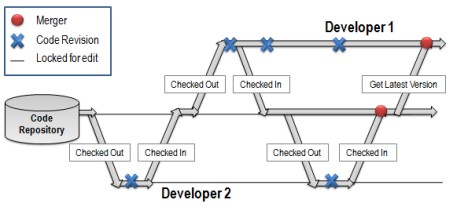
Figure 1 illustrates a check in / checkout model for source code control
Figure 1 is an illustration of how source code control improves the development process for team-based projects. Instead of just copying code, developers now use source code control to check it out. This is a developer’s a way of notifying the SCC provider that they have the intent to modify the source code. This makes it easier for other developers to see when files have been updated, and easily retrieve the latest version from the repository.
The behavior and limitations of the SCC interface are setup at the discretion of an administrator. Some may choose, for example, to lock the code when someone has indicated they choose to modify. Others may allow multiple users to have it checked out simultaneously. If it becomes necessary to combine changes made by developers to the same piece of code, SCC can help with merging by allowing the two copies of the file to exist in the repository. Automated merge tools can also be used to help resolve these types of conflicts for VIs.
Source Code Control Integration with LabVIEW
The LabVIEW Professional Development System is a Microsoft SCC enabled environment, which allows integration with a majority of source code control tools through a standard API.
Of the many third-party source code control providers used with LabVIEW, Perforce and Subversion are popular choices.
Perforce, which supports the Microsoft API, can also be integrated from within LabVIEW using a custom command-line provider that is included with the professional version of LabVIEW. Integrating Perforce from within LabVIEW offers several advantages over the standard API as it enables the use of more advanced functionality.
Subversion, a popular open-source solution, does not support the standard Microsoft SCC API. However, it can be setup through the Tortoise client to call into the LabVIEW environment in order to invoke graphical diff and merge utilities, which requires some basic configuration. Additionally, a variety of third-party products are also available to help with this integration, including:
Fundamentally, there are two approaches for the integration of LabVIEW and a source code control tool: either LabVIEW can be used to call the SCC functionality from within the environment, or the SCC tool can call into LabVIEW for the sake of operations like Diff and Merge.
Configuring LabVIEW to Call the Microsoft SCC API
Once your source control provider of choice has been installed you can configure LabVIEW to allow developers to use source code control functionality from within the development environment, if it supports the Microsoft API. The goal of providing this integration is that developers can perform common tasks such as checking in and out of files and view the current status of files without launching a separate client or leaving the LabVIEW development environment.
Some source code control providers may offer proprietary or advanced functionality that developers still need to go into the client to use; however, a majority of the time, they should be able to perform these operations from within LabVIEW.
Integration can be configured through the Tools > Source Control menu. This functionality is only available in the LabVIEW Professional Development System. Any source control provider installed on your computer and supported by LabVIEW will automatically populate the options dialog.
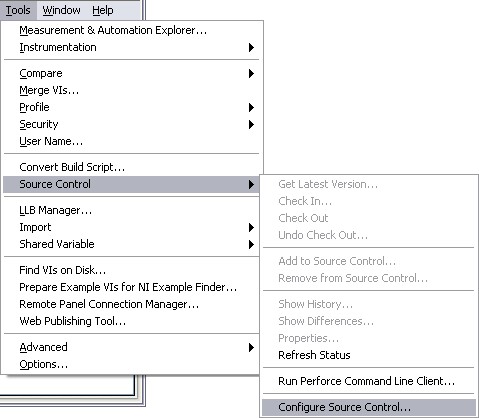
Figure 2 illustrates where users can enable source code control integration from within LabVIEW.
Source code control can be used to manage any resource in your Project Explorer that has a corresponding file on the hard-drive. This includes VIs, documentation, images and the Project file. Requirements documents are frequently stored in source code control so that developers can track changes to documentation and view the history of revisions. This can be especially important for certified development practices, which often require developers to demonstrate that changes to requirements were covered by code. Learn more about requirements management best practices.
If source code control is configured in an existing LabVIEW Project, the addition of any previously saved VI to the Project will prompt the user to add the new file to source code control. This prompt will only be displayed on existing files. New VIs do not have a corresponding file on disk until they are saved; therefore, they cannot be added to source code control. Adding files to a Project during development introduces new links and results in modifications to the Project file, which must be carefully managed and is discussed in greater detail in the next section.
Managing the Project File in Source Code Control
It is recommended that an application's Project file, or *.lvproj file, be stored in the source code control repository. This file contains links to physical resources in the Project Explorer using relative paths to the location of files, the settings specific to a particular project, and virtual items such as the build specifications. It is important that all developers have the most recent version of the *.lvproj file in order to ensure they have all the latest dependencies and resources.
Adding or renaming files in a Project will alter the contents of the *.lvproj file, which requires checking it out and submitting a new revision to the SCC provider. Since these changes affect all developers using the *.lvproj file, it is inadvisable to make any modifications during development. If changes must be made, they should only be made by one user at a time, and all other developers should get the latest revision of this file as soon as changes are complete. However, there are alternatives when this is not possible.
Ideally, the framework for the application is determined before development, and placeholders already exist for all future code and functionality. However, changes are sometimes required that force modifications to the framework and therefore to the contents of the *.lvproj file. These modifications can potentially affect linkages throughout the application and should not be taken lightly. The recommended practice is to make these modifications offline and outside of development - all files should be checked in to the depot and locked to prevent checking out. It is also important to ensure that new code is covered by requirements documents and that they describe why the files are being added.
Alternatively, many developers may opt to have their own copy of the .lvproj file. This is generally only recommended when the application can be compartmentalized into separate, self-contained sections. Project Libraries (.lvlib) may also be used to organize an application into discrete components.
Graphical Diff and Merge Utilities
The binary nature of the source code of VIs require that specific comparison and merge utilities be used. These utilities can be invoked from within the development environment, or they can be called from the command-line, which means that they can be called automatically from source code control utilities.
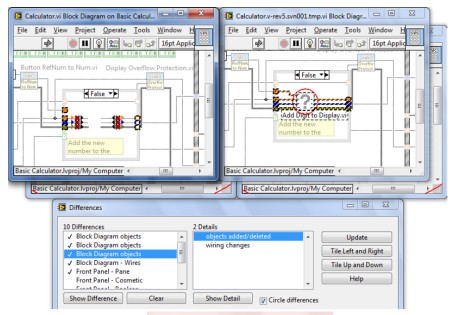
Figure 3 shows the graphical differencing tool, which allows developers to navigate between all the changes that have been made between any two-copies of a file.
When integration within the environment is active, 'Show Differences' can be selected from the-right click menu in the Project Explorer. However, many may prefer to invoke this capability from within the source code control client.
More Information
Configuring Source Control for Command-Line Integration with LVCompare.exe
Configuring Source Control for Command-Line Integration with LVMerge.exe
Managing Reuse Libraries
The reuse of code across multiple projects and in different versions of an application benefits from practices that can manage the independent development cadences of the reuse libraries and the applications they are being deployed in. It is beneficial to be able to de-couple these libraries from the projects they are used in, such that they can easily be managed and developed independently. It may also be important to ensure that these libraries can be upgraded or downgraded as necessary when maintaining multiple versions of an application. This is especially important when changes to these libraries have to be deployed to multiple copies of an application.
LabVIEW Project Libraries
LabVIEW Project Libraries make it possible to encapsulate large sections of an application. A Project Library file (.lvlib) contains references to a set of files and thereby provides name-spacing and can define access scope. Name-spacing qualifies the name of files using the name of the Project Library, which prevents collisions that occur as a result of calling dependencies with the same name (consider multiple instrument drivers that all share a function named initialize.vi). A project library can also be used to prevent direct access to private functions, enforcing the use of the defined API. Project Libraries can be built into a Packed Project Library (.lvlibp), which is a single-file that contains all required dependencies in a non-editable, version-specific format.
Sharing Code with the LabVIEW Project Library
VI Package Manager
The VI Package Manager (VIPM) is the recommended solution for distributing and deploying reuse libraries in LabVIEW. A collection of VIs, tools and/or Project Libraries can be built into a single-file, known as a VI Package, which can then be installed, un-installed and version controlled from within the VI Package Manager environment. Consumers of these packages can easily see which versions of the libraries are installed and available in their installed copies of LabVIEW. The installation process is also streamlined thanks to VIPM's ability to identify the compatibility of packages and whether or not all required dependencies are installed and available on the system.
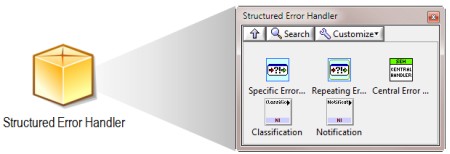
Figure 4 illustrates that a VIPM package can encapsulate dependencies for an API and easily install palette and/or tool menu items.
Professional and Enterprise versions of VIPM are available for advanced configuration management capabilities. LabVIEW Project files can be scanned by VIPM Professional to determine which reuse libraries are currently in use and store this in a configuration file, making it easy to reproduce this configuration. The Enterprise version can be used to create and manage private, internal repositories for distribution and exchange of packages across a large internal network.
Capability Maturity Model Integration with LabVIEW
The Capability Maturity Model, known as CMM or CMMI, prescribes best practices for software development and configuration management. CMM defines a framework for continuous improvement and iteration on development practices, and recognizes and identifies five levels of maturity of these processes. CMMI is primarily used within large organizations as a metric for identifying the rigor of development practices, and to drive down the total development time and the number of defects in a project.
Frequently Asked Questions (FAQ)
1. Why was built-in source code control removed from LabVIEW?
NI provides integration with third party source code control providers in order to allow developer to take advantage of providers that are the industry standard when providing configuration management and change control.
2. Does LabVIEW have any built-in source control tools that don't require 3rd party software?
Unlike previous versions of LabVIEW, LabVIEW 8.x does not include any built-in tools for source control. However, numerous third party options have been tested with LabVIEW 8.x, including some free open source options such as Subversion and CVS.
3. Which version of LabVIEW integrates with third-party source control software?
The LabVIEW Professional Development System (PDS) provides the ability to integrate third-party source control software.
4. Is there a LabVIEW "merge" feature for resolving conflicts between different version of the same VI?
Yes. There is also a graphical differencing feature
5. What source control options do I have if I am using a Linux or Mac OS?
If you are running LabVIEW on either Linux or Mac, you must use Perforce as your source control provider to utilize source control from within the LabVIEW environment. However, it is possible to use LabVIEW with any source control provider by simply accessing the source control functionality through the provider itself.