Overview
The following are the most frequently asked questions about NI USB data acquisition devices.
Table of Contents
- Why should I choose USB for my data acquisition?
- On which operating systems can my data acquisition device run?
- What performance level can USB data acquisition devices offer?
- For which applications are USB DAQ devices most useful?
- How far away from my computer can I place my USB DAQ device?
- Are NI USB data acquisition devices compatible with USB 1.1 or USB 2.0?
- Can USB data acquisition products be used in industrial environments?
- Which certifications are provided with the USB data acquisition devices?
- Is there a way to prevent the USB cable from disconnecting from my laptop?
- Can I use smart TEDS sensors with NI USB data acquisition devices?
- What is the NI ready-to-run data-logging software and how do I use it?
- Which software works with my USB data acquisition device? Which operating systems are supported?
- Do I need to buy a separate terminal block and cable to use my NI USB data acquisition device?
- Do any NI USB data acquisition devices have isolation?
- Additional Ressources
Why should I choose USB for my data acquisition?
- USB data acquisition devices take advantage of the plug-and-play capabilities of USB, making their installation as simple as connecting a USB memory stick to your computer.
- Hi-Speed USB and NI signal streaming enable USB data acquisition devices to have throughput performances similar to that of their plug-in counterparts. Refer to NI Signal Streaming: Sustaining High-Speed Data Streams on USB for more information.
- You can use USB data acquisition with desktops, laptops, and PDAs.
On which operating systems can my data acquisition device run?
National Instruments data acquisition products are compatible with most common operating systems, depending on the device. Visit the NI-DAQmx driver support page for more information.
What performance level can USB data acquisition devices offer?
USB data acquisition technologies, such as NI signal streaming, help users achieve unprecedented performance over USB.
-
National Instruments high-speed USB M Series devices deliver bidirectional streaming at up to 1.25 MS/s for analog input and up to 2.8 MS/s for analog output.
-
NI CompactDAQ delivers a modular platform with up to 256 channels and analog input throughput of over 5 MS/s.
For which applications are USB DAQ devices most useful?
USB data acquisition devices are flexible, general-purpose devices that work well in a variety of applications. Some common applications include the following:
-
Portable or desktop data logging
Recommended National Instruments hardware: NI USB-6221, NI USB-6229, NI USB-6259, NI USB-6251, and NI CompactDAQ -
In-vehicle data acquisition/logging
Recommended National Instruments hardware: NI USB-6259, NI USB-6251, and NI CompactDAQ -
Portable voltage and environmental measurements
Recommended hardware: NI CompactDAQ, NI USB-9211A, NI USB-9215A, NI USB-9211, NI USB-9215, NI USB-9201, and NI USB-9221 -
Industrial digital I/O
Recommended National Instruments hardware: NI-CompactDAQ, NI USB-9421, NI USB-9472, and NI USB-9481 -
Embedded OEM applications
Recommended National Instruments hardware: NI USB-6009 OEM, NI USB-6008 OEM, NI USB-6211 OEM, NI USB-6218 OEM,NI USB-6251 OEM, NI USB-6259 OEM, and NI USB-6501 OEM -
Academic lab experiments
Recommended National Instruments hardware: NI USB-6009, NI USB-6008, NI USB-6501, and NI ELVIS for USB
How far away from my computer can I place my USB DAQ device?
The USB specification limits the distance between your computer and a device or hub to 5 m. By using the maximum of five hubs, you can achieve a distance of up to 30 m. In addition, several companies make solutions that you can use to extend USB beyond its distance limits, in some cases up to 2 km. You can find three such companies linked below.
See Also: Icron Technologies - USB Extension, Network Technologies Inc., Opticis
Note: The NI SCXI-1600, which requires different USB communication due to the two way communication SCXI requires, might not work with all extenders. The NI SCXI-1600 has only been tested with select USB extenders, please contact NI support for further information about options with the NI SCXI 1600.
Are NI USB data acquisition devices compatible with USB 1.1 or USB 2.0?
All NI USB data acquisition devices are compatible with USB 2.0. Three speed classifications exist in USB 2.0: low-speed (1.5 Mb/s transfer rate), full-speed (12 Mb/s), and Hi-Speed (480 Mb/s). NI USB data acquisition devices use both the Hi-Speed and full-speed modes of operation. Full-speed devices compatible with USB 2.0 also work with USB 1.1 hosts without any decrease in transfer rate. However, USB 2.0 devices are limited in speed if used with a USB 1.1 host or a USB 1.1 hub.
See Also: USB Moves into Industrial Applications
Can USB data acquisition products be used in industrial environments?
High data throughput; ease of use; reliable communication; and availability on industrial PCs, laptops, and industrial HMIs have made USB an attractive bus technology for industrial use. Several NI products also provide built-in galvanic isolation to product plant assets, the data acquisition system, the host PC, and the user from hazardous voltages. They also offer panel and DIN-rail mounting options, along with strain relief to prevent accidental disconnection of a USB cable.
See Also: USB Moves into Industrial Applications
Which certifications are provided with the USB data acquisition devices?
NI products comply with the applicable international requirements for product safety, electromagnetic compatibility (EMC), hazardous locations, marine, RoHS, and quality. Refer to the NI product certification Web page for product-specific certification information.
Is there a way to prevent the USB cable from disconnecting from my laptop?
An accessory is available to prevent any accidental disconnection of the USB cable from a laptop. Refer to Strain Relief Accessory.
Can I use smart TEDS sensors with NI USB data acquisition devices?
Combine USB data acquisition and smart TEDS sensors to achieve the ultimate in simple setup: a plug-and-play data acquisition system. National Instruments has worked with more than 20 sensor vendors to create Sensors Plug&Play hardware and software to parse and interpret the data from smart TEDS sensors. There are three ways that you can combine smart TEDS sensors, Sensors Plug&Play hardware and software, and USB DAQ to create a plug-and-play DAQ system:
-
Use the NI USB-6015 DAQ device and cable it to the NI SC-2350 signal conditioning carrier for TEDS sensors. Simply connect your TEDS sensor to the appropriate SCC module inside the SC-2350 and use NI-DAQmx measurement services software to automatically interpret the TEDS data and apply it to your program.
-
Use the NI SCXI-1600 USB data acquisition and control module for SCXI along with the NI SCXI-1520 bridge sensor input module and the NI SCXI-1314T TEDS terminal block. Connect any bridge-based TEDS sensor to the terminal block and use NI-DAQmx measurement services software to interpret and apply the TEDS data.
See Also: Sensors Plug&Play
What is the NI ready-to-run data-logging software and how do I use it?
Windows Users
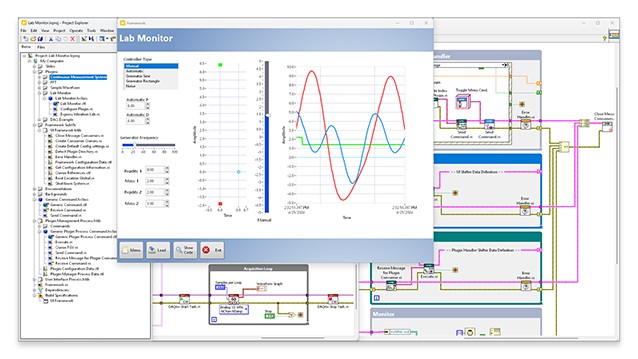
All NI USB data acquisition devices supported by NI-DAQmx also include the NI LabVIEW SignalExpress LE interactive data-logging software, as shown in Figure 1. Please visit the LabVIEW SignalExpress Web page to learn more about the capabilities of this software.
Mac OS/Linux® Users
On Mac OS and Linux OS, the NI USB-9211, USB-9215, USB-6008, and USB-6009 are supported by NI-DAQmx Base driver software. This software includes ready-to-run data-logging software to help you begin taking measurements quickly.
Figure 1. NI LabVIEW SignalExpress
Which software works with my USB data acquisition device? Which operating systems are supported?
Table 1 shows the software and operating systems compatible with NI USB data acquisition devices:
| Hardware Device | Application Programming Interface | Data-Logging Software | Driver Software | Supported Operating Systems |
| USB-6008, USB-6009 USB-6221, USB-6229 USB-6210, USB-6211 USB-6215, USB-6218 USB-6251, USB-6259 USB-9201, USB-9211A USB-9215A, USB-9221 USB-9233, USB-9421 USB-9472, USB-9481 |
LabVIEW 7.x or later, Visual Studio .NET, Visual Basic 6, and C/C++/C#
|
NI LabVIEW SignalExpress
|
NI-DAQmx
|
Windows XP/2000
|
| USB-6008, USB-6009 USB-9211, USB-9215 |
LabVIEW 7.x or later, C
|
Ready-to-run data-logging software
|
NI-DAQmx Base
|
Mac OS X, Linux
|
| USB-6008 USB-6009 |
LabVIEW PDA Module
|
NA
|
NI-DAQmx Base for Pocket PC
|
Pocket PC
|
Do I need to buy a separate terminal block and cable to use my NI USB data acquisition device?
Most NI USB data acquisition devices include built-in signal connectivity for your convenience, including the USB-92xx, USB-600x, USB-621x, USB-622x, USB-625x (screw terminated), and NI CompactDAQ. Table 2 shows connectivity options for devices that do not have direct D-Sub, BNC, or screw-terminal connectivity.
|
Hardware
|
Cable
|
Signal Connectivity
|
||
|
Noise Reducing, Shielded
|
Low-Cost, Ribbon
|
Signals >10 V
|
Signals <10 V
|
|
|
USB-625x (Mass Termination)
|
SH68-68-EP
|
R6868
|
SCC Signal Conditioning
|
SCC-68
|
Do any NI USB data acquisition devices have isolation?
Many NI USB-9xxx DAQ devices have channel-to-ground (bank) isolation:
Withstand................................. 2,300 Vrms, 1 minute max
Continuous................................250 Vrms, Installation Category II
Additional Ressources
Want to learn more about the advanced capabilities of NI USB products?
Download the High-Performance USB E-Kit now.
Related Links:
Products and Services: USB Data Acquisition
High-Performance USB E-Kit
Reader Comments | Submit a comment »
add high-speed reference
However, USB 2.0 devices will be limited
in speed if used with a USB 1.1 host.
s/b
However, USB 2.0 high-speed devices
will be limited in speed if used with a
USB 1.1 host.
- Feb 1, 2007
M Series USB 2 boards
You discuss 3 high speed USB 2 boards but
you never show them.
Are these the upcomming M-series USB 2
boards and if so, when will they be out?
- Feb 17, 2006
The stop button is not the same as the abort button
While the stop button in the program looks
very similar to the abort button in
LabVIEW, it is not the same thing. Its use
is actually built into the data logger
program and follows good LabVIEW
programming guidelines.
- Kristi Hobbs, National Instruments. kristi.hobbs@ni.com - Aug 1, 2005
Use of "Abort" button to stop logging is poor LabVIEW practice.
Instruction 5 for the Ready-to-Run Data Logger says, "Press
[stop sign] to stop logging but not exit the program." In
LabVIEW, the stop sign button is used to Abort Execution,
and it is considered poor practice to employ it to normally
stop a VI. Therefore. the Data Logger ought to be revised to
have a boolean 'STOP' control button to encourage acquistion
of good LabVIEW habits.
- Jul 4, 2005
Legal
This tutorial (this "tutorial") was developed by National Instruments ("NI"). Although technical support of this tutorial may be made available by National Instruments, the content in this tutorial may not be completely tested and verified, and NI does not guarantee its quality in any way or that NI will continue to support this content with each new revision of related products and drivers. THIS TUTORIAL IS PROVIDED "AS IS" WITHOUT WARRANTY OF ANY KIND AND SUBJECT TO CERTAIN RESTRICTIONS AS MORE SPECIFICALLY SET FORTH IN NI.COM'S TERMS OF USE (http://ni.com/legal/termsofuse/unitedstates/us/).