Basic TCP/IP Communication in LabVIEW
Overview
This article is an introduction to the basics of TCP/IP communication. It requires some prerequisite knowledge about LabVIEW. If you are a beginner in LabVIEW, consulting this LabVIEW Tutorial first might help you better understand this article.
Contents
- TCP Communication Protocol
- Developing Communication Applications
- Example of TCP/IP in LabVIEW
- Additional Resources
TCP Communication Protocol
Internet Protocol (IP), User Datagram Protocol (UDP), and Transmission Control Protocol (TCP) are the basic tools for network communication. The name TCP/IP comes from two of the best-known protocols of the internet protocol suite, the Transmission Control Protocol and the Internet Protocol. With TCP/IP you can communicate over single networks or interconnected networks (Internet).
TCP/IP communication provides a simple user interface that conceals the complexities of ensuring reliable network communications. Refer to the Using LabVIEW with TCP/IP and UDP from LabVIEW Help for more information about how TCP/IP communication works.
Use the TCP/IP functions located on the Functions»Data Communication»Protocols»TCP palette for TCP communication in LabVIEW. As with DAQ, instrument, and File I/O communication, the process involves opening the connection, reading and writing the information, and closing the connection.
With most I/O communication, the processor is always the client that initiates a connection to the disk drive server, the external instrument server, or the DAQ board server. With TCP/IP connections, a computer can function either as the client or the server. The following block diagram represents a client application that initiates a connection to a remote server with TCP Open Connection. The server, or daemon, listens for remote connections and responds appropriately.
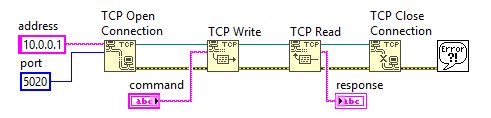
LabVIEW users can develop custom applications for TCP/IP communication. The programmer is responsible for developing both the client and the server.
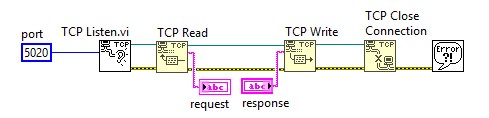
Because anyone can initiate a connection to a server, you might want server access control. The following block diagram shows how the server uses the remote address output value of the TCP Listen VI to determine whether a remote client has permission to access the server.
Developing Communication Applications
Most applications do more than write and read one value. Communication is an ongoing process that involves protocol. For example, suppose a client sends the following four commands by 8-bit integer to the server:
1 = acquire data and confirm
2 = send data
3 = get status
4 = close connection
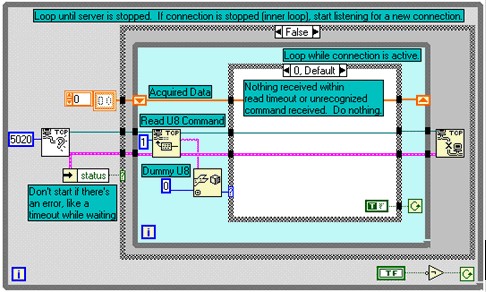
The following image* shows how the server receives these commands. Notice that the same basic TCP functions are included, but surrounding code allows for more complex connections and robust communication.
- A While Loop surrounds the rest of the VI. This allows the VI to handle multiple sequential connections without having to restart after each connection closes. The VI cannot handle multiple simultaneous connections.
- The outer Case structure determines whether a valid connection occurred.
- If a valid connection is not established, nothing happens.
- If a valid connection occurs, the VI enters a While Loop that reads one byte from the TCP/IP port. This byte holds commands 1 through 4 from the client.
- If the connection is valid but no command is received within the read timeout period, the default case of the inner Case structure sends a TRUE value to the continuation terminal of the inner While Loop to keep the connection active.
The following block diagram* shows the other four cases of the inner case statement. Each case handles a specific command that the server can send. Each case sends information to the continuation terminal, which determines whether to continue the loop. In particular, the Quit case always returns a value of FALSE. After leaving the loop, the server closes the connection with the client.
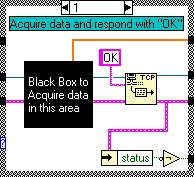
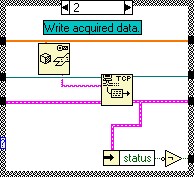
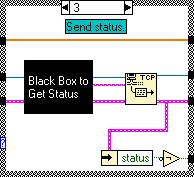
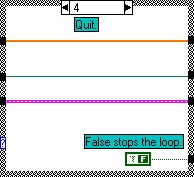
This type of server architecture allows you to develop flexible servers for the more complex network communication procedures. The protocols you develop might be more complex than the preceding example.
* Note that these images are from a previous version of LabVIEW. The colors of data wires and function icons may not match your version. The structure of the code is still applicable.
Example of TCP/IP in LabVIEW
- Refer to the Simple TCP.lvproj in the labview\examples\Data Communication\Protocols\TCP\Simple TCP directory for an example of using the TCP VI and Functions.
- TCP/IP Communication over SSL – NI Community Example
- Simple TCP/IP Protocol Example using LabVIEW – NI Community Example
- Reconnectable TCP Server Connection – NI Community Example
- TCP Remote Control of another VI in LabVIEW – NI Community Example