TDMS File Format Internal Structure
Overview
Contents
Logical Structure
TDMS files organize data in a three-level hierarchy of objects. The top level is comprised of a single object that holds file-specific information like author or title. Each file can contain an unlimited number of groups, and each group can contain an unlimited number of channels. In the following illustration, the file example events.tdm contains two groups, each of which contains two channels.
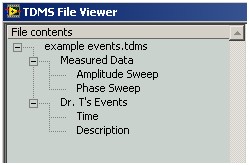
Every TDMS object is uniquely identified by a path. Each path is a string including the name of the object and the name of its owner in the TDMS hierarchy, separated by a forward slash. Each name is enclosed by the quotation marks. Any single quotation mark within an object name is replaced with double quotation marks. The following table illustrates path formatting examples for each type of TDMS object:
| Object Name | Object | Path |
| -- | File | / |
| Measured Data | Group | /'Measured Data' |
| Amplitude Sweep | Channel | /'Measured Data'/'Amplitude Sweep' |
| Dr. T's Events | Group | /'Dr. T''s Events' |
| Time | Channel | /'Dr. T''s Events'/'Time' |
In order for all TDMS client applications to work properly, every TDMS file must contain a file object. A file object must contain a group object for each group name used in a channel path. In addition, a file object can contain an arbitrary number of group objects with no channels.
Every TDMS object can have an unlimited number of properties. Each TDMS property consists of a combination of a name (always a string), a type identifier, and a value. Typical data types for properties include numeric types such as integers or floating-point numbers, time stamps or strings. TDMS properties do not support arrays. If a TDMS file is located within a search area of the NI DataFinder, all properties automatically are available for searching.
Only channel objects in TDMS files can contain raw data arrays. In current TDMS versions, only one-dimensional arrays are supported.
Binary Layout
Every TDMS file contains two types of data: meta data and raw data. Meta data is descriptive data stored in objects or properties. Data arrays attached to channel objects are referred to as raw data. TDMS files contain raw data for multiple channels in one contiguous block. In order to be able to extract raw data from that block, TDMS files use a raw data index, which includes information about the data block composition, including the channel that corresponds to the data, the amount of values the block contains for that channel, and the order in which the data was stored.
TDMS Segment Layout
Data is written to TDMS files in segments. Every time data is appended to a TDMS file, a new segment is created. Refer to the Meta Data and Raw Data sections of this article for exceptions to this rule. A segment consists of the following three parts:
- Lead In—Contains basic information, such as a tag that identifies files as TDMS, a version number, and the length information of the meta data and the raw data.
- Meta Data—Contains names and properties of all objects in the segment. For objects that include raw data (channels), the meta data part also contains index information that is used to locate the raw data for this object in the segment.
- Raw Data—A contiguous block of all raw data associated with any of the objects included in the segment. The raw data part can contain interleaved data values or a series of contiguous data chunks. The raw data part can furthermore contain raw data from DAQmx.
All strings in TDMS files, such as object paths, property names, property values, and raw data values, are encoded in UTF-8 Unicode. All of them, except for raw data values, are preceded by a 32-bit unsigned integer that contains the length of the string in bytes, not including the length value itself. Strings in TDMS files can be null-terminated, but since the length information is stored, the null terminator will be ignored when you read from the file.
Timestamps in TDMS files are stored as a structure of two components:
- (i64) seconds: since the epoch 01/01/1904 00:00:00.00 UTC (using the Gregorian calendar and ignoring leap seconds)
- (u64) positive fractions: (2^-64) of a second
Boolean values are stored as 1 byte each, where 1 represents TRUE and 0 represents FALSE.
Lead In
The lead in contains information used to validate a segment. The lead in also contains information used for random access to a TDMS file. The following example shows the binary footprint of the lead in part of a TDMS file:
| Binary layout (hexadecimal) | Description |
| 54 44 53 6D | "TDSm" tag |
| 0E 00 00 00 | ToC mask 0x1110 (segment contains object list, meta data, raw data) |
| 69 12 00 00 | Version number (4713) |
| E6 00 00 00 00 00 00 00 | Next segment offset (value: 230) |
| DE 00 00 00 00 00 00 00 | Raw data offset (value: 222) |
The lead in part in the previous table contains the following information:
- The lead in starts with a 4-byte tag that identifies a TDMS segment ("TDSm").
- The next four bytes are used as a bit mask in order to indicate what kind of data the segment contains. This bit mask is referred to as ToC (Table of Contents). Any combination of the following flags can be encoded in the ToC:
Flag Description #define kTocMetaData (1L<<1) Segment contains meta data #define kTocRawData (1L<<3) Segment contains raw data #define kTocDAQmxRawData (1L<<7) Segment contains DAQmx raw data #define kTocInterleavedData (1L<<5) Raw data in the segment is interleaved (if flag is not set, data is contiguous) #define kTocBigEndian (1L<<6) All numeric values in the segment, including the lead in, raw data, and meta data, are big-endian formatted (if flag is not set, data is little-endian). ToC is not affected by endianess; it is always little-endian. #define kTocNewObjList (1L<<2) Segment contains new object list (e.g. channels in this segment are not the same channels the previous segment contains) - The next four bytes contain a version number (32-bit unsigned integer), which specifies the oldest TDMS revision a segment complies with. At the time of this writing, the version number is 4713. The only previous version of TDMS has number 4712.
Note: The version number 4713 corresponds to the TDMS file format version 2.0 in LabVIEW. The version number 4712 corresponds to the TDMS file format version 1.0 in LabVIEW.
- The next eight bytes (64-bit unsigned integer) describe the length of the remaining segment (overall length of the segment minus length of the lead in). If further segments are appended to the file, this number can be used to locate the starting point of the following segment. If an application encountered a severe problem while writing to a TDMS file (crash, power outage), all bytes of this integer can be 0xFF. This can only happen to the last segment in a file.
- The last eight bytes (64-bit unsigned integer) describe the overall length of the meta information in the segment. This information is used for random access to the raw data. If the segment contains no meta data at all (properties, index information, object list), this value will be 0.
Meta Data
TDMS meta data consists of a three-level hierarchy of data objects including a file, groups, and channels. Each of these object types can include any number of properties. The meta data section has the following binary layout on disk:
- Number of new objects in this segment (unsigned 32-bit integer).
- Binary representation of each of these objects.
The binary layout of a single TDMS object on disk consists of components in the following order. Depending on the information stored in a particular segment, the object might contain only a subset of these components.
- Object path (string)
- Raw data index
- If this object does not have any raw data assigned to it in this segment, an unsigned 32-bit integer (0xFFFFFFFF) will be stored instead of the index information.
- If this object contains DAQmx raw data in this segment, then the first four bytes of the raw data index is "69 12 00 00" (which means the raw data contains DAQmx Format Changing scaler) or "69 13 00 00" (which means the raw data contains DAQmx Digital Line scaler). Following these first four bytes is information about the DAQmx raw data index. Refer to the bullet item below for mmore information about the DAQmx raw data index.
- If the raw data index of this object in this segment exactly matches the index the same object had in the previous segment, an unsigned 32-bit integer (0x0000000) will be stored instead of the index information.
- If the object contains raw data that does not match the index information assigned to this object in the previous segment, a new index for that raw data will be stored:
- Length of the raw data index (unsigned 32-bit integer)
- Data type (tdsDataType enum, stored as 32-bit integer)
- Array dimension (unsigned 32-bit integer) (In TDMS file format version 2.0, 1 is the only valid value)
- Number of values (unsigned 64-bit integer)
- Total size in bytes (unsigned 64-bit integer) (only stored for variable length data types, e.g. strings)
- If the raw data index is the DAQmx raw data index, the index contains the following information:
- Data type (unsigned 32-bit integer), where "FF FF FF FF" indicates the raw data is DAQmx raw data)
- Array dimension (unsigned 32-bit integer) (In TDMS file format version 2.0, 1 is the only valid value)
- Number of values (unsigned 64-bit integer), also known as "chunk size"
- The vector of Format Changing scalers
- Vector size (unsigned 32-bit integer)
The following applies to the first Format Changing scaler's information. - DAQmx data type (unsigned 32-bit integer)
- Raw buffer index (unsigned 32-bit integer)
- Raw byte offset within the stride (unsigned 32-bit integer)
- Sample format bitmap (unsigned 32-bit integer)
- Scale ID (unsigned 32-bit integer)
(If the vector size is larger than 1, the object contains multiple Format Changing scalers and the information in the previous bullet items can be repeated.)
- Vector size (unsigned 32-bit integer)
- The vector of raw data width
- Vector size (unsigned 32-bit integer)
- Elements in the vector (each is unsigned 32-bit integer)
- Number of properties (unsigned 32-bit integer)
- Properties. For each property, the following information is stored:
- Name (string)
- Data type (tdsDataType)
- Value (numerics stored binary, strings stored as explained above).
The following table shows an example of meta information for a group and a channel. The group contains two properties, one string and one integer. The channel contains a raw data index and no properties.
| Binary footprint (hexadecimal) | Description |
| 02 00 00 00 | Number of objects |
| 08 00 00 00 | Length of the first object path |
| 2F 27 47 72 6F 75 70 27 | Object path (/'Group') |
| FF FF FF FF | Raw data index ("FF FF FF FF" means there is no raw data assigned to the object) |
| 02 00 00 00 | Number of properties for /'Group' |
| 04 00 00 00 | Length of the first property name |
| 70 72 6F 70 | Property name (prop) |
| 20 00 00 00 | Data type of the property value (tdsTypeString) |
| 05 00 00 00 | Length of the property value (only for strings) |
| 76 61 6C 75 65 | Value of the property prop (value) |
| 03 00 00 00 | Length of the second property name |
| 6E 75 6D | Property name (num) |
| 03 00 00 00 | Data type of the property value (tdsTypeI32) |
| 0A 00 00 00 | Value of the property num (10) |
| 13 00 00 00 | Length of the second object path |
| 2F 27 47 72 6F 75 70 27 2F 27 43 68 61 6E 6E 65 6C 31 27 | Path of the second object (/'Group'/'Channel1') |
| 14 00 00 00 | Length of index information |
| 03 00 00 00 | Data type of the raw data assigned to this object |
| 01 00 00 00 | Dimension of the raw data array (must be 1) |
| 02 00 00 00 00 00 00 00 | Number of raw data values |
| 00 00 00 00 | Number of properties for /'Group'/'Channel1' (does not have properties) |
The following table is an example of the DAQmx raw data index.
| Binary footprint (hexadecimal) | Description |
| 03 00 00 00 | Number of objects |
| 23 00 00 00 | Length of the group object path |
| 2F 27 4D 65 61 73 75 72 65 64 20 54 68 72 6F 75 67 68 70 75 74 20 44 61 74 61 20 28 56 6F 6C 74 73 29 27 | Object path (/'Measured Throughput Data (Volts)') |
| FF FF FF FF | Raw data index ("FF FF FF FF" means there is no raw data assigned to the object) |
| 00 00 00 00 | Number of properties for /'Measured Throughput Data (Volts)' |
| 34 00 00 00 | Length of the channel object path |
| 2F 27 4D 65 61 73 75 72 65 64 20 54 68 72 6F 75 67 68 70 75 74 20 44 61 74 61 20 28 56 6F 6C 74 73 29 27 2F 27 50 58 49 31 53 6C 6F 74 30 33 2d 61 69 30 27 69 12 00 00 | /'Measured Throughput Data (Volts)'/'PXI1Slot03-ai0' |
| 69 12 00 00 | DAQmx raw data index and contains Format Changing scaler |
| FF FF FF FF | Data type, DAQmx raw data |
| 01 00 00 00 | Data dimension |
| 00 00 00 00 00 00 00 00 | Number of values, no values in this segment |
| 01 00 00 00 | Size of the vector of Format Changing scalers |
| 05 00 00 00 | DAQmx Data Type of the first Format Changing scaler |
| 00 00 00 00 | Raw buffer index of the first Format Changing scaler |
| 00 00 00 00 | Raw byte offset within the stride |
| 00 00 00 00 | Sample format bitmap |
| 00 00 00 00 | Scale ID |
| 01 00 00 00 | Size of the vector of raw data width |
| 08 00 00 00 | First element in the vector of the raw data width |
| 06 00 00 00 | Number of properties for /'Measured Throughput Data (Volts)'/'PXI1Slot03-ai0' |
| 11 00 00 00 | Length of the first property name |
| 4E 49 5F 53 63 61 6C 69 6E 67 5F 53 74 61 74 75 73 | Property name ("NI_Scaling_Status") |
| 20 00 00 00 | Data type of the property value (tdsTypeString) |
| 08 00 00 00 | Length of the property value (only for strings) |
| 75 6E 73 63 61 6C 65 64 | Value of the property prop ("unscaled") |
| 13 00 00 00 | Length of the second property name |
| 4E 49 5F 4E 75 6D 62 65 72 5F 4F 66 5F 53 63 61 6C 65 73 | Property name ("NI_Number_Of_Scales") |
| 07 00 00 00 | Data type of the property value (tdsTypeU32) |
| 02 00 00 00 | Value of the property (2) |
| 16 00 00 00 | Length of the third property name |
| 4E 49 5F 53 63 61 6C 65 5B 31 5D 5F 53 63 61 6C 65 5F 54 79 70 65 | Property name ("NI_Scale[1]_Scale_Type") |
| 20 00 00 00 | Data type of the property (tdsTypeString) |
| 06 00 00 00 | Length of the property value |
| 4C 69 6E 65 61 72/span> | Property value ("Linear") |
| 18 00 00 00 | Length of the fourth property name |
| 4E 49 5F 53 63 61 6C 65 5B 31 5D 5F 4C 69 6E 65 61 72 5F 53 6C 6F 70 65 | Property name ("NI_Scale[1]_Linear_Slope") |
| 0A 00 00 00 | Data type of the property (tdsTypeDoubleFloat) |
| 04 E9 47 DD CB 17 1D 3E | Property value (1.693433E-9) |
| 1E 00 00 00 | Length of the fifth property name |
| 4E 49 5F 53 63 61 6C 65 5B 31 5D 5F 4C 69 6E 65 61 72 5F 59 5F 49 6E 74 65 72 63 65 70 74 | Property name ("NI_Scale[1]_Linear_Y_Intercept") |
| 0A 00 00 00 | Data type of the property (tdsTypeDoubleFloat) |
| 00 00 00 00 00 00 00 00 | Property value (0) |
| 1F 00 00 00 | Length of the sixth property name |
| 4E 49 5F 53 63 61 6C 65 5B 31 5D 5F 4C 69 6E 65 61 72 5F 59 6E 70 75 74 5F 53 6F 75 72 63 65 | Property name ("NI_Scale[1]_Linear_Input_Source") |
| 07 00 00 00 | Data type of the property (tdsTypeU32) |
| 00 00 00 00 | Property value (0) |
From the previous table, the channel "/'Measured Throughput Data (Volts)'/'PXI1Slot03-ai0" contains two scalers. One scaler is Format Changing, where the information of the Format Changing scaler is stored in the DAQmx raw data index. The other scaler is a Linear scaler, where the information is stored as TDMS properties. The Format Changing scaler is identifiable where the Slope of hte Linear scaler is 1.693433E-9, the Intercept is 0, and the Input Source ID is 0.
Meta information that matches meta information in the previous segments can be omitted in following segments. This is optional, but omitting redundant meta information significantly speeds up reading the file. If you choose to write redundant information, you can later remove it using the TDMS Defragment function in LabVIEW, LabWindows/CVI, MeasurementStudio, etc.
- Writing a new object to the next segment will imply that the segment contains all objects from the previous segment, plus the new objects described here. If the new segment does not contain any channel(s) from the previous segment, or if the order of channels in segment changes, the new segment needs to contain a new list of all objects. Refer to the Optimization section of this article for more information.
- Writing a new property to an object that already exists in the previous segment will add this property to the object.
- Writing a property that already exists on an object will overwrite the previous value of that property.
Note: In TDMS file format version 2.0, specifying a value for the name property of an existing object will rename that object.
The following example shows the binary footprint for the meta data section of a segment directly following the segment described above. The only meta information written to the new segment is the new property value.
| Binary layout (hexadecimal) | Description |
| 01 00 00 00 | Number of new/changed objects |
| 08 00 00 00 | Length of object path |
| 2F 27 47 72 6F 75 70 27 | Object path (/'Group') |
| FF FF FF FF | Raw data index (no raw data assigned to the object) |
| 01 00 00 00 | Number of new/changed properties |
| 03 00 00 00 | Length of property name |
| 6E 75 6D | Property name (num) |
| 03 00 00 00 | Data type of the property value (tdsTypeI32) |
| 07 00 00 00 | New value for property num (7) |
Raw Data
The segment finally contains the raw data associated with each channel. The data arrays for all channels are concatenated in the exact order in which the channels appear in the meta information part of the segment. Numeric data needs to be formatted according to the little-endian/big-endian flag in the lead in. Note that channels cannot change their endian format or data type once they have been written for the first time.
String type channels are preprocessed for fast random access. All strings are concatenated to a contiguous piece of memory. The offset of the first character of each string in this contiguous piece of memory is stored to an array of unsigned 32-bit integers. This array of offset values is stored first, followed by the concatenated string values. This layout allows client applications to access any string value from anywhere in the file by repositioning the file pointer a maximum of three times and without reading any data that is not needed by the client.
If meta information between segments does not change, the lead in and meta information parts can be completely omitted and raw data can just be appended to the end of the file. Each following raw data chunk has the same binary layout, and the number of chunks can be calculated from the lead in and meta information by the following steps:
- Calculate the raw data size of a channel. Each channel has a Data type, Array dimension and Number of values in meta information. Refer to the Meta Data section of this article for details. Each Data type is associated with a type size. You can get the raw data size of the channel by: type size of Data type × Array dimension × Number of values. If Total size in bytes is valid, then the raw data size of the channel is this value.
- Calculate the raw data size of one chunk by accumulating the raw data size of all channels.
- Calculate the raw data size of total chunks by: Next segment offset - Raw data offset. If the value of Next segment offset is -1, the raw data size of total chunks equals the file size minus the absolute beginning position of the raw data.
- Calculate the number of chunks by: Raw data size of total chunks ÷ Raw data size of one chunk.
Raw data can be organized into two types of layout: interleaved and non-interleaved. The ToC bit mask in the segment lead in declares whether or not data in the segment is interleaved. For example: storing 32-bit integer values to channel 1 (1,2,3) and channel 2 (4,5,6) results in the following layouts:
| Data Layout | Binary Footprint (hexadecimal) |
| Non-interleaved | 01 00 00 00 02 00 00 00 03 00 00 00 04 00 00 00 05 00 00 00 06 00 00 00 |
| Interleaved | 01 00 00 00 04 00 00 00 02 00 00 00 05 00 00 00 03 00 00 00 06 00 00 00 |
Data Type Values
The following enum type describes the data type of a property or channel in a TDMS file. For properties, the data type value will be stored in between the name and the binary value. For channels, the data type will be part of the raw data index.
typedef enum {
tdsTypeVoid,
tdsTypeI8,
tdsTypeI16,
tdsTypeI32,
tdsTypeI64,
tdsTypeU8,
tdsTypeU16,
tdsTypeU32,
tdsTypeU64,
tdsTypeSingleFloat,
tdsTypeDoubleFloat,
tdsTypeExtendedFloat,
tdsTypeSingleFloatWithUnit=0x19,
tdsTypeDoubleFloatWithUnit,
tdsTypeExtendedFloatWithUnit,
tdsTypeString=0x20,
tdsTypeBoolean=0x21,
tdsTypeTimeStamp=0x44,
tdsTypeFixedPoint=0x4F,
tdsTypeComplexSingleFloat=0x08000c,
tdsTypeComplexDoubleFloat=0x10000d,
tdsTypeDAQmxRawData=0xFFFFFFFF
} tdsDataType;
Notes:
- Refer to the LabVIEW Timestamp article for more information about using tdsTypeTimeStamp in LabVIEW.
- LabVIEW floating-point types with unit translate into a floating-point channel with a property named unit_string that contains the unit as a string.
Refer to the VI-based API for Writing TDMS Files article for more information about TDMS writing capabilities.
Predefined Properties
LabVIEW waveforms are represented in TDMS files as numeric channels, where the waveform attributes are added to the channel as properties.
- wf_start_time–This property represents the time at which the waveform was acquired or generated. This property can be zero if the time information is relative or if the waveform is not time-domain, but e.g. frequency domain.
- wf_start_offset–This property is used for the LabVIEW Express Dynamic Data Type. Frequency-domain data and histogram results will use this value as the first value on the x-axis.
- wf_increment–This property represents the increment between two consecutive samples on the x-axis.
- wf_samples–This property represents the number of samples in the waveform.
Optimization
Applying the format definition as described in the previous sections creates perfectly valid TDMS files. However, TDMS allows for a variety of optimizations that are commonly used by NI software like LabVIEW, LabWindows/CVI, MeasurementStudio, etc. Applications that are trying to read data written by NI software need to support the optimization mechanisms described in this paragraph.
Incremental Meta Information Example
Meta information such as object paths, properties, and raw indexes, is added to a segment only if it changes. Incremental meta information is explained in the following example.
In the first writing iteration, channel 1 and channel 2 are written. Each channel has three 32-bit integer values (1,2,3 and 4,5,6) and several descriptive properties. The meta information part of the first segment contains paths, properties, and raw data indexes for channel 1 and channel 2. The flags kTocMetaData, kTocNewObjList, and kTocRawData of the ToC bit field are set. The first writing iteration creates a data segment. The following table describes the binary footprint of the first segment.
| Part | Binary Footprint (hexadecimal) |
| Lead In | 54 44 53 6D 0E 00 00 00 69 12 00 00 8F 00 00 00 00 00 00 00 77 00 00 00 00 00 00 00 |
| Number of objects | 02 00 00 00 |
| Meta information object 1 | 13 00 00 00 2F 27 67 72 6F 75 70 27 2F 27 63 68 61 6E 6E 65 6C 31 27 14 00 00 00 03 00 00 00 01 00 00 00 03 00 00 00 00 00 00 00 01 00 00 00 04 00 00 00 70 72 6F 70 20 00 00 00 05 00 00 00 76 61 6C 69 64 |
| Meta information object 2 | 13 00 00 00 2F 27 67 72 6F 75 70 27 2F 27 63 68 61 6E 6E 65 6C 32 27 14 00 00 00 03 00 00 00 01 00 00 00 03 00 00 00 00 00 00 00 00 00 00 00 |
| Raw data channel 1 | 01 00 00 00 02 00 00 00 03 00 00 00 |
| Raw data channel 2 | 04 00 00 00 05 00 00 00 06 00 00 00 |
In the second writing iteration, none of the properties have changed, channel 1 and channel 2 still have three values each, and no additional channels are written. Therefore, this iteration will not write any meta data. The meta data from the previous segment is still assumed valid. This iteration will not create a new segment; instead, this iteration only appends the raw data to the existing segment and then updates the Next Segment Offset in the Lead In section. The following table describes the binary footprint of the updated segment.
| Part | Binary Footprint (hexadecimal) |
| Lead In | 54 44 53 6D 0E 00 00 00 69 12 00 00 A7 00 00 00 00 00 00 00 77 00 00 00 00 00 00 00 |
| Number of objects | 02 00 00 00 |
| Meta information object 1 | 13 00 00 00 2F 27 67 72 6F 75 70 27 2F 27 63 68 61 6E 6E 65 6C 31 27 14 00 00 00 03 00 00 00 01 00 00 00 03 00 00 00 00 00 00 00 01 00 00 00 04 00 00 00 70 72 6F 70 20 00 00 00 05 00 00 00 76 61 6C 69 64 |
| Meta information object 2 | 13 00 00 00 2F 27 67 72 6F 75 70 27 2F 27 63 68 61 6E 6E 65 6C 32 27 14 00 00 00 03 00 00 00 01 00 00 00 03 00 00 00 00 00 00 00 00 00 00 00 |
| Raw data channel 1 | 01 00 00 00 02 00 00 00 03 00 00 00 |
| Raw data channel 2 | 04 00 00 00 05 00 00 00 06 00 00 00 |
| Raw data channel 1 | 01 00 00 00 02 00 00 00 03 00 00 00 |
| Raw data channel 2 | 04 00 00 00 05 00 00 00 06 00 00 00 |
In the previous table, the last two rows contain data appended to the first segment during the second writing iteration.
The third writing iteration adds another three values to each channel. In channel 1, the property status was set to valid in the first segment, but now needs to be set to error. This iteration will create a new segment and the meta data section of this segment now contains the object path for channel, name, type, and value for this property. In future file reads, the error value will override the previously written valid value. However, the previous valid value remains in the file, unless it is defragmented. The following table describes the binary footprint of the second segment.
| Part | Binary Footprint (hexadecimal) |
| Lead In | 54 44 53 6D 0A 00 00 00 69 12 00 00 50 00 00 00 00 00 00 00 38 00 00 00 00 00 00 00 |
| Number of objects | 01 00 00 00 |
| Meta information object 1 | 13 00 00 00 2F 27 67 72 6F 75 70 27 2F 27 63 68 61 6E 6E 65 6C 31 27 00 00 00 00 01 00 00 00 04 00 00 00 70 72 6F 70 20 00 00 00 05 00 00 00 65 72 72 6F 72 |
| Raw data channel 1 | 01 00 00 00 02 00 00 00 03 00 00 00 |
| Raw data channel 2 | 04 00 00 00 05 00 00 00 06 00 00 00 |
The fourth writing iteration adds an additional channel, voltage, which contains five values (7,8,9,10,11). This iteration will create a new segment, the third segment, in the TDMS file. Because all other meta data from the previous segment is still valid, the meta data section of the fourth segment includes the object path, the properties, and the index information for channel voltage only. The raw data section contains three values for channel 1, three values for channel 2, and five values for channel voltage. The following table describes the binary footprint of the third segment.
| Part | Binary Footprint (hexadecimal) |
| Lead In | 54 44 53 6D 0A 00 00 00 69 12 00 00 5E 00 00 00 00 00 00 00 32 00 00 00 00 00 00 00 |
| Number of objects | 01 00 00 00 |
| Meta information object 3 | 12 00 00 00 2F 27 67 72 6F 75 70 27 2F 27 76 6F 6C 74 61 67 65 27 14 00 00 00 03 00 00 00 01 00 00 00 05 00 00 00 00 00 00 00 00 00 00 00 |
| Raw data channel 1 | 01 00 00 00 02 00 00 00 03 00 00 00 |
| Raw data channel 2 | 04 00 00 00 05 00 00 00 06 00 00 00 |
| Raw data channel 3 | 07 00 00 00 08 00 00 00 09 00 00 00 0A 00 00 00 0B 00 00 00 |
In the fourth segment, channel 2 now has 27 values. All other channels remain unchanged. The meta data section now contains the object path for channel 2, the new raw data index for channel 2, and no properties for channel 2. The following table describes the binary footprint of the fourth segment.
| Part | Binary Footprint (hexadecimal) |
| Lead In | 54 44 53 6D 0A 00 00 00 69 12 00 00 BF 00 00 00 00 00 00 00 33 00 00 00 00 00 00 00 |
| Number of objects | 01 00 00 00 |
| Meta information object 2 | 13 00 00 00 2F 27 67 72 6F 75 70 27 2F 27 63 68 61 6E 6E 65 6C 32 27 14 00 00 00 03 00 00 00 01 00 00 00 1B 00 00 00 00 00 00 00 00 00 00 00 |
| Raw data channel 1 | 01 00 00 00 02 00 00 00 03 00 00 00 |
| Raw data channel 2 | 01 00 00 00 02 00 00 00 03 00 00 00 04 00 00 00 05 00 00 00 06 00 00 00 07 00 00 00 08 00 00 00 09 00 00 00 0A 00 00 00 0B 00 00 00 0C 00 00 00 0D 00 00 00 0E 00 00 00 0F 00 00 00 10 00 00 00 11 00 00 00 12 00 00 00 13 00 00 00 14 00 00 00 15 00 00 00 16 00 00 00 17 00 00 00 18 00 00 00 19 00 00 00 1A 00 00 00 1B 00 00 00 |
| Raw data channel 3 | 07 00 00 00 08 00 00 00 09 00 00 00 0A 00 00 00 0B 00 00 00 |
In the fifth segment, the application stops writing to channel 2. The application only continues writing to channel 1 and channel voltage. This constitutes a change in the channel order, which requires you to write a new list of channel paths. You must set the ToC bit kTocNewObjList. The meta data section of the new segment must contain a complete list of all object paths, but no properties and no raw data indexes, unless they also change. The following table describes the binary footprint of the fifth segment.
| Part | Binary Footprint (hexadecimal) |
| Lead In | 54 44 53 6D 0E 00 00 00 69 12 00 00 61 00 00 00 00 00 00 00 41 00 00 00 00 00 00 00 |
| Number of objects | 02 00 00 00 |
| Meta information object 1 | 13 00 00 00 2F 27 67 72 6F 75 70 27 2F 27 63 68 61 6E 6E 65 6C 31 27 00 00 00 00 00 00 00 00 |
| Meta information object 2 | 12 00 00 00 2F 27 67 72 6F 75 70 27 2F 27 76 6F 6C 74 61 67 65 27 00 00 00 00 00 00 00 00 |
| Raw data channel 1 | 01 00 00 00 02 00 00 00 03 00 00 00 |
| Raw data channel 3 | 07 00 00 00 08 00 00 00 09 00 00 00 0A 00 00 00 0B 00 00 00 |
Index Files
All data written to a TDMS file is stored to a file with the extension *.tdms. TDMS files can be accompanied by a *.tdms_index optional index file. The index file is used to speed up reading from the *.tdms file. If an NI application opens a TDMS file without an index file, the application automatically creates the index file. If an NI application, such as LabVIEW or LabWindows/CVI, writes a TDMS file, the application creates the index file and the main file at the same time.
The index file is an exact copy of the *.tdms file, except that it does not contain any raw data and every segment starts with a TDSh tag instead of a TDSm tag. The index file contains all information to precisely locate any value of any channel within the *.tdms file.
Conclusion
In brief, the TDMS file format is designed to write and read measured data at very high speed, while maintaining a hierarchical system of descriptive information. While the binary layout by itself is rather simple, the optimizations enabled by writing meta data incrementally can lead to very sophisticated file configurations.
Additional Resources
- VI-based API for Writing TDMS Files
- Introduction to the LabWindows/CVI TDM Streaming Library (An introductory overview of features and use cases for the TDMS file format)
The mark LabWindows is used under a license from Microsoft Corporation. Windows is a registered trademark of Microsoft Corporation in the United States and other countries.