Academic Company Events NI Developer Zone Support Solutions Products & Services Contact NI MyNI

Document Type: Tutorial
NI Supported: Yes
Publish Date: Feb 18, 2008


Feedback


Yes No

Related Links - Developer Zone

Related Links - Products and Services

A Closer Look at Windows Vista, Part III: 32-Bit vs. 64-Bit Windows

200 ratings | 3.09 out of 5
Read in | Print

Overview

The release of Windows Vista, the latest Microsoft operating system, is an opportunity for engineers and scientists to harness new technologies and features to solve technical problems. Unlike previous versions of Windows, there are two widely available versions of the new Windows operating system: Windows Vista for 32-bit processors and Windows Vista x64 Edition for 64-bit processors. Whether porting a system to Windows Vista or starting new development on the OS, it is important to understand which version best suits your needs.

What Are the Differences between 64-Bit and 32-Bit Processors?

To understand why 64-bit operating systems are a logical step in the evolution of the PC, consider this background information. Often the maximum size of the physical memory on a computer is less than the amount needed for all running programs. This is especially true when multiple processes or applications execute simultaneously. The solution for this is that programs store some of their data on the hard drive and copy it back and forth to physical memory as needed.

This solution is often referred to as “virtual memory,” in which the computer simulates having large amounts of contiguous physical memory. A paging table is responsible for moving segments of virtual memory into physical memory as necessary. If the amount of memory demanded by all running processes exceeds the available physical memory (RAM), the paging table stores low-priority processes on the hard drive in the page file, which is much slower than RAM. When the user needs these processes, the page table remaps them into physical memory, where the user can access them at high speeds (see Figure 1). The total number of addresses available in the virtual memory – the total amount of data the computer can keep in its working area for applications – is determined by the width of the registers on the computer processor.

Figure 1. The paging table moves segments of virtual memory into physical memory as needed to provide more memory to running processes.

Until recently, almost all consumer PCs used 32-bit processors. The bit size of a processor refers to the size of the address space it can reference. A 32-bit processor can reference 2^32 bytes, or 4 GB of memory. These 32-bit processors were standard at a time when 4 GB was thought to be more than enough memory space for software applications on Windows. When a process, such as running a program, is created on an x86 Windows computer with a 32-bit processor, the operating system allocates its 4 GB of virtual memory, irrespective of the actual physical memory installed on a system. Half of that allocated memory is user-accessible memory, while the other half is for kernel processes such as drivers. Modern computing systems increasingly confront the 4 GB ceiling thanks to memory-intensive applications and the need to store multiple processes in memory simultaneously.

In 2003, AMD released the first widely accepted 64-bit processor aimed at consumers, the Athlon 64, and coined AMD64 as the name for the new instruction set. Microsoft refers to the instruction set as x64, which parallels the widely accepted x86 nomenclature used for the instructions that run on most 32-bit processors. Per preferred Microsoft naming conventions, Windows Vista x64 Edition refers to the 64-bit version of Windows Vista in this article.

Processors capable of referencing larger address spaces provide the opportunity to use more physical memory than ever before, potentially reducing the overhead spent moving processes in and out of physical memory. The 64-bit processors are theoretically capable of referencing 2^64 locations in memory, or 16 exabytes, which is more than 4 billion times the number of memory locations  32-bit processors can reference. However, all 64-bit versions of Microsoft operating systems currently impose a 16 TB limit on address space and allow no more than 128 GB of physical memory due to the impracticality of having 16 TB of RAM. Processes created on Windows Vista x64 Edition are allotted 8 TB in virtual memory for user processes and 8 TB for kernel processes to create a virtual memory of 16 TB.

To summarize, the ability of Windows Vista x64 Edition to add address more memory space than previous versions of Windows helps minimize the time spent swapping processes in and out of memory by storing more of them in RAM.

Misconceptions about Windows Vista x64 Edition

Operating systems such as Windows Vista x64 Edition are not automatically faster than their 32-bit counterparts. In some cases, they may even perform slower because of the larger pointers as well unrelated OS overhead. Overall, an application’s performance depends on what it is used for and how it is implemented. Emulated applications running within the Windows on Windows 64 layer (discussed in more detail later in this article) will not be able to address any more memory than they could on a 32-bit system.

Drivers supported by Windows Vista x64 Edition will not necessarily be supported by the 64-bit edition of Windows XP. National Instruments will support Windows Vista x64 Edition with driver releases and software updates, but there are no plans for NI to support Windows XP x64 Edition.

Hardware Requirements for the Different Versions of Windows Vista

Windows Vista requires significantly more processing power than previous versions of Microsoft Windows. The enhanced Windows user interface promises to be one of the biggest consumer attractions to the new operating system, but it places considerably greater demands on a system’s processor, graphics card, and memory. Both editions of Windows Vista share these performance requirements and offer compatible modes for use on slower systems; however, to install Windows Vista x64 Edition, you must have a 64-bit processor. Conversely, the x86 edition of Windows Vista can run on a 64-bit processor as a 32-bit operating system.

Some motherboards that work with 64-bit processors retain the limitations of 32-bit systems, so to exploit the advantages offered by the newer architecture, it is important to ensure the motherboard has a wide enough address bus. Motherboards with wider address and data buses currently still impose artificial limitations on the amount of memory due to the impracticality otherwise. Windows Vista x64 Edition allows up to 128 GB of memory – far more than most current motherboards permit - but you should consider the expandability of applications built using the new architecture as the technology improves.

Potential Benefits of Windows Vista x64 Edition

The transition to the 64-bit architecture is overwhelmingly driven by the limitations of the x86 architecture in terms of addressing memory. Applications running on Windows Vista x64 Edition should theoretically experience improved performance because of the larger quantity of available memory, even if the application is running within the WoW64 layer. Much like the advantage offered by increasing physical memory in a 32-bit system, the larger memory space on Windows Vista x64 Edition allows more processes to actively reside in the system RAM simultaneously.

This change potentially eliminates or reduces time spent loading and switching between processes, a condition that can lead to “thrashing” when all the processor’s efforts are spent merely loading and switching between threads. To reap the benefits of a 64-bit operating system such as Windows Vista x64 Edition, you should invest in a large amount of RAM (4 GB or more) and a compatible motherboard.

For Windows Vista x64 Edition, Microsoft also requires a digital signature on all drivers. By requiring new, signed drivers, Microsoft aims to reduce failures and improve stability by shining a spotlight on vendor responsibility for bugs. With Windows Vista x86, administrators can install unsigned drivers, but Microsoft continues to discourage their use. All nonlegacy National Instruments drivers will be digitally signed and available for both the 32-bit and 64-bit editions of Windows Vista after Microsoft releases the OS.

Potential Drawbacks to Windows Vista x64 Edition

Windows XP was available only as a 32-bit operating system for 32-bit processors until 2005, when Microsoft released a 64-bit edition. This version of Windows XP did not see widespread adoption due to a lack of available software and hardware drivers. Vendors were hesitant to invest in a platform that seemed more novel than practical for consumers at the time, which led to compatibility issues with common devices such as sound and graphics cards.

Given the increasing number of 64-bit processors, Windows Vista x64 Edition is unlikely to suffer the same lack of support. However, it will take some time for vendors to release 64-bit software and hardware drivers. A potential drawback stems from the possibility that some hardware vendors may not release Windows Vista x64 Edition-compatible versions of drivers quickly, or they may not offer signed drivers, which Windows Vista x64 Edition requires.

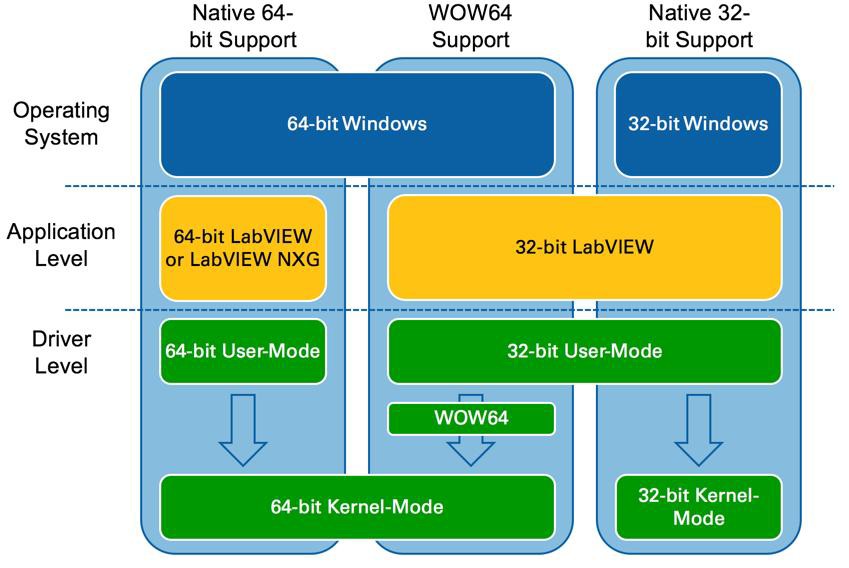
Many 32-bit applications will not be updated for Windows Vista x64 Edition; however, most 32-bit software will still function because of a Microsoft emulation layer. This emulation layer, known as Windows on Windows 64 or WoW64, enables 32-bit programs to run as though on a 32-bit version of Windows by translating instructions passing in and out of 32-bit applications into 64-bit instructions. Emulated programs act as though they are running on an x86 computer and operate within the 2 GB of virtual memory that a 32-bit version of Windows allocates to every process. However, despite Wow64, 32-bit programs on Windows Vista x64 Edition cannot take advantage of the larger 64-bit address spaces or wider 64-bit registers on 64-bit processors.

To work with Windows Vista x64 Edition, you must invest in large quantities of RAM. The overhead associated with Windows Vista is larger than that of prior operating systems such as Windows XP, so slower systems are likely to see performance decreases.

Evaluating an Engineering System on Windows Vista

Windows Vista represents an upgrade from Windows XP for consumer PC users in many ways, and the 64-bit edition in particular is drawing significant attention. The 64-bit processors have enormous potential that modern PCs are not fully exploiting, which means there is significant room for growth during the next few years. However, Windows Vista x64 Edition was not designed explicitly for scientists and engineers, and not all scientific and engineering applications will immediately benefit from migrating to a Windows Vista x64 Edition PC.

The following types of applications could see performance benefits on Windows Vista x64 Edition, provided that both 64-bit application software and drivers are available:

  • Applications for creating digital content in computer-aided design and digital video editing
  • Applications that require mathematical precision and floating-point performance
  • Applications that involve large, high-performance databases
  • Vision acquisition and analysis applications with large amounts of data moving directly into memory at rapid rates

If your application does not fall into one of these categories, you should carefully consider the necessity of using Windows Vista x64 Edition. Not every application stands to benefit from the x64 architecture, and it will take time for Windows Vista x64 Edition to gain widespread adoption.

Summary

Windows Vista x64 Edition represents the first mainstream 64-bit operating system from Microsoft in terms of general availability and support from third-party add-on vendors. Because of this, moving from a 32-bit operating system such as Windows XP to a 64-bit operating system such as Windows Vista x64 Edition merits serious consideration in many cases.

However, the feasibility of successfully making the jump to Windows Vista x64 Edition depends largely on your application and its requirements. For some, Windows Vista x64 Edition offers much needed performance improvement, while for others, it could needlessly complicate applications designed to operate on x86 platforms or even have a negative effect on performance.

More Information on Windows Vista

Read other white papers in this series at ni.com/vista.

Sign-up to be notified when the next whitepaper in the five-part series on Microsoft Vista is available.

LabVIEW, National Instruments, ni, and ni.com are trademarks of National Instruments. Other product and company names listed are trademarks or trade names of their respective companies.

200 ratings | 3.09 out of 5
Read in | Print

Reader Comments | Submit a comment »

Props for Vista-64
I've recently installed a new Intel quad core with Vista 64 and am very impressed both with the stability and performance. Everything on this machines run smoother than any previous version of Windows (and I've used every version since 1.0 back in 1987 on a Zenith 8086!) My key applications (Adobe Photoshop and Lightroom) are out in 64-bit versions and the performance is breathtaking. 64-bit computing has arrived!
- Nov 10, 2008

32-bit is becoming history
Took a little while, but as of today, 64-bit seems to be the main focus of PC builders as well as the preferred choice of desktop buyers. New HP’s are mostly 64-bit as well a NewEgg’s Top Sellers (as of this writing). http://news.cnet.com/8301-13924_3- 10076795-64.html?tag=mncol http://www.newegg.com/Product/Product List.aspx? Submit=ENE&N=2032280010% 204802&name=Top%20Sellers
- Ericson Mar, The Cooper Union. mar@cooper.edu - Nov 2, 2008

brilliant
clarified loads of stuff about 32vs64bit in one article.
- Oct 6, 2008

Now I'm found
Thank you for the article. It written in such a way that I feel like I have a good understanding of 32-bit and. 64-bit processors. That was something that boggled me; but no more!
- Enlightened, N/A. running_the_dream@yahoo.com - Sep 20, 2008

Intel G33 chipset
Gateway makes a model with Vista X64 that uses the Intel G33 chipset. Will that be able to use the 4GB of memory installed?
- Sep 16, 2008

A very well-written and informative article - thanks!
- Sep 11, 2008

A good synopsis that supplied every thing I needed to know.
Thank you for the article, Set at the right technical level for my requirements and gave me all the info I required In one go (a rare thing these days). Ta, Mick.
- mick_obrien685@hotmail.com - Aug 5, 2008

All Core 2 Duos and Quads support 64 but
64 bit processors have been out for a while now, most pentium 4 processors support 64 bit (my 3 year old 630 did). All the core 2 duos and quads support it.
- Jul 19, 2008

Memory Limits
Quoted from Microsoft's website: For Windows Vista to use all 4 GB of memory on a computer that has 4 GB of memory installed, the computer must meet the following requirements: The chipset must support at least 8 GB of address space. Chipsets that have this capability include the following: • Intel 975X • Intel P965 • Intel 955X on Socket 775 • Chipsets that support AMD processors that use socket F, socket 940, socket 939, or socket AM2. These chipsets include any AMD socket and CPU combination in which the memory controller resides in the CPU. • The CPU must support the x64 instruction set. The AMD64 CPU and the Intel EM64T CPU support this instruction set. • The BIOS must support the memory remapping feature. The memory remapping feature allows for the segment of system memory that was previously overwritten by the Peripheral Component Interconnect (PCI) configuration space to be remapped above the 4 GB address line. This feature must be enabled in the BIOS configuration utility on the computer. View your computer product documentation for instructions that explain how to enable this feature. Many consumer-oriented computers may not support the memory remapping feature. No standard terminology is used in documentation or in BIOS configuration utilities for this feature. Therefore, you may have to read the descriptions of the various BIOS configuration settings that are available to determine whether any of the settings enable the memory remapping feature. • An x64 (64-bit) version of Windows Vista must be used.
- Jul 15, 2008

Can 32 bit applications use 64 bit custom written drivers?
I would like to know whether on 64 bit Vista: 32 bit applications can use 64 bit custom drivers. Or will the application need to be 64 bit to use the 64 bit driver. I could notfind much about this issue on the internet.
- Jul 1, 2008

A very good document. Now I understand!
- Carl - Jun 23, 2008

Which Processors support Vista x64?
Which processor families support Vista x64? My AMD 64 x2 loaded the 32 bit version and the install wizard never mentioned a 64 bit option. I have ordered an Intel Q6600 and don't know if I can or should make the x64 jump on that system.
- May 18, 2008

Excellent
I like the article.
- Apr 29, 2008

So, if you are using a 32-bit operating system on an x64 processor, you are not fully utilizing it. 64-bit long mode has several advantages: it allows the processor to break the 4gb memory barrier and also 64-bit long mode enables twice the number of general purpose registers than in 32-bit mode… which explains why it is faster than a 32- bit processor/mode. 64 bit is the future! BTW: the 64-bit version of Windows Vista operating system is for about 10.9 percent faster than 32-bit Vista, according to the GeekBench benchmark for 32-bit and 64-bit Windows platforms.
- Dec 16, 2007

Good clear explanation of 32 Bit vs 64 Bit fundamentals
Traditionally larger width cpu's means more powerful instructions and more addressable memory. 64 Bit Vista from my viewpoint is really about eliminating memory thrashing. 32 Bit only gets you roughly 3325MB of usable memory out of 4 GB which quickly puts you into paging when running multiple or large apps.
- Jerry Mills, Ideal Computer Services. jerrym@icsgroup.com - Dec 14, 2007

Very helpful article
Great article. Really clarified what components / software need to be compatible to upgrade to x64. Interested that 32 bit can reference 4 GB of RAM. My brand new 32 bit system can only reference 3 GB (1 GB is completely unused). Any suggestions?
- Dec 12, 2007

Damn that was a full breakdown and I'm still confused. Ok already I'll stick with 32- bit Vista. I only wish I understood all that info.
- Nov 26, 2007

this article is poor written. x64bit version is faster than x32, because it uses 64-bit instructions and 64-bit registers.
- Oct 15, 2007

Best Vista 64 bit Article
So far this is the best and most professional/complete article I have read on the internet comparing Vista 32 bit and 64 bit providing valuable information regarding pros/cons for each. Thanks for the info.
- Amar, xParticle Inc.. catchall@xparticle.com - Aug 22, 2007

Vista 32 OS with a 64-bit CPU onboard
There are a bunch of off the shelf machines now with 64-bit CPUs , but all I have seen run , mostly, with 32-bit Vista (speaking of the newest stuff), is the 64-bit processor buying you anything?
- May 18, 2007

good article
good article for anybody who has doubts regarding the Vista 64 bit os ...provides adequate info ...but would be great if also includes how the mem addressing works in 64 bit o/s in detail
- Mar 21, 2007

Only memory addressability
The article gives MS VISTA perspective from memory addressability only; it would have been better to widen the scope to include Data Bus size, System Bus speed, memory speed too. One can argue that this all pertains to system architecture but then system architecture along with VISTA decide the overall speed of the PC system.
- Vinay Gupta, MTE Meter Test Equipment AG. viney1@vsnl.com - Feb 1, 2007

Dear Sir, The 64 bit processor and 32 bit processor refers to data bus width. This article refers that as address bus width. Is my opinion right? A.G.Kumar
- A.G.Kumar, R.Stahl private limited. kumar@rstahl.net - Jan 30, 2007

very helpful survey of Vista
- barnaade@luther.edu - Jan 30, 2007


Legal
This tutorial (this "tutorial") was developed by National Instruments ("NI"). Although technical support of this tutorial may be made available by National Instruments, the content in this tutorial may not be completely tested and verified, and NI does not guarantee its quality in any way or that NI will continue to support this content with each new revision of related products and drivers. THIS TUTORIAL IS PROVIDED "AS IS" WITHOUT WARRANTY OF ANY KIND AND SUBJECT TO CERTAIN RESTRICTIONS AS MORE SPECIFICALLY SET FORTH IN NI.COM'S TERMS OF USE (http://ni.com/legal/termsofuse/unitedstates/us/).