Transition from Traditional NI-DAQ (Legacy) to NI-DAQmx using ANSI C and LabWindows/CVI: Part Four
Overview
Contents
Accessing Help in NI-DAQmx
This series references two manuals that are shipped with NI-DAQmx.
- NI-DAQmx Core Help – references the language-agnostic manual for NI-DAQmx. The NI-DAQmx Core Help explains NI-DAQmx concepts and provides background about the various features and capabilities of the driver. Refer to Start » Programs » National Instruments » NI-DAQ » NI-DAQmx Help to access this manual.
- NI-DAQmx C Reference Help – references the manual for the DAQmx ANSI C API. This reference is specific to the C API and provides documentation for NI-DAQmx function calls. There are also concept topics specific to using the DAQmx ANSI C API. Part of the NI-DAQmx driver software, this manual is located at Start » All Programs » National Instruments » NI-DAQ » NI-DAQmx C Reference Help.
Notes for LabWindows/CVI Users
Function Panels and Enumerated Constants
NI LabWindows/CVI works with NI-DAQmx function panels that have intuitive user interfaces and enumerated constants.
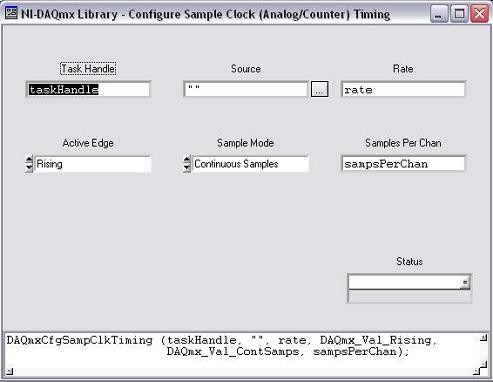
Figure 1. LabWindows/CVI Function Panel for DAQmxCfgTiming();
DAQmxAttributes Functionality
The DAQmx Set Attributes and DAQmx Get Attributes functions help you browse to low-level NI-DAQmx properties without having to search for the specific function call.
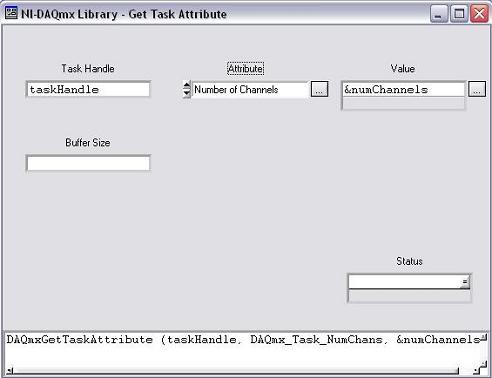
Figure 2. LabWindows/CVI DAQmx GetTaskAttribute();
For example, to get the number of channels in a LabWindows/CVI task, you can use the DAQmxGetTaskAttribute(); call and navigate to the “Number of Channels” attribute. The corresponding C function call from the NI-DAQmx C Reference Help is DAQmxGetTaskNumChans();.
DAQ Assistant
DAQ Assistant is an interactive tool you can use to graphically configure a customized task to incorporate into a LabWindows/CVI project. For more information, view Using the DAQ Assistant in LabWindows/CVI.
Scaling Is Now a Fully Supported Feature of NI-DAQmx
NI-DAQmx provides built-in scaling for most common transducers, sensors, and actuators. For example, when creating an analog input temperature channel, you can specify the type of transducer, such as a thermistor, RTD, or thermocouple, used to make the measurement when creating the channel. However, if NI-DAQmx does not explicitly support your transducer or actuator, you can create a scale that specifies how to convert from the prescaled units to the scaled units. For more information, refer to the Custom Scales help topic by selecting NI-DAQmx Help >> Key NI-DAQmx Concepts >> Custom Scales.
Programmatically Save Tasks to Measurement & Automation Explorer (MAX)
With NI-DAQmx Version 7.4 and later, you can create tasks programmatically and save them to MAX.
Simulated NI-DAQmx Devices
NI-DAQmx 7.4 and later supports creating and using simulated NI-DAQmx devices. You can create NI-DAQmx applications without having the devices installed in the system. For more information, refer to the “NI-DAQmx Simulated Devices” help topic under NI-DAQmx Help >> Key NI-DAQmx Concepts >> NI-DAQmx Simulated Devices .
Consistent Terminology
With NI-DAQmx, many of the terminal and signal names have been changed so that the names are easier to understand and more consistent across NI hardware and software products.
For a list of frequently asked questions, refer to Answers to Frequently Asked Questions about NI-DAQmx and Traditional NI-DAQ (Legacy).
Links to Other Topics in This Series
- Transition from Traditional NI-DAQ (Legacy) to NI-DAQmx using ANSI C and LabWindows/CVI: Part One
- Transition from Traditional NI-DAQ (Legacy) to NI-DAQmx using ANSI C and LabWindows/CVI: Part Two
- Transition from Traditional NI-DAQ (Legacy) to NI-DAQmx using ANSI C and LabWindows/CVI: Part Three
The mark LabWindows is used under a license from Microsoft Corporation.