TestStand Type Management Best Practices
Overview
Although TestStand types facilitate the development of test systems, the shared and modular nature of types requires you to follow type management practices to avoid unintended type version propagation. This document describes how types function and suggests best practices for type management.
Contents
- Categories of TestStand Types
- Storing Types in Type Palette Files Versus Sequence Files
- Managing Changes to Shared Types
- Type Conflicts
- Managing Type Conflict Resolution
- Customizing Built-in Data Types
- View Additional Sections of the TestStand Advanced Architecture Series
Categories of TestStand Types
TestStand uses different categories of types to store information and define the behavior of steps. Data types store information during the development and execution of a test system, and step types define the behavior of a step and the results the step collects during execution. Both data types and step types can be built-in and ship with TestStand, or they can be custom types that the user develops.
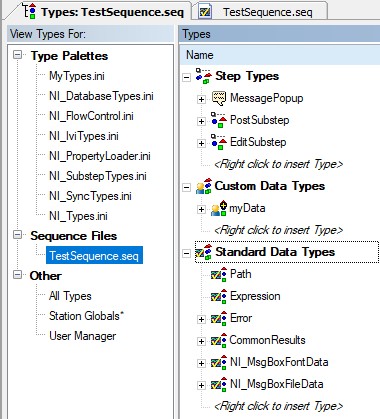
TestStand types are categorized as Step Types, Custom Data Types, and Standard data types
Data Types
In many cases, you will need to define complex data structures to manage your test data. Data types allow you to manage these data structures in a centralized location. Data types define the structure of TestStand properties or variables, such as sequence file global variables, sequence local variables, and step properties. All data types have the following components:
- Type name: used to uniquely identify the type. TestStand can never load more than one type of the same name in memory.
- Version: used to manage revisions to types and resolve type conflicts.
- Data: the structure of properties defined in the type
- Default values: the property values you define in the types pane act as default values for instances of the type.
Typically, you use data types when defining a set of related complex data, which contains several different properties and containers. For example, an error data type can consist of three properties: a Boolean property in the type that can specify if an error occurred, a string value property that can contain the error message, and an integer property that can define the error code.
You should always use a data type when managing complex data, because if you modify the structure of a data type, all the instances of that data type update to reflect the new data type structure. This allows you to manage the structure of your data in a centralized location.
Standard Data Types
Standard data types are a particular set of data types that ship with TestStand and that define a standard format for storing common types of data, such as error, path, or waveform. You cannot modify most standard data types. While some can be modified, you should only do so if necessary, since these types are used extensively by other TestStand components.
Step Types
Just as you can create a variable or property from a custom data type, you create a step from a step type. Each step type consists of a unique name, built-in and custom step type properties, and default values for properties and step type operations. All step types share a common set of properties that define the basic operation and data for all steps. Use the Step Type Properties dialog box to edit these common properties.
This document focuses on concepts that apply to all types, including step and data types. For specific information on step type best practices, refer to the Best Practices for Custom Step Type Development document.
Storing Types in Type Palette Files Versus Sequence Files
When you create new types, it is important to consider the location on disk where the type is stored. TestStand can store types in sequence files or in type palette files. In most cases, you should store any types you create in a type palette file. Using a type palette offers the following benefits:
- Type palette files provide a centralized location to store types in multiple sequence files.
- Type palette files can be configured to be loaded into memory when you launch TestStand, ensuring that the types are available for any new sequence files.
- Having a single centralized location for types helps avoid type conflicts, which can arise when multiple developers make changes to types stored in multiple locations.
- By default, TestStand does not automatically update any types in a type palette, offering protection from unwanted type propagation.
When you use a type from a type palette file in a sequence file, a copy of the type is stored in the file to ensure that it will function even without the type palette file. However, you should only make changes to the type using the version in the type palette. When you deploy your test sequence, you do not need to include type palette files in the deployment. However, including the type palette file will allow you to more easily make incremental updates to the test system. If updates are required for particular types, you can create and deploy a new version of the type palette file, without making any changes to sequence files.
Managing Changes to Shared Types
When sharing types among multiple developers, it is important to ensure that each developer is using the same, latest version of the type definition. You must also ensure that developers do not make separate changes to the same type, since merging changes to types is difficult. Use the following techniques to effectively manage shared types:
- Define an owner for type palette files
- Use source code control for type palettes
Defining Ownership of Type Palette Files
To control changes to types, it is important to establish a clear owner for each type, who either implements or approves any changes to types. In a large organization, it often makes sense to assign type ownership to different individuals in the group. To facilitate this approach, create separate type palette files to organize types into logical groups; for example, you can store project-specific types in a type palette containing the project name, and you can save more general types you use in multiple projects in a shared type palette file. You can then determine an owner for each type palette file.
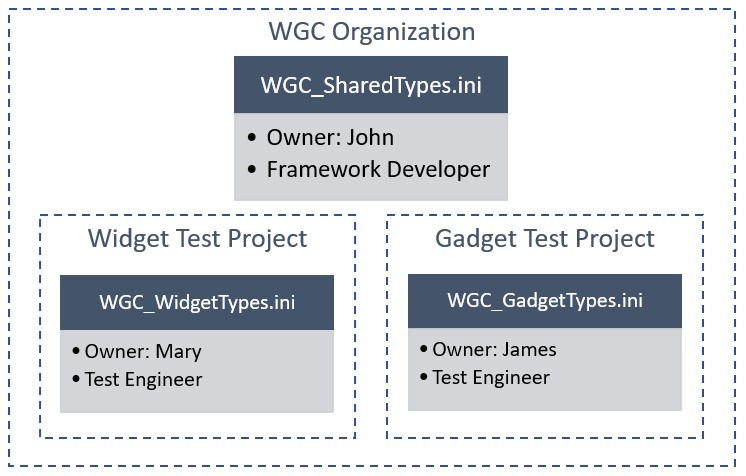
Organizing type palette files into logical groups allows you to more easily assign type owners to each type palette file
Use Source Code Control to Restrict Changes to Type Palette files
To further control changes to type versions, use a source code control solution to ensure that files can only be edited if they are checked out. You can use source code control permissions to ensure that only the owner for a particular type palette file has the ability to check in changes. Minimally, the type palette owner should enable notifications for the files, so they are aware of any activity pertaining to the file.
Although users will still have the ability to modify types on their local machine, using source code control prevents TestStand from saving these changes to disk or to the shared version of the file.
Preventing Conflicts Among Unrelated Types
One way that type conflicts can arise is when multiple unrelated types inadvertently have the same name. Because types use their name as a unique identifier on the system, when you develop new types, prepend a unique organization ID to the type name. For example, all the names of the step types that ship with TestStand begin with the prefix “NI”. This ensures that your types do not conflict with types created outside your organization if code is shared between groups.
Type Conflicts
TestStand loads only one version of a type with a particular name at a time to ensure that the same type information is used for all loaded files on the station. If you attempt to open a sequence file or load a type palette which contains a type with the same name as one that is already loaded, a type conflict occurs, where TestStand must determine whether to keep the current type loaded or replace it with the new type.
A type conflict occurs when you attempt to load a file that contains a type definition that is different from the one currently loaded in TestStand. The conflict must be resolved before the new file can be loaded
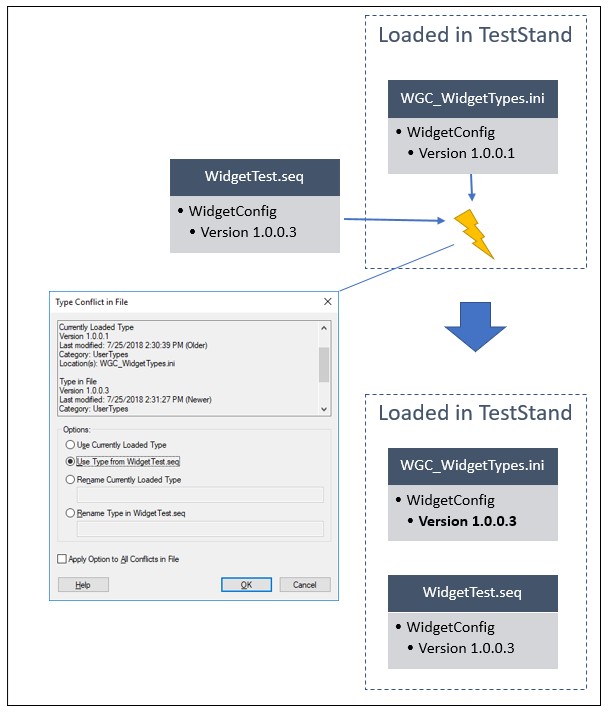
If developers are careful to maintain unique type names and maintain types in a single controlled type palette file, TestStand will be able to correctly handle type conflicts. However, type conflicts can cause incorrect changes to your files based on automatic type conflict resolution rules or incorrect decisions by developers, which can lead to unwanted type version propagation.
Unwanted Type Version Propagation
Unwanted type propagation describes the case when resolving a type conflict causes undesired changes to files containing a different version of a type. When files with the incorrect type are shared, other developers can unknowingly load the incorrect version of the type. As files are shared across more developers, the new type propagates to many files, and it can be difficult to find every file with the incorrect type.
This situation can occur when resolving conflicts that arise in the following situations:
- Loading a type in a previous TestStand version in which the type is incompatible
- Creating multiple unrelated types with the same name
- Multiple developers making parallel changes to a type
Managing Type Conflict Resolution
Use the techniques in this section to minimize cases where type conflicts are handled incorrectly, and prevent unwanted type version propagation.
Maintain the Type Version Field
TestStand types use the version field to determine which version of a type is the most recent. If the most recent version of the type is loaded in memory, and you load a sequence file which uses an older version of the type, TestStand can automatically update the file to use the newer type version, depending on station settings. By default, TestStand automatically resolves any conflicts that do not update types in type palette files.
To help ensure that type versions are updated, TestStand tracks types you edit using the Modified type flag. If you save a type with this flag enabled, TestStand displays a warning indicating that changes have been made.
TestStand provides a warning when you make modifications to types to ensure that the changes are intended before saving them.
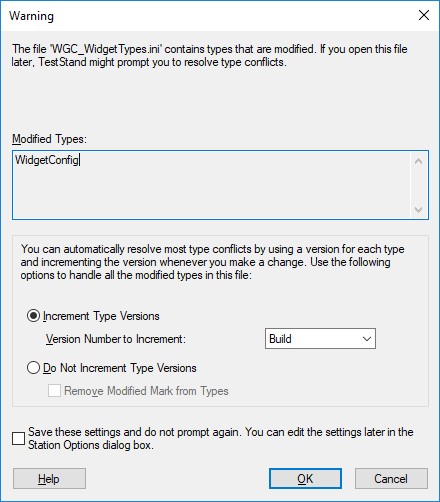
You should choose to increment the type versions in this case, which will ensure that the changes you make are propagated to other files which reference the type when they are loaded in TestStand. However, you should not select the option to save the settings and not prompt, since this warning is a useful tool to prevent unwanted changes to types. If you are unsure of the change, cancelling the dialog will cancel the save operation, allowing you to inspect the type and ensure the changes are valid.
Configuring Automatic Type Conflict Resolution
In some cases, TestStand can automatically determine which type should be loaded in the case of a type conflict. Automatic type conflict resolution is only possible when these conditions are met:
- The type versions are not the same for the two types
- The “modified” flag is not set for either type.
TestStand provides the Allow Automatic Type Conflict Resolution setting to allow you to determine when TestStand will resolve these conflicts automatically. To access this setting:
- In the sequence editor, select Configure » Station Options
- Select the File tab
TestStand allows you to configure when type conflicts are handled automatically, and when the developer is prompted to choose which type version to keep in memory.
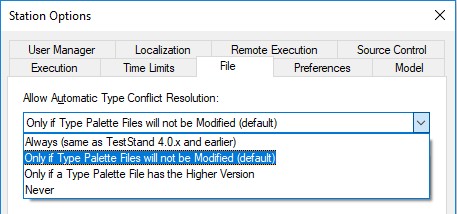
In most cases, you should use the default value of this setting, which is to only prompt if a type palette file will be modified. This setting will allow TestStand to automatically choose the type with the higher version, as long as the lower version type is not stored in a type palette file. This setting helps to ensure that the type conflict prompt only appears when a potential for unwanted type propagation occurs. It will also ensure that harmless conflicts, such as loading an older sequence file with older NI types in a new version of TestStand, are resolved automatically do not require the user to make a decision.
For example, developer A updates step type “RunCalibration”, a type stored in the company type palette file, Company_types.ini. After discussing this with the type palette file owner, they save the change to the type, and select to increment the type version to 1.0.1.0. They then save the updated type palette in the source code control repository. Another developer B later syncs to the repository, obtaining the version of Company_types.ini with the updated type. They then open TestStand, and load a sequence file which references the type. Since the sequence file is still referencing the previous type version, the reference in the sequence file is updated automatically, which is the desired behavior.
However, a third developer C also has a sequence file which uses the “RunCalibration” step, and they inadvertently make a separate change to the “RunCalibration” step type without consulting the type owner, updating their local instance to version 1.1.0.0. If this developer syncs the company type palette file, then loads their sequence file in TestStand, TestStand will prompt them to resolve the type conflict, since the type will be modified if the newer version is used. Developer C will know that the type palette file was updated and will either consult the type palette owner or revert the local changes they made to the type.
If TestStand cannot automatically resolve the type conflict, you will be prompted to decide on how to resolve the conflict:
Use the Type Conflict In File dialog box to resolve type conflicts that cannot be resolved automatically
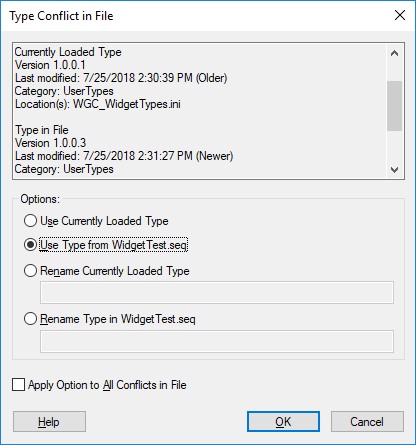
To resolve the type conflict, you can choose to load one of the two types, rename one of the types, or cancel opening the file. When you select the version to use, TestStand converts all instances in memory to match the type you selected. If you rename one of the types, TestStand modifies the instances in memory to refer to the loaded type, and the instances in the new file to refer to the type in the file.
Setting Type Specific Conflict Resolution Settings
In a tightly controlled environment, you may be tempted to select the Always prompt the user to resolve the conflict option to disable automatic type conflict resolution in all cases. This will prompt the user to resolve the conflict in any case a type conflict is detected, allowing you to have full control over which types are loaded. However, this adds additional decision making to the development process, which can cause developers to make incorrect decisions and quickly dismiss the many dialogs they will encounter.
A better approach is to use the type specific setting for types which require strict control. Located in the Version tab of the Type settings, you can specify whether the type can be resolved automatically. Using this setting prevents unnecessary user interaction for low-risk type conflicts, such as loading an older sequence file with older NI types in a new version of TestStand, while still providing full control over tightly controlled custom types.
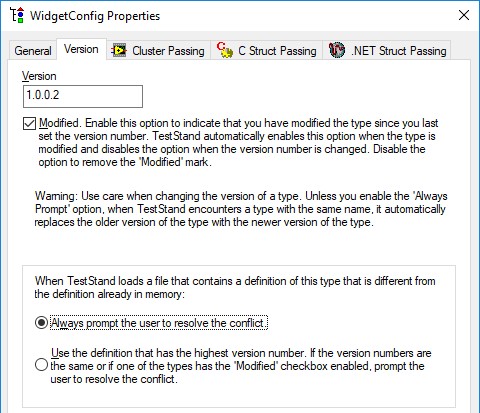
Disable automatic type conflict resolution for specific types that require more tight control
Avoiding Unwanted Type Version Propagation to Previous Versions of TestStand
Because you can save sequence files to previous versions of TestStand but some types might not run correctly on previous versions of TestStand, you can specify the earliest version of TestStand that can run a type. Enable the Set Earliest TestStand Version that can Use this Type option on the Version tab of the Type Properties dialog box and set the earliest version to the current version of TestStand. This will prevent the current version of a type from being used in or accidentally propagated to an earlier TestStand version.
If a type needs to be available in previous TestStand versions, create different versions of the type to run in different versions of TestStand. When you save a sequence for a previous version of TestStand, TestStand searches a set of compatibility directories to find the type version that is compatible with the previous version for which you want to save the sequence file. TestStand saves the types from the type palette files in the <TestStand Public>\Components\Compatibility\<version number> and <TestStand Public>\Components\Compatibility\<version number> directories with the sequence file. You can place type palette files from earlier versions of TestStand in the <TestStand Public>\Components\Compatibility\<version number> directory to ensure that TestStand saves the correct version of the types with the sequence file.
Customizing Built-in Data Types
Developers should be cautious when customizing built-in data types, including standard data types and process model data types. Many built-in types, such as CommonResults, are used extensively by other TestStand step types or data types, increasing the potential for unwanted type propagation.
Considerations for Customizing Standard Data Types
Do not customize built-in types if you are creating sequence files or type palette files which will be distributed as third-party products or will be used across multiple organizations. Files with modified built-in types should remain within a single organization that is made aware of the type changes. If your sequence files or type palettes are distributed, other organizations will either inherit your type customizations or encounter conflicts if the other organization's version of these types is loaded into your files.
Because a change to built-in types have such an impact on any test station where they are used, assign a central developer or architect that understands the organizations’ test architecture to sign off on the changes to reduce type management issues.
Considerations for Customizing Process Model Data Types
The TestStand process models and plug in sequences use a variety of data types to define process model data structures. For example, the UUT data type contains data such as the serial number, part number, and test socket index. While you can customize these types, you should only do so when necessary. Process model types are defined in only sequence files, and do not have a central type palette. For this reason, unwanted type propagation can occur more easily for these types, since the default automatic conflict resolution settings will allow TestStand to update these types automatically.
If you need to add additional data to the UUT or the NI_StationInfo data types, you can use the AdditionalData property, which is an unstructured container defined in the type, to add additional data to instances of the type at run-time. For more information on this approach, refer to the Storing Additional Information for UUTs and Test Stations in Process Models help topic.