From Friday, April 19th (11:00 PM CDT) through Saturday, April 20th (2:00 PM CDT), 2024, ni.com will undergo system upgrades that may result in temporary service interruption.
We appreciate your patience as we improve our online experience.
From Friday, April 19th (11:00 PM CDT) through Saturday, April 20th (2:00 PM CDT), 2024, ni.com will undergo system upgrades that may result in temporary service interruption.
We appreciate your patience as we improve our online experience.
Selection Guide for the Most Common Buses
All PC buses have a limit to the amount of data that can be transferred in a certain period of time. This is known as the bus bandwidth and is often specified in megabytes per second (MB/s). If dynamic waveform measurements are important in your application, be sure to consider a bus with enough bandwidth.
Depending on the bus that you choose, the total bandwidth can be shared among several devices or dedicated to certain devices. The PCI bus, for example, has a theoretical bandwidth of 132 MB/s that is shared among all PCI boards in the computer. Gigabit Ethernet offers 125 MB/s shared across devices on a subnet or network. Buses that offer dedicated bandwidth, such as PCI Express and PXI Express, provide the maximum data throughput per device.
When taking waveform measurements, you have a certain sampling rate and resolution that need to be achieved based on how fast your signal is changing. You can calculate the minimum required bandwidth by taking the number of bytes per sample (rounded up to the next byte), multiplied by the sampling speed, and then multiplied by the number of channels.
For example, a 16-bit device (2 bytes) sampling at 4 MS/s on four channels would be
Your bus bandwidth needs to be able to support the speed at which data is being acquired, and it is important to note that the actual system bandwidth will be lower than the theoretical bus limits. Actual observed bandwidth depends on the number of devices in a system and any additional bus traffic from overhead. If you need to stream a lot of data on a large number of channels, bandwidth may be the most important consideration when choosing your DAQ bus.
Applications that require single-point reads and writes are often dependent on I/O values to be updated immediately and consistently. Based on how bus architectures are implemented in both hardware and software, single-point I/O requirements could be the determining factor for the bus that you choose.
Bus latency is the responsiveness of I/O. It is the time delay between when a driver software function is called and the actual hardware value of the I/O is updated. Depending on the bus you choose, this delay could range from less than a microsecond to a few milliseconds.
In a proportional integral derivative (PID) control system, for example, this bus latency can directly impact the maximum speed of the control loop.
Another important factor in single-point I/O applications is determinism, which is a measure of how consistently I/O can execute on time. Buses that always have the same latency when communicating with I/O are more deterministic than buses that can vary their responsiveness. Determinism is important for control applications because it directly impacts the reliability of the control loop, and many control algorithms are designed with the expectation that the control loop always executes at a constant rate. Any deviation from the expected rate makes the overall control system less effective and less reliable. Therefore, when implementing closed-loop control applications, you should avoid buses such as wireless, Ethernet, or USB that are high in latency with poor determinism.
The software side of how a communications bus is implemented plays a big part in bus latency and determinism. Buses and software drivers that have support for real-time OSs provide the best determinism and therefore give you the highest performance. In general, internal buses such as PCI Express and PXI Express are better for low-latency single-point I/O applications than external buses such as USB or wireless.
Many measurement systems have complex synchronization needs, whether it is synchronizing hundreds of input channels or multiple types of instruments. A stimulus-response system, for example, might require the output channels to share the same sample clocks and start triggers as the input channels to correlate the I/O and better analyze the results. DAQ devices on different buses provide different ways to accomplish this. The simplest way to synchronize measurements across multiple devices is to share a clock and a trigger. Many DAQ devices offer programmable digital lines for importing and exporting both clocks and triggers. Some devices even offer specialized trigger lines with BNC connectors. These external trigger lines are common on USB and Ethernet devices, as the DAQ hardware is located outside of the PC enclosure. Certain buses, however, have additional timing and triggering lines built in to make multidevice synchronization as easy as possible. PCI and PCI Express boards offer the real-time system integration (RTSI) bus, on which multiple boards in a desktop system can be cabled directly together inside the case. This removes the need for additional wiring through the front connector and simplifies I/O connectivity.
The best bus option for synchronizing multiple devices is the PXI platform, including PXI and PXI Express. This open standard was designed specifically for high-performance synchronization and triggering, with a number of different options for synchronizing I/O modules within the same chassis as well as synchronizing multiple chassis.
The dramatic adoption of portable computing is undeniable, and has offered new ways to innovate with PC-based data acquisition. Portability is an important factor for many applications, and could easily be the primary reason to choose one bus over another. In-vehicle DAQ applications, for example, benefit from hardware that is compact and easily transported. External buses like USB and Ethernet are particularly good for portable DAQ systems because of quick hardware installation and compatibility with laptop computers. Bus-powered USB devices offer additional convenience because they do not require a separate power supply to be present, and are powered off the USB port. Using wireless data transfer buses is another good option for portability because the measurement hardware itself becomes portable while the computer can remain stationary.
The distance between measurements you need and where the computer is located can drastically vary from application to application. To achieve the best signal integrity and measurement accuracy, you should place your DAQ hardware as close to the signal source as possible. This can be a challenge for large distributed measurements like those used for structural health monitoring or environmental monitoring. Running long cables across a bridge or factory floor is costly and can result in noisy signals. One solution to this problem is to use a portable computing platform to move the entire system closer to the signal source. With wireless technology, the physical connection between the computer and the measurement hardware is removed altogether, and you can take distributed measurements and send the data back to a central location.
Based on the five questions previously outlined, Table 1 shows a selection guide for the most common data acquisition buses available.
| Bus | Waveform1 Streaming | Single-Point I/O | Multidevice | Portability | Distributed Measurements |
| PCI | 132 MB/s (shared) | Best | Better | Good | Good |
| PCI Express | 250 MB/s (per lane) | Best | Better | Good | Good |
| PXI | 132 MB/s (shared) | Best | Best | Better | Better |
| PXI Express | 250 MB/s (per lane) | Best | Best | Better | Better |
| USB | 60 MB/s | Better | Good | Best | Better |
| Ethernet2 | 125 MB/s (shared) | Good | Good | Best | Best |
| Wireless | 6.75 MB/s (per 802.11g channel) | Good | Good | Best | Best |
Table 1. This table shows a bus-selection guide based on application requirements with example NI products.
1Maximum theoretical data streaming rates are based on the following bus specifications: PCI, PCI Express 1.0, PXI, PXI Express 1.0, USB 2.0, Gigabit Ethernet, and Wi-Fi 802.11g
2The usage of the Ethernet bus in this table is as being used as part of a network containing multiple devices and not as a direct connection to a computer. The maximum throughput can be limited by several factors.
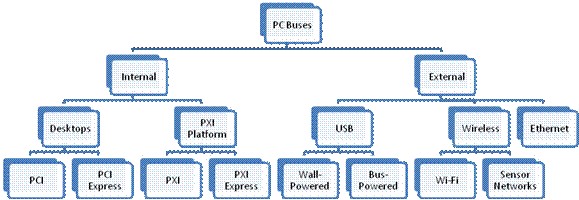
While there are many different buses and form factors to choose from, this section focuses on the seven most common buses, including:
Figure 1 shows these buses organized into a PC-bus hierarchy of NI data acquisition products, from internal plug-in options to hot-swappable external buses.
Figure 1. You can choose from many buses to meet your data acquisition requirements.
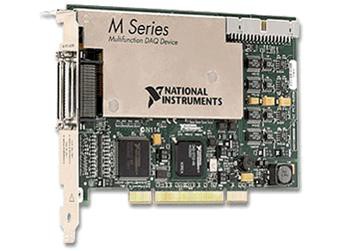
Figure 2. PCI M Series Multifunction DAQ
The Peripheral Component Interconnect (PCI) bus is one of the most commonly used internal computer buses today. With a shared bandwidth of 132 MB/s, PCI offers high-speed data streaming and deterministic data transfer for single-point control applications. There are many different DAQ hardware options for PCI, with multifunction I/O boards up to 10 MS/s and up to 18-bit resolution.
PCI Express
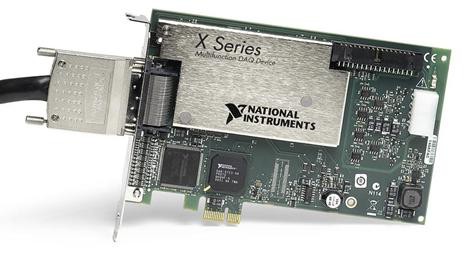
Figure 3. PCI Express X Series Multifunction DAQ
PCI Express, an evolution of PCI, offers a new level of innovation in the PC industry. The single biggest benefit of PCI Express architecture is the dedicated bus bandwidth provided by independent data transfer lines. Unlike PCI, in which 132 MB/s of bandwidth is shared among all devices, PCI Express uses independent data lanes that are each capable of data transfer up to 250 MB/s.
The PCI Express bus is also scalable from a single x1 (pronounced “by one”) data lane to x16 data lanes for a maximum throughput of 4 GB/s, enough to fill a 200 GB hard drive in less than a minute. For measurement applications, this means higher-sustained sampling and data throughput rates, and multiple devices do not have to compete for time on the bus.
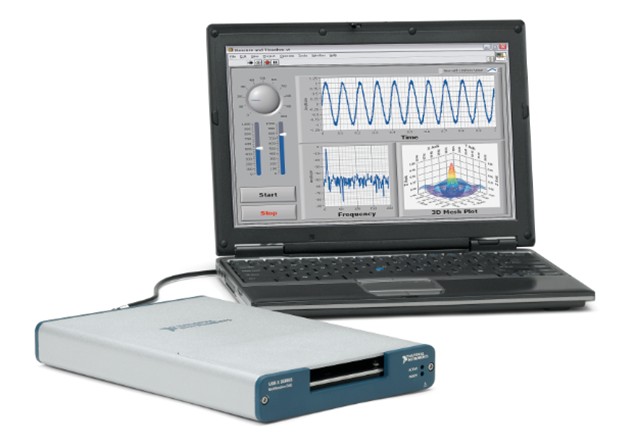
Figure 4. USB X Series adds data acquisition to any computer with a USB port
The Universal Serial Bus (USB) was originally designed to connect peripheral devices, such as keyboards and mice, with PCs. However, it has proven useful for many other applications, including measurement and automation. USB delivers an inexpensive and easy-to-use connection between data acquisition devices and PCs. USB 2.0 has a maximum theoretical bandwidth of 60 MB/s, which is shared among all devices connected to a single USB controller. USB devices are inherently latent and nondeterministic. This means that single-point data transfers may not happen exactly when expected, and therefore USB is not recommend for closed-loop control applications, such as PID.
On the other hand, the USB bus has several characteristics that make it easier to use than some traditional internal PC buses. Devices that connect using USB are hot-pluggable, so they eliminate the need to shut down the PC to add or remove a device. The bus also has automatic device detection, meaning that users do not have to manually configure their devices after plugging them in. Once the software drivers have been installed, the operating system should detect and install the device on its own.
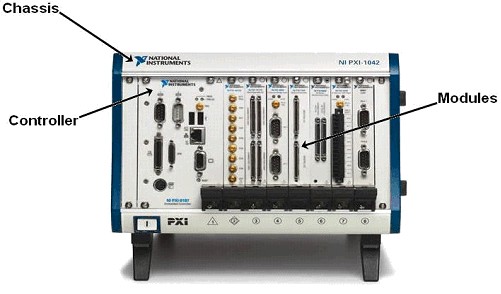
Figure 5. The PXI platform is composed of chassis, controllers, and I/O modules.
PCI eXtensions for Instrumentation (PXI) were developed to bridge the gap between desktop PC systems and high-end VXI and GPIB systems. The PXI Systems Alliance, with more than 200 members, maintains this open standard, and in 2006, passed the PXI Express specification to deliver PCI Express data transfer technology to the PXI platform.
Based on CompactPCI, PXI incorporates instrumentation extensions and more rigid system-level specifications to ensure an open yet high-performance specification for measurement and automation. The benefits of PXI-based DAQ systems include rugged packaging that can withstand the harsh conditions that often exist in industrial applications. PXI systems also offer a modular architecture, which means that you can fit several devices in the same space as a single stand-alone instrument, and you have the ability to expand your system far beyond the capacity of a desktop computer with a PCI bus. One of the most important benefits PXI offers is its integrated timing and triggering features. Without any external connections, multiple devices can be synchronized by using the internal buses resident on the backplane of a PXI chassis.
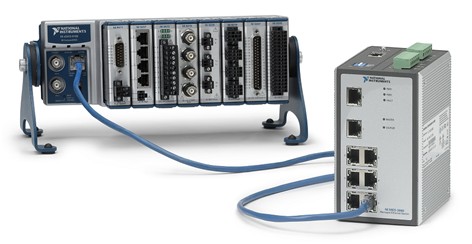
Figure 6. Supporting 100 m per segment and the ability to use existing network infrastructure, Ethernet data acquisition can extend the reach of your measurement system.
Ethernet is the backbone of almost every corporate network in the world and, therefore, is widely available. As a bus for DAQ, Ethernet is ideal for taking portable or distributed measurements at distances beyond the 5 m length of a USB cable. A single Ethernet cable can extend 100 m before needing a hub, switch, or repeater. This distance in combination with a large install base of networks in labs, offices, and manufacturing facilities makes Ethernet an ideal choice for distributing measurements to remote locations. Though available network bandwidth is dependent on the number of networked devices, 100BASE-T (100 Mbit/s) Ethernet can accommodate multiple Ethernet DAQ devices running at full speed. In addition, Gigabit Ethernet (1000BASE-T) can aggregate data from multiple 100BASE-T networks or higher-speed devices for larger systems.
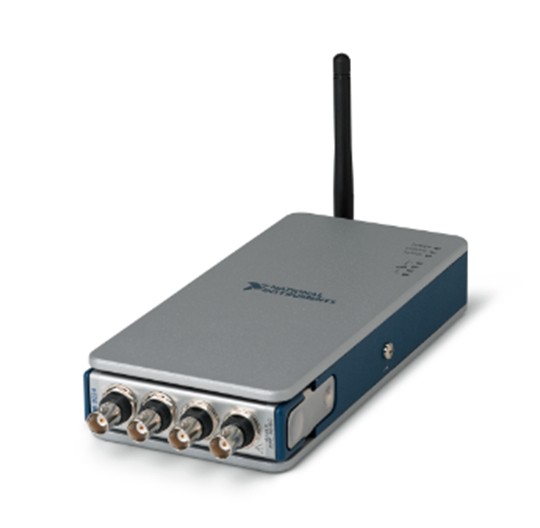
Figure 7. Wi-Fi data acquisition uses standard 802.11 networks to eliminate the need for wires between measurement hardware and the host PC
Wireless technology extends the flexibility and portability of PC-based data acquisition to measurement applications where cables are inconvenient or impractical, such as wind farms or civil structures. Wireless can dramatically reduce costs by eliminating cables and installation time. However, wireless also has the highest latency of any other DAQ bus, so applications requiring high-speed control or determinism are not recommended. There are many different wireless technologies available. The most popular is IEEE 802.11 (Wi-Fi).
Wi-Fi is among the easiest of wireless technologies to set up. Connecting to a Wi-Fi “hotspot” is as familiar to most as plugging in a USB cable. After 10 years of use in the IT sector, Wi-Fi is also secure. IEEE 802.11i (WPA2) is the highest commercially available wireless security standard to date with 128-bit AES encryption and IEEE 802.1x authentication. For streaming dynamic waveform signals, Wi-Fi provides more bandwidth than other wireless technologies, making it ideal for machine condition monitoring and other high-speed applications.