Recertification Policy and Process
Overview
Recertification demonstrates up-to-date expertise with the software as new features are released and maintains the certified professional's presence as a product expert in the technical community. To keep certifications current, the certified individual should advance to take the next higher certification level or recertify at the current level. NI sends a recertification reminder prior to your expiration date.
Contents
- Certification Status Definitions
- Recertification Process
- Recertification by Points
- Recertification by Exam
Certification Status Definitions
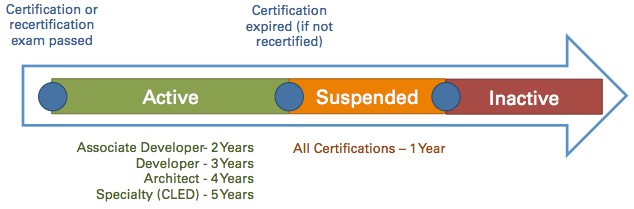
Figure 1. Certification Status Timeline
Active
Active status is achieved immediately after passing a certification or recertification exam. The length of time in which active status is in effect varies by certification type: Associate Developer - 2 years, Developer - 3 years, Architect - 4 years and Specialty (CLED) - 5 years.
A Participant's status remains Active until their certification period expires. Participants are not penalized for early recertification, but the certification validity will begin after the original certification expiration date.
Suspended (Expired)
Suspended status results if a certified individual does not pass either:
- The recertification exam OR
- The exam for the next level of certification OR
- Does not recertify by points prior to the expiration date of the certification.
In the suspended state, the following changes occur:
- The individual will not be allowed to take the exam for the next level of certification without first recertifying at the current level.
- Recertification points cannot be earned in the suspended state.
Suspended status is cleared and changed to Active upon passing the recertification exam within a year of the date of suspension.
Inactive
Inactive status occurs after one year of Suspended status. Architects and Developers who fail to recertify before the end of their suspended period become inactive. To become active, they restart their recertification process with the Developer practical exam.
Recertification Process
All NI Certified Professionals can recertify by exam. Certified Professionals at the Developer level or above have the option to recertify by achieving and logging activity points. Each of those methods are outlined below.
Recertification by Points
The Recertification by Points program is open to Certified Developers and Architects immediately upon certification or recertification.
- Participants may begin Approved Activities following the day of certification or recertification issuance.
- Participants in the Suspended status will lose the benefits of the Recertification by Points program and any accumulated Points. Participants are able to claim points during the first 30 days of their Suspended status, but the activity must have been completed during Active status to be valid.
- Participants in Suspended or Inactive status are not eligible to recertify under the Recertification by Points program. Points expire upon certification Suspension or Inactivity status.
By participating and completing approved activities, Certified Professionals can earn and accumulate Points redeemable towards recertification.
Participants will be issued an automatic recertification upon accumulation of 50 points. Upon recertification, participants will receive a confirmation email. Participation in the Recertification by Points program does not guarantee recertification.
Recertification by Points program participants may not carry over Points from one recertification period to another. A Recertification by Points program participant may choose to recertify by exam. On passing the exam, any accumulated Points will be discarded and not be counted toward future recertification. Upon the start of the next active certification period, program participants may begin accumulating Points toward the next recertification.
Recertification activities will only apply towards the recertification in the product area needing recertification, for example, TestStand activities will only count towards TestStand recertification. The requestor must indicate which certification they would like to claim Points for. The number of Points of an Approved Activity can’t be split towards multiple certifications. Program participants cannot receive Points for attending and presenting at the same event.
Activities to Earn Points Towards Recertification
Participants are responsible for filling out a form to request Points upon completion of the activity with the appropriate validation.
| Points for teaching, organizing or presenting | Points for attending or participating |
| Instructor-led courses |
|
|
| NI Connect/NI Days | 30 points | 15 points |
| Watching NI Connect keynotes (online) | N/A | 5 points |
| NI Webinars | 10 points | 5 points |
| NI Partner Forums | N/A | 10 points |
| Beta Testing Release | 10 points | 5 points |
| User Groups | 10 points | 5 points |
| G Dev Con or GLA Summit | 30 points | 15 points |
| Learning Badge | N/A | 2 points |
| On-demand Learning Paths | N/A | 5 points |
*Participants who wish to teach must be Certified Professional Instructors (CPI) and must follow the Training & Certification guidelines.
Other Policies
- National Instruments may add to and/or update these policies, at any time, to clarify or ensure fairness.
- If the Recertification by Points program Participant wishes to withdraw prematurely from the Recertification by Points program and passing the recertification exam, he/she will not receive any credit or monetary compensation for submitted and accepted exam content.
- If National Instruments decides to terminate the Recertification by Points program, for any reason, all program participants with 25 Points or more will be awarded the recertification.
Recertification by Exam
Recertification exams can be taken up to four months prior to your expiration date. Exams taken within this window do not alter your current certification status, nor do they lessen the recertification interval.
Scheduling and preparing for your exam
To find preparation materials and schedule your recertification exam, visit the exam pages in the table below. You may also attend free virtual preparation sessions. Most exams are taken online, but in some cases they may be scheduled at an NI location.
Certification | Exams |
Certified LabVIEW Associate Developer | Retake the 1-hour multiple choice CLAD exam |
Certified LabVIEW Developer | Take the 1-hour multiple choice CLD-R exam Retake the 4-hour CLD practical exam |
Certified LabVIEW Architect | Take the 1-hour CLA-R exam Retake the CLA exam |
Certified LabVIEW Embedded Systems Developer | Retake the CLED-2 exam |
Certified TestStand Developer | Retake the CTD exam |
Certified TestStand Architect | Retake the CTA exam |